

Set the company's name, money, tax and region
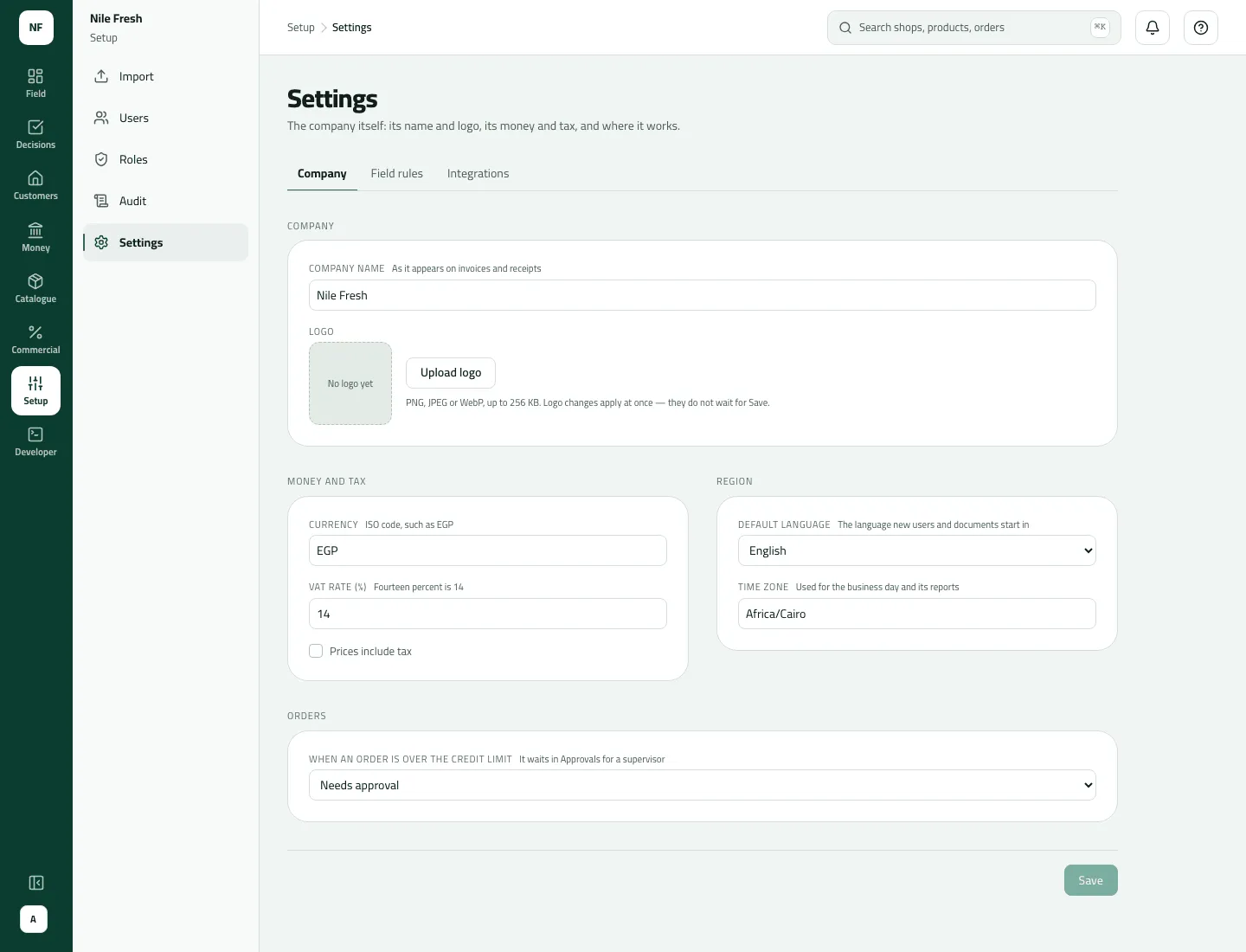
The Company tab of Settings: who the company is, its money and tax, and what an order over a credit limit does. Who: administrator · Where in the cycle: Set up.
Before you start
Section titled “Before you start”- You need Run the company (full access) (TENANT_ADMIN). Without it the Settings row is not in the menu.
- Decide your VAT rate and whether your list prices already include it — every price list is read that way.
- A new company starts with currency EGP, VAT 14 with Prices include tax ticked, default language English, time zone Africa/Cairo, and over-credit orders Block. Untick Prices include tax if your list prices are before VAT.
- Open Setup › Settings. The Company tab opens.
- Company card: the Company name (as it appears on invoices and receipts, up to 120 characters) and the Logo (Upload logo: PNG, JPEG or WebP, up to 256 KB). A logo change applies at once, without Save.
- Money and tax card: Currency (a three-letter code such as EGP), VAT rate (%) (“Fourteen percent is 14”) and Prices include tax.
- Region card: Default language (English or العربية) and Time zone (search, for example Cairo).
- Orders card: When an order is over the credit limit — Block (“The rep cannot save it”), Allow (“It goes through, marked as over credit”) or Needs approval (“It waits in Approvals for a supervisor”).
- Press Save. The status line says Saved.
- VAT rate (%)
- Prices include tax
- Time zone
- Over the credit limit
The Company and Field rules tabs share one Save: what you typed on one tab is kept while you look at the other. See Choose how reps work on the road.
Example
Section titled “Example”Nile Fresh: name “Nile Fresh” with its logo, currency EGP, VAT 14, Prices include tax unticked (VAT is added on top of list prices), default language English, time zone Africa/Cairo, over-credit orders Needs approval.
What the over-credit choice does — Delta Kiosk has a credit limit of 300.00 and owes nothing. Omar takes 4 × Juice 1L = 400.00 + VAT 56.00 = 456.00, which is 156.00 over:
| Choice | What happens |
|---|---|
| Block | The order is refused (“This order goes over the shop’s credit limit…”). |
| Allow | The order is taken and marked over credit by 156.00. |
| Needs approval | The order (SO-000002) waits in Decisions › Approvals until a supervisor decides — what happened at Nile Fresh at 11:05. |
The check uses the order’s total with VAT against the credit left (limit − owed − open orders).
What happens next
Section titled “What happens next”- Name and logo show in the console header, and on the phone’s invoices and receipts after its next sync.
- VAT and Prices include tax apply to invoices issued from now on; invoices already issued keep the rate they were made with.
- Currency is what new records start in. Nothing already priced is converted.
- Default language is the language the console opens in for someone who never chose one.
- Time zone decides the business day and report days; a change can take up to 5 minutes to apply.
- Over the credit limit applies to rep orders and office orders alike. Phones follow it after their next sync.
- Every saved change is written to the audit trail as “Changed the company settings”, with the old and new values.
There are no settings for invoice layout or document numbering (numbers are made by Slflo: INV-, RC-, SO-…), and whether booked orders wait for your ERP is set by Slflo, not here.
If something goes wrong
Section titled “If something goes wrong”| What you see | What to do |
|---|---|
Save stays grey | Nothing differs from what is saved yet (14.00 is the same as 14). |
Someone else changed the same setting while you were editing. Reload to see their change, then make yours again. SETTINGS_CHANGED_ELSEWHERE | Another administrator changed the same setting meanwhile. Reload, check theirs, then make yours again. |
Enter VAT as a percentage from 0 to under 100, with up to two decimals. SETTINGS_INVALID_VAT_RATE | Type the percentage, from 0 to under 100, at most two decimals: 14, not 0.14. |
VAT is a number, such as 14 | The VAT box has something that isn't a number. (This line shows in English on the Arabic console.) |
Choose a currency from the list, such as EGP. SETTINGS_INVALID_CURRENCY | Pick a three-letter code from the list. |
Choose a time zone from the list, such as Africa/Cairo. SETTINGS_INVALID_TIME_ZONE | Pick a place-name zone such as Africa/Cairo; offsets such as GMT+2 aren't accepted. |
That logo is too large. Use a file under 256 KB. LOGO_TOO_LARGE | Use a file under 256 KB. |
Use a PNG, JPEG or WebP image for the logo. LOGO_UNSUPPORTED_TYPE | Use PNG, JPEG or WebP. SVG isn't accepted. |