

Approve a shop a rep found
A rep who finds a shop on the street proposes it from the phone. It waits here until someone makes it a customer, places it on a route, or declines it. Who: administrator (or anyone who adds customers) · Where in the cycle: Approve.
Before you start
Section titled “Before you start”- See customers (CUSTOMER_VIEW) shows the shops; Add and change customers (CUSTOMER_MANAGE) shows the buttons. By default only the Administrator has both, so a supervisor sees the list with no buttons.
- The Approvals menu row itself needs Approve orders (ORDER_APPROVE).
- New shops aren’t counted in the bell. Look at the New shops tab.
- Open Decisions › Approvals and the New shops tab.
- Read the row: Shop (its names, “New customer” or “New branch of …”, contact, address, the rep’s note and Where the rep stood), Proposed by, and Duplicate check (“Nothing similar found”, or what it looks like).
- If it’s already a customer, press Decline, type the Reason (the rep sees it beside the shop) and press Decline shop.
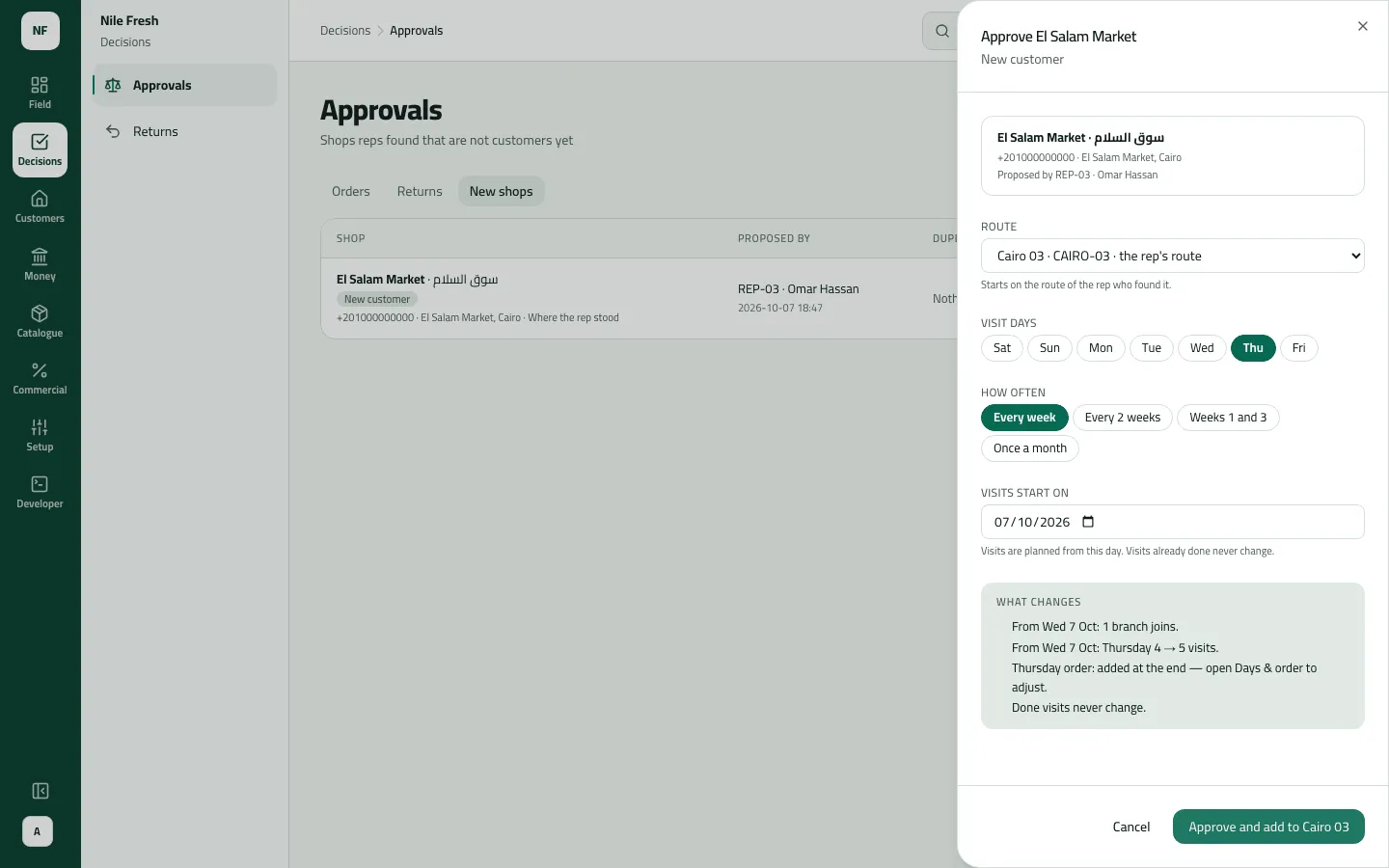
- Otherwise press Approve…. Under Route, keep the rep’s route or pick another — or No route for now.
- With a route, choose the Visit days, How often and Visits start on.
- Press Check what changes and read what the route will look like.
- Press Approve and add to route name.
- Open the new customer and set its credit limit. It starts at 0: cash only.
- Route
- Visit days
Example
Section titled “Example”Suppose at 16:00 Omar proposes El Salam Market from the phone. The duplicate check says “Nothing similar found”. The administrator presses Approve…, keeps the rep’s route Cairo 03 (CAIRO-03), ticks Thursday, Every week, and presses Check what changes: one branch joins and Thursday goes from 4 to 5 visits. She presses Approve and add to Cairo 03. The notice says “El Salam Market: approved and added to Cairo 03” and the customer is CUST-00005. She opens it and sets a credit limit of 1,000.00. Thursday’s plan has 5 stops; Omar sees the new shop after his next sync.
What happens next
Section titled “What happens next”- Approve: a customer (CUST-…) or a branch is created with the rep’s details and placed on the route from the start date; day plans are made from it. Price list: the default; currency: EGP.
- Decline: the proposal closes with your reason, which the rep sees on the phone.
- The rep: the shop stays greyed on the phone until approved; the new customer arrives at the next sync.
- Audit: “Approved a new shop” / “Declined a new shop”.
- Stock and money: nothing moves.
If something goes wrong
Section titled “If something goes wrong”| What you see | What to do |
|---|---|
Someone already decided this one. Refresh to see the result. ALREADY_DECIDED | Someone decided this shop first. Refresh. |
That route doesn't exist. Pick another one. NO_SUCH_ROUTE | The route was removed. Pick another, or No route for now. |
This comes from your ERP, so it can't be changed here. Change it in the ERP. ERP_MASTERED | Your customers come from your ERP. Add the shop there; it reaches Slflo from the ERP. |
Add a reason, then send again. REASON_REQUIRED | A decline needs a reason the rep can read. |
The shops are listed but there are no buttons | You need Add and change customers. Ask an administrator. |
A shop the rep proposed isn't listed | The tab shows the first 50 waiting. Decide some, and the rest come up. |