

Sort out a refused or miscounted van load
When a rep refuses a van load or counts something different, the load waits for the office on the Stock screen. This is how you close it. Who: office · Where in the cycle: Load.
Before you start
Section titled “Before you start”- You need Move stock (STOCK_MOVE).
- Find the load under Van loads waiting for you on Catalogue › Stock, or from the bell’s Van loads row (“Refused loads and counts that differed”). Loads the rep hasn’t checked yet are listed too, but the bell doesn’t count them.
- Each card shows the load number, the van, where it came from, who loaded it and when, who refused or counted it, the rep’s reason and note, and the lines with any difference.
What the rep can do on the phone
Section titled “What the rep can do on the phone”| On the phone | The load becomes | Stock |
|---|---|---|
| Accepts, or counts the same | Accepted — leaves the list | Nothing changes |
| Counts something different (under the Count rule) | Counted with differences | The differences are already written on the van |
| Refuses, with a reason and a note | Refused by the rep | The whole load is already back in the warehouse it came from |
- Read the rep’s reason (Quantities don’t match, Wrong products, Damaged goods or Something else) and the note.
- Put right what was wrong in the warehouse.
- Choose:
- Re-send to the van — loads the same lines again as a new load with a new LD- number. The notice says “Re-sent. The rep checks the new load on the phone.”
- Reverse, keep in the warehouse — closes the load; the goods stay where they are. “Reversed. The goods stay in the warehouse.”
- Read the lines: This load and Difference.
- Find out where the difference went (a short delivery, breakage, a miscount).
- Press Mark as checked. The card leaves the list: “Marked as checked.”
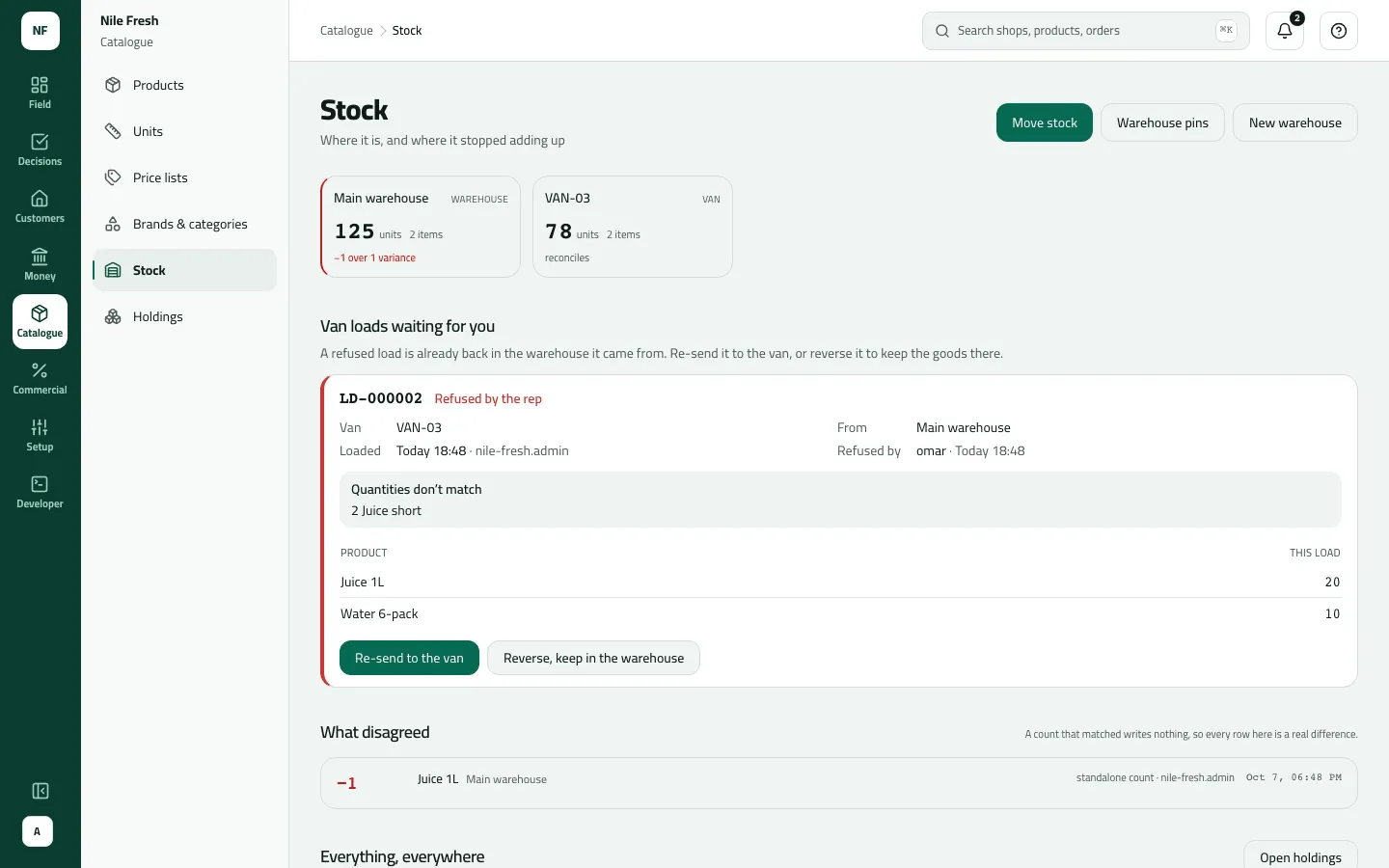
- Reason and note
- Re-send to the van
- Reverse, keep in the warehouse
Re-send loads exactly the same lines. To change the quantities, reverse the load and load the van again with Load a van.
Example
Section titled “Example”Suppose the morning after the Nile Fresh day the office loads LD-000002: 20 Juice 1L and 10 Water 6-pack from MAIN to VAN-03. The stock moves at once:
| Item | Before | After | Change |
|---|---|---|---|
| Main warehouse · Juice 1L | 66 PCS | 46 PCS | −20 |
| VAN-03 · Juice 1L | 40 PCS | 60 PCS | +20 |
Omar counts 18 bottles of juice and presses Refuse… on the phone: “Quantities don’t match”, note “2 Juice short”. The whole load goes straight back — MAIN 66, VAN-03 40 again — and the card reads Refused by the rep. The storekeeper finds the two bottles behind a pallet, presses Re-send to the van, and Omar accepts LD-000003.
Under the Count rule the same morning could go differently: Omar counts 18 and saves the count. The load is Counted with differences, VAN-03 already shows 58 juice, and the office presses Mark as checked once it knows where the two went.
What happens next
Section titled “What happens next”- Stock: a refusal has already returned everything to the warehouse; Re-send moves it out again; Reverse and Mark as checked move nothing.
- Documents: Re-send makes a new load number; the old load is closed as re-sent.
- The rep: sees the new load at the next sync and checks it again.
- Audit: “A van load was refused”, “Sent a van load again”, “Reversed a van load”, “Reviewed a van load”.
If something goes wrong
Section titled “If something goes wrong”| What you see | What to do |
|---|---|
Some of this load has already been sold from the van, so it can't be refused. Tell the office. LOAD_PARTLY_SOLD | The rep sold from this load before refusing it, so it can't be refused. Correct the stock with a count or an unload instead. |
This load has already been sorted out. Refresh to see what was done. LOAD_NOT_OPEN | Someone has already re-sent, reversed or checked this load. Refresh the page. |
There isn't enough stock at that location. INSUFFICIENT_STOCK | Re-send needs the goods in the warehouse again. Receive them or load less with a new load. |
Choose why you are refusing the load and add a note for the office. LOAD_REFUSAL_REASON_REQUIRED | On the phone, a refusal needs a reason and a note for the office. |