

Check the day's visits
Visits tells you whether the reps were really at the shops, and how each visit ended. It only reads. Who: supervisor · Where in the cycle: Visit.
Before you start
Section titled “Before you start”- See reports (REPORT_VIEW) opens Field › Visits, for the reps your reach covers.
- A visit appears once the rep’s phone has synced it.
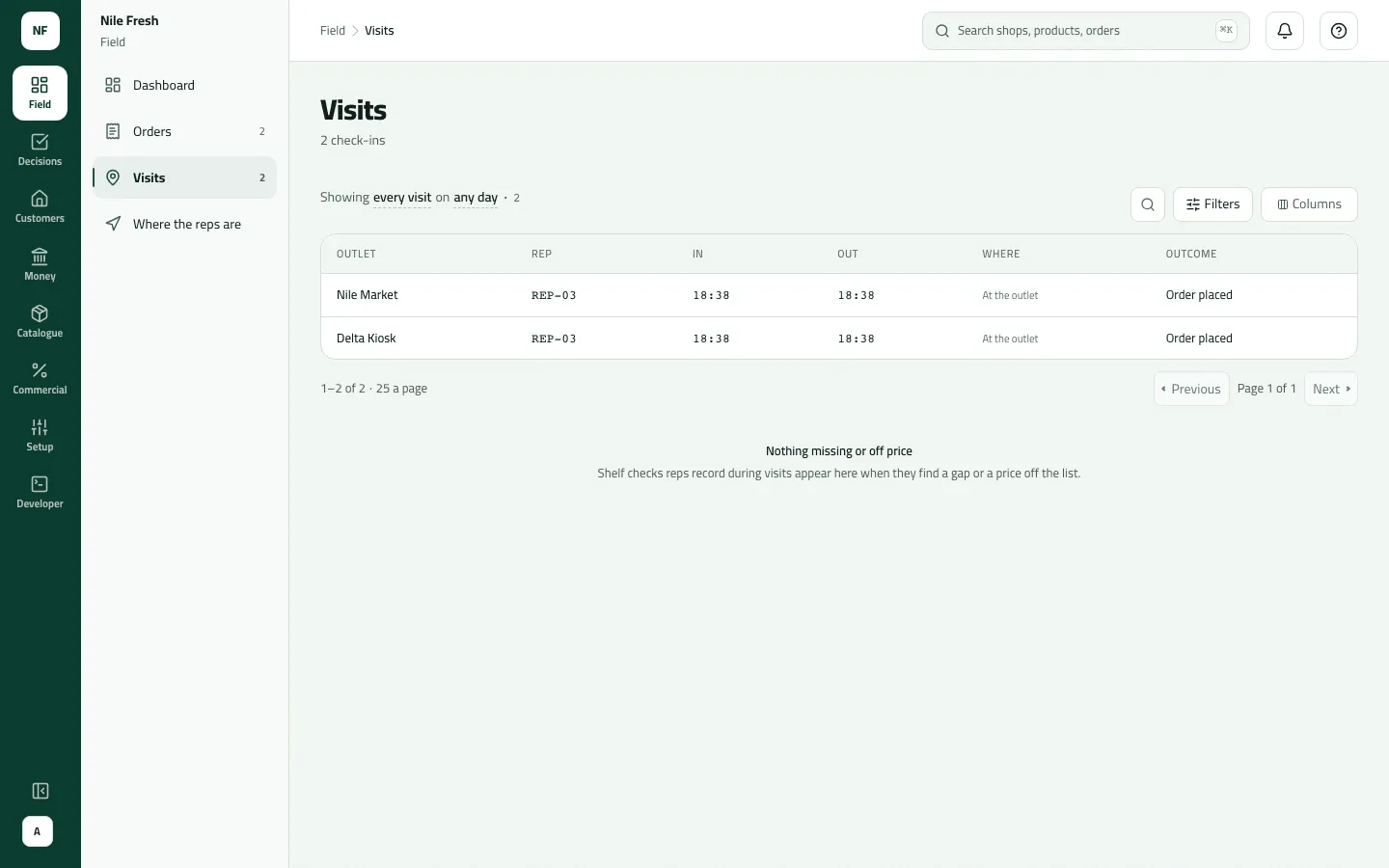
- Open Field › Visits. The sentence at the top reads “Showing every visit · on any day”.
- Pick the day. The list opens on every day, oldest first — choose Today (or a date) in Filters, or click “on any day” in the sentence.
- To see only visits worth a look, set Visits to Flagged only.
- Narrow further if you need: Outcome (Order placed, No order, Outlet closed, Outlet refused), Where (At the outlet, Outside the fence) or Location (No location only).
- Read each row: Outlet, Rep, In, Out (or “Open” while the visit runs), Where and Outcome. Flagged rows are tinted.
- Below the list, Shelf findings lists shelf checks that found something out of stock or off the price list — for the picked day, or the last 7 days when no day is picked.
- Sentence filters
- Where
- Outcome
- Shelf findings
Where says one of three things: “At the outlet”, “Outside the fence by 400 m” (the distance from the shop’s pin, beyond its radius — see away from the shop), or “No location” with the rep’s reason.
Example
Section titled “Example”On the Nile Fresh day, with Today picked:
Omar checks in about 17 m from Nile Market's pin, inside its 150 m radius. The visit starts and selling opens here.
| Item | Before | After | Change |
|---|---|---|---|
| Stops visited | 0 stops | 1 stops | +1 |
The list shows Nile Market, REP-03, In 09:32, Where “At the outlet”, Outcome “Order placed”; and Delta Kiosk, REP-03, “At the outlet”, “Order placed” (the order that went on to wait for approval). Neither row is flagged. Zamalek Corner and Garden City Grocer have no row — Omar didn’t reach them, and they were marked skipped when he ended the day.
What happens next
Section titled “What happens next”- Nothing changes from this screen. A flagged visit is a record, never a refusal: the check-in went through.
- To fix a shop whose pin is wrong, move its pin on the customer page (Manage a customer’s branches, credit and pins).
If something goes wrong
Section titled “If something goes wrong”| What you see | What to do |
|---|---|
The first page shows visits from long ago | The list opens on every day, oldest first. Pick Today, or sort In newest first. |
The search box finds nothing | Search doesn't filter this list yet. Use the filters and sort by Outlet or Rep instead. |
A row is tinted but nothing says why | The console shows that a visit was flagged — outside the fence, no location, a mock location, poor accuracy or the phone's clock — but not which, and not the rep's reason. Ask the rep. |
"At the outlet" for a shop with no pin | A visit that couldn't be measured (no pin on the shop, or no fix on the phone) also shows At the outlet. Check the shop has a pin. |
Times without a date | In and Out are times only. Pick a day so you know which day you are reading. |