

Record a return at the counter
When a shop brings goods back to the office instead of giving them to the rep, the office records the return here, against the invoice the goods were sold on. Who: office (returns desk) · Where in the cycle: Return.
Before you start
Section titled “Before you start”- Record returns (RETURN_RECORD) opens the form. The invoice list also needs Download data to the phone (SYNC_PULL); without it the list stays empty, with no message.
- You file the return under a rep: yourself, a rep in your reach, or anyone if you Manage people.
- Have the invoice number. A return is always against an invoice line, never more than was sold.
- Open Decisions › Returns and press Record a return.
- Outlet: the customer. Invoice: the invoice the goods came on (the 50 newest are offered).
- Who is taking them back: the rep the return is filed under.
- Where the goods land: a warehouse or a van.
- In the lines table, read Billed and Left for each line, and type how many are Coming back. Tick Expired for expired goods.
- Why: Wrong delivery, Damaged, Expired or Unsold. Add a Note if useful.
- Press Record return. You return to Returns with “RET-… recorded” — or, over a ceiling under Needs approval, “RET-… is over a ceiling and waits for a supervisor in Approvals”.
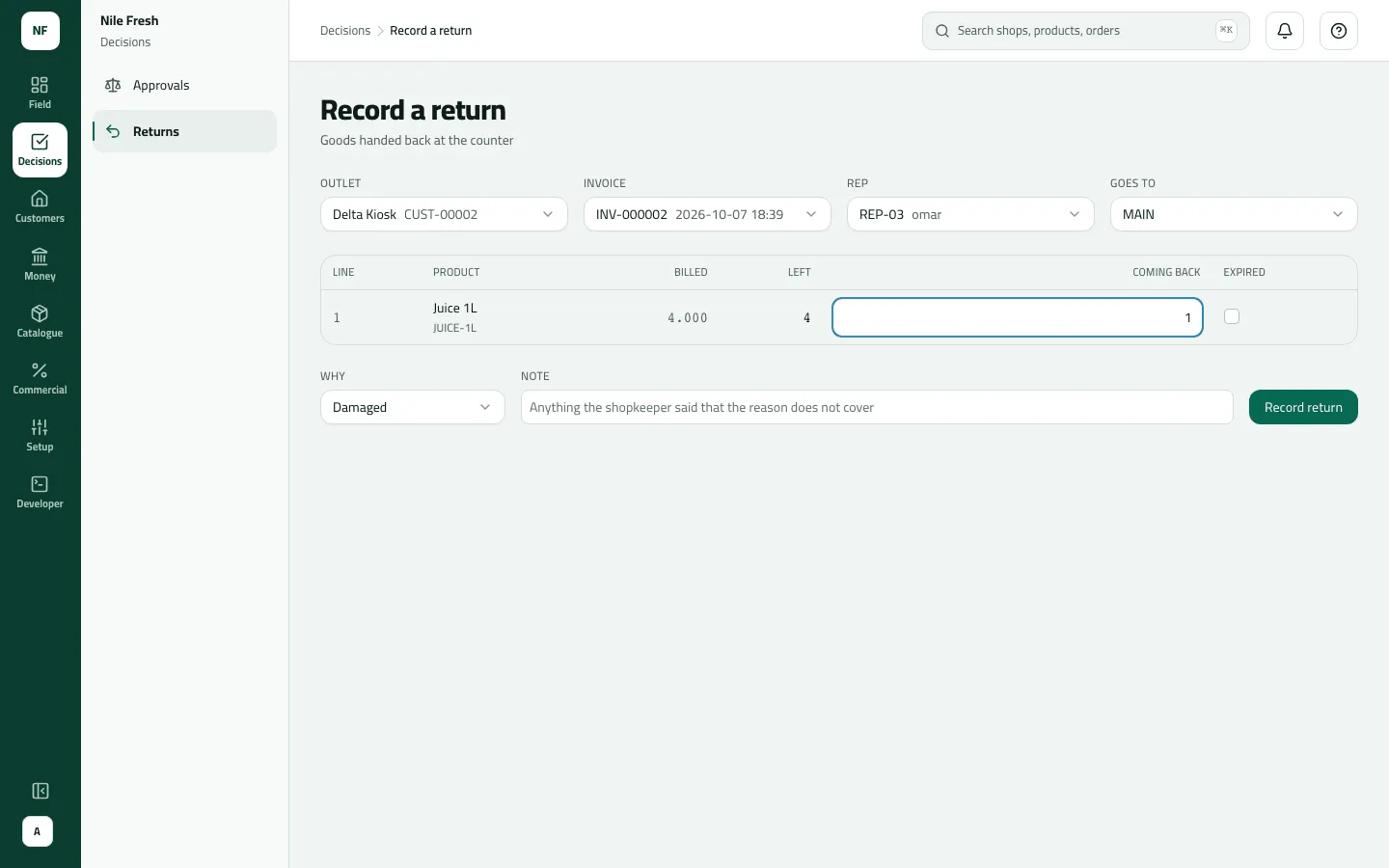
- Left
- Coming back: 1
- Why: Damaged
You don’t choose where each line goes: Damaged or Expired (or the Expired tick) sends it to the held-back place of where the goods land; anything else goes back into sellable stock there.
Example
Section titled “Example”Suppose Delta Kiosk brings one Juice 1L back to the office, damaged, the day after INV-000002. The desk picks Delta Kiosk, INV-000002, rep REP-03, lands it at MAIN, types 1 under Coming back and chooses Damaged. The credit is 100.00 + 14 % = 114.00.
| Item | Before | After | Change |
|---|---|---|---|
| Delta Kiosk owes | 456.00 EGP | 342.00 EGP | −114.00 |
| Main warehouse (held back) · Juice 1L | 0 PCS | 1 PCS | +1 |
The bottle can’t be sold; it waits in MAIN’s held-back place to be written off (Receive goods, count stock and write off).
What happens next
Section titled “What happens next”- Documents: a return numbered RET-, which is also the credit note’s number. Print it from Credit notes.
- Money: the credit is what the line was billed — after its discount, VAT included — and first lowers the invoice it is against.
- Stock: back where the goods landed, or into its held-back place.
- Over a ceiling: refused under Block; under Needs approval it is numbered but nothing moves until someone approves it.
- ERP: the credit note joins the returns feed your ERP reads.
- Audit: “Recorded a return” (or “Held a return for approval”).
If something goes wrong
Section titled “If something goes wrong”| What you see | What to do |
|---|---|
This return is over the shop's return limit, so it wasn't accepted. Talk to the office. RETURN_REFUSED | It goes over the customer's return ceiling and your company blocks such returns. Take back less, or ask an administrator about the ceilings. |
Line 1: only 4 left to come back, not 5 | That line has had returns before. Return at most what is left. |
There's nowhere set up to hold goods that can't be sold again. Ask the office to set one up. NO_QUARANTINE | The place has no held-back place for damaged goods. Pick another place, or ask an administrator. |
That rep isn't in your team, so you can't file this under them. Pick one of your own reps. REP_OUT_OF_REACH | That rep isn't in your team. File it under one of yours. |
The place these goods were to go back to doesn't exist. Sync and try again. UNKNOWN_LOCATION | The place was removed. Pick another. |
The Invoice list is empty | Your role needs Download data to the phone to list invoices. An invoice older than the 50 newest isn't offered. |
Some refusals here (a price or product that doesn’t match the invoice) still show in English.