

Read the day on the dashboard
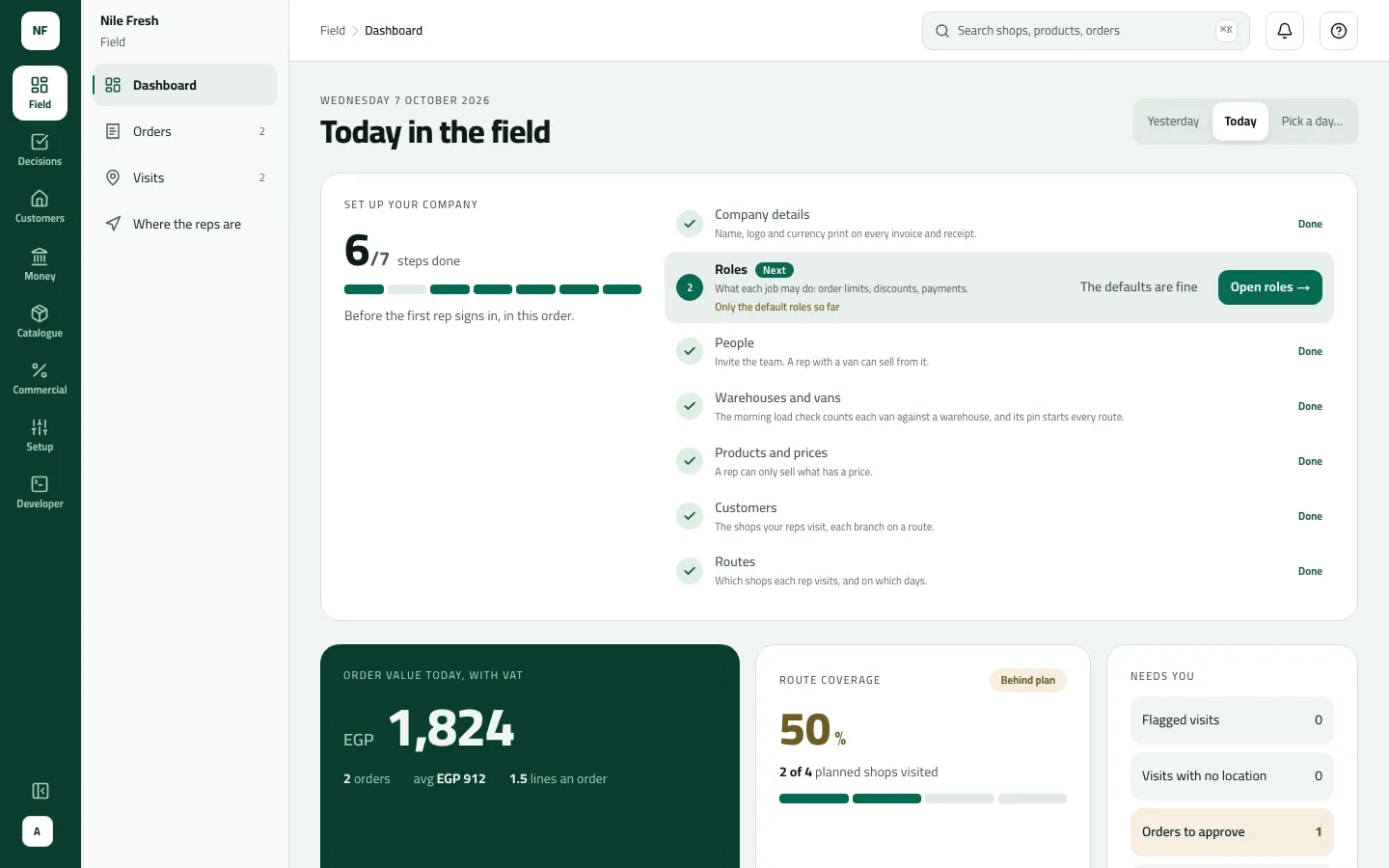
The console opens here: one day of field work on one screen. It only reads — nothing is changed from the dashboard. Who: supervisors and office · Where in the cycle: across the whole day.
Before you start
Section titled “Before you start”- See reports (REPORT_VIEW) opens Field › Dashboard. Without it the console sends you to the first screen you may use.
- Each Needs you row has its own permission: Orders and Returns to approve need Approve orders, Van loads needs Move stock, Day differences needs Take payments, Overdue money needs See customers. A row you can’t act on is left out, not shown as 0.
- Your reach decides whose figures you see: a supervisor with Their team sees her team.
What is on it
Section titled “What is on it”- Yesterday · Today · Pick a day… — the day you are reading. It stays in the address, so a reload or a shared link keeps it.
- Order value today, with VAT — the day’s orders at their billed total including VAT, then “N orders · avg … · N lines an order”. Declined and cancelled orders don’t count; an order waiting for approval does. Open today’s orders goes to Orders.
- Route coverage — planned stops visited, with On plan (80 % or more), Behind plan or Not started yet, and one mark per stop.
- Needs you — Flagged visits, Visits with no location, Orders to approve, Returns to approve, Van loads to sort out, Day differences to sort out, Overdue money. Each opens its screen.
- This month — coverage, strike rate, average order (with VAT) and lines an order, from the 1st to today.
- Representatives — each rep’s coverage, stops, orders and value (with VAT), and flagged visits, highest value first.
The administrator also sees the Set up your company card until it is put away (Set up your company).
- Order value, with VAT
- Route coverage
- Needs you › Orders to approve
- Open Field › Dashboard. It shows today.
- Read the order value and coverage to see how the round is going.
- Work down Needs you: each amber row is waiting for someone. Open it to act.
- To look back, press Yesterday or Pick a day….
Example
Section titled “Example”On the Nile Fresh day at 11:10:
- Order value today, with VAT reads EGP 1,824 — “2 orders · avg EGP 912 · 1.5 lines an order”. That is Nile Market’s van sale (1,368.00) and Delta Kiosk’s held order (456.00); the held order counts because it isn’t declined.
- Route coverage: 2 of 4 planned shops visited, Behind plan.
- Needs you › Orders to approve: 1, in amber — SO-000002, over Delta Kiosk’s credit limit. Sara opens it and goes on to Approve or decline a held order.
- Representatives: one row, REP-03, 2 / 4 stops, 2 orders.
What happens next
Section titled “What happens next”- The figures follow the server: an order counts on the day it reached the server, a visit on the day it was checked in. A phone that hasn’t synced isn’t in the figures yet.
- Opening a Needs you row takes you to the screen where the work is done.
If something goes wrong
Section titled “If something goes wrong”| What you see | What to do |
|---|---|
A morning of zeros | Normal: orders and visits count once the phones have sent them. Reps' work arrives as they sync. |
The dashboard and the Orders strip show different values | On purpose: the dashboard is with VAT and leaves out declined and cancelled orders; the Orders strip is before VAT and counts every order received. |
Flagged visits opens every visit, not the flagged ones | On Visits, pick the day and Flagged only. |
This month and Visits with no location don't change when I pick another day | They always show the current month and today. |
A rep who worked today has no row | A row needs a planned stop or an order that day. A rep who only visited shops off the plan without selling has none. |
You do not have access to this. Ask your administrator if your work needs it. MISSING_PERMISSION | Your role can't read reports. Ask your administrator if your work needs the dashboard. |