

Check your van load
When the office loads your van, the phone asks you to check it. You accept it, count it, or refuse it. Who: rep who sells from a van · Where in the cycle: Load.
Before you start
Section titled “Before you start”- You sell from a van (Put someone on a round with a van).
- The office saved a load to your van (Load a van) and your phone has synced since. Pull down on Today in signal if the banner hasn’t come.
- Your company decides how you check it (Choose how reps work on the road): accept or refuse the whole load (the usual way), count each line, or not at all — then no banner shows and there is nothing to do.
- On Today or the Van tab, tap Check the load on A van load is waiting (“Load LD-000001 from Main warehouse.”).
- Check your van load opens. The dark card shows THIS LOAD, the load number and how many products, and where it came from, when and who loaded it.
- Compare the van with the table: Product, This load, Already on van, Total after. “Already on van” is what the van holds now; “Total after” is what it will hold once you accept.
- If everything is there, tap Accept load. The phone says “Load accepted. The office has it.”
- If it is wrong, tap Refuse… instead (below).
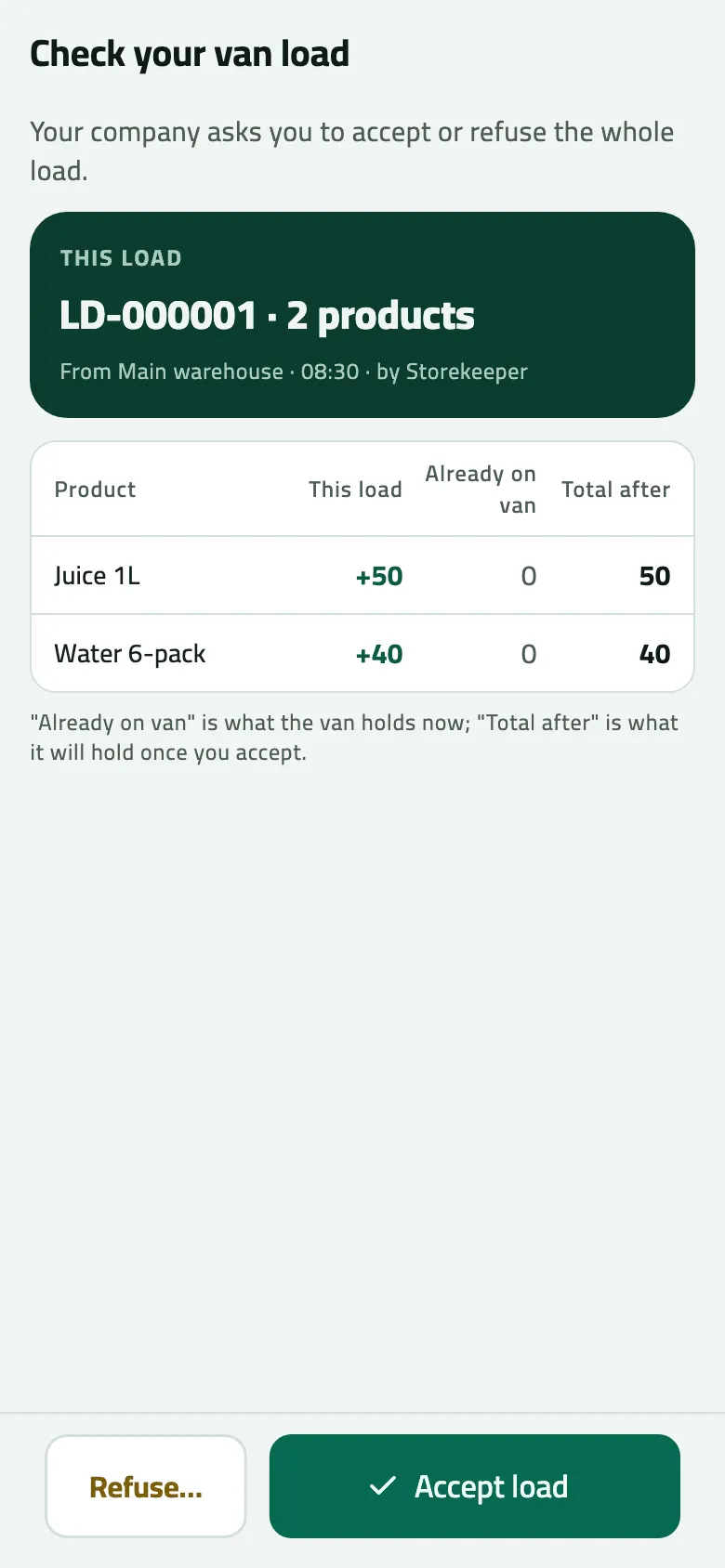
- This load, already on the van, and the total after
- Refuse… the whole load, with a reason
- Accept load
When your company asks you to count
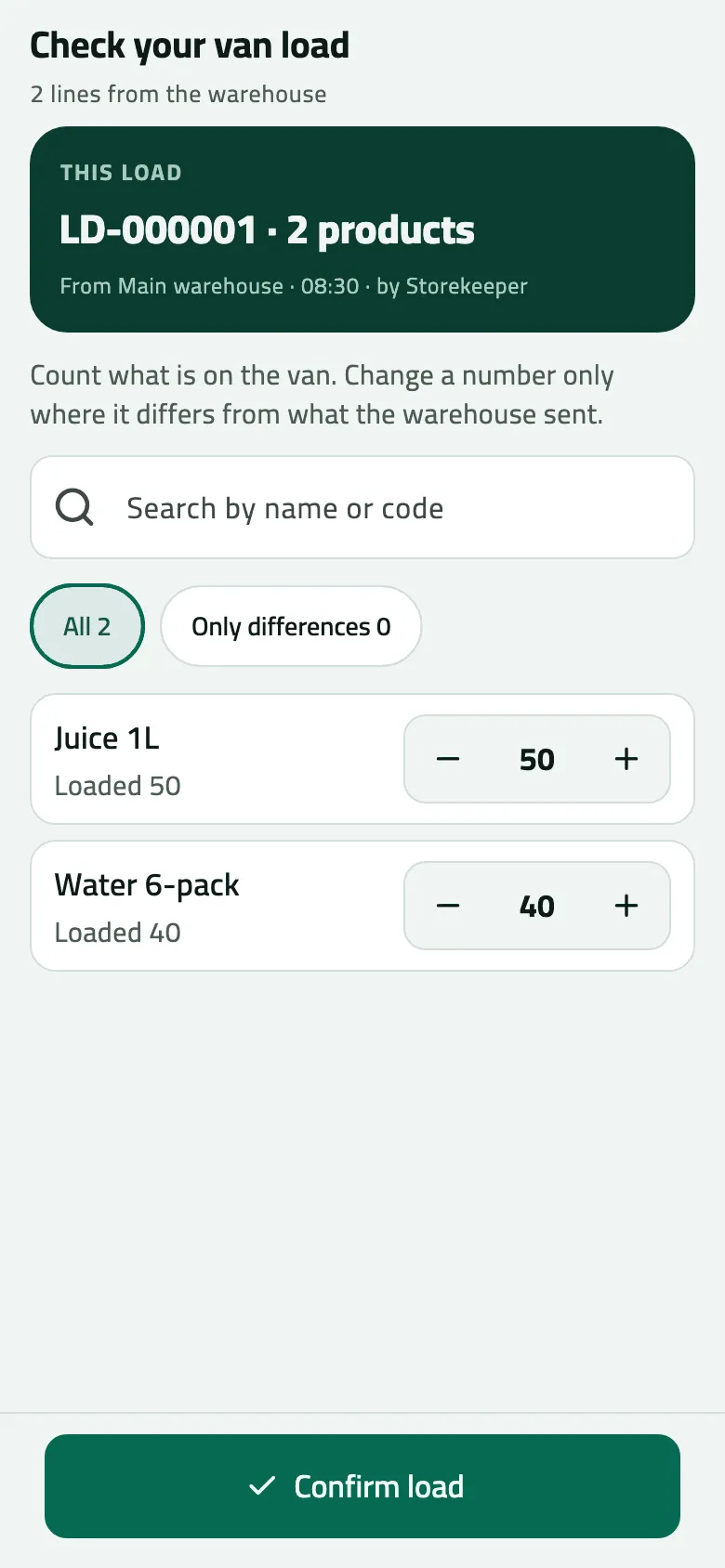
Section titled “When your company asks you to count”The screen says “Count what is on the van. Change a number only where it differs from what the warehouse sent.” Each line starts at what was loaded (Loaded 50 for Juice 1L). Change only the lines that differ: the line turns amber with 2 short or 1 over, and Only differences lists them. Tap Confirm load; the phone says “Load checked. The office has your count.”
Refuse the load
Section titled “Refuse the load”- Tap Refuse…. The sheet Refuse this load? says the load stays with the warehouse and you can’t sell these products from the van until the office sorts it out.
- Under Why, choose Quantities don’t match, Wrong products, Damaged goods or Something else.
- Write a Note for the office — it is required.
- Tap Refuse load. The phone says “Load refused. The office is told.”
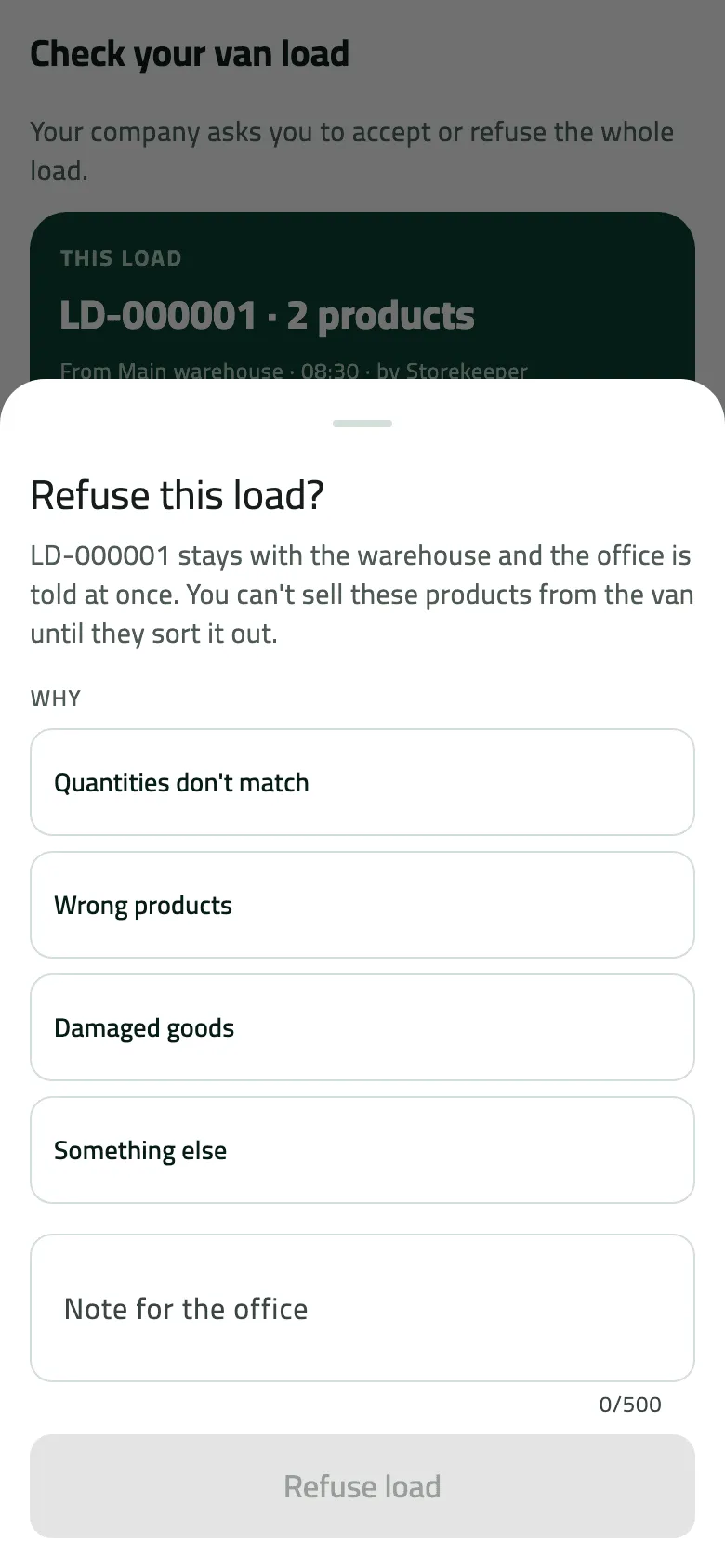
- The whole load goes back to the warehouse at once
Example
Section titled “Example”At 08:40 Omar checks LD-000001: Juice 1L +50 · 0 · 50 and Water 6-pack +40 · 0 · 40. The van holds exactly that, so he taps Accept load.
VAN-03 is loaded from the main warehouse: 50 Juice 1L and 40 Water 6-pack. The load waits for Omar to check it.
Van load LD-000001 — state: waiting
| Item | Before | After | Change |
|---|---|---|---|
| Main warehouse · Juice 1L | 120 PCS | 70 PCS | −50 |
| Main warehouse · Water 6-pack | 100 PCS | 60 PCS | −40 |
| VAN-03 · Juice 1L | 0 PCS | 50 PCS | +50 |
| VAN-03 · Water 6-pack | 0 PCS | 40 PCS | +40 |
Omar starts his day, counts the van and accepts the whole load. Van sales open.
Van load LD-000001 — state: accepted
The stock moved onto the van at 08:30, when the office saved the load. Accepting it moved nothing; it told the office the van is right, and — because Nile Fresh asks for it — opened van selling.
What happens next
Section titled “What happens next”- Accept: the load leaves the office’s waiting list. If your company asks you to accept before selling, your van sales open now.
- Count with differences: the van is set to what you counted and the office sees the difference.
- Refuse: the phone takes the load off your van at once; the office sends it again, or keeps it in the warehouse (Sort out a refused or miscounted van load).
- Until you accept, under the “accept before selling” rule, a new order says Van selling waits for the load — “Accept LD-000001 first. Until then this order is booked for delivery.”
If something goes wrong
Section titled “If something goes wrong”| What you see | What to do |
|---|---|
This load was already checked. Pull down to refresh. LOAD_ALREADY_CHECKED | Someone already answered for this load. Pull down on Today. |
This load was refused and the office is sorting it out. Pull down to refresh. LOAD_ALREADY_REFUSED | Wait for the office to send it again. |
This load has already been sorted out. Refresh to see what was done. LOAD_NOT_OPEN | The office already sorted this load out. Pull down to see what they did. |
Some of this load has already been sold from the van, so it can't be refused. Tell the office. LOAD_PARTLY_SOLD | You have sold from this load. Tell the office what is wrong instead. |
This load belongs to another rep's van. NOT_YOUR_LOAD | The load was put on another rep's van. Call the office. |
No banner, but the office says they loaded the van | Pull down on Today in signal. If still nothing, your company may not ask for a check. |
If the office doesn’t accept your answer, the load is asked again, and the reason is listed under the red items the office did not accept banner (Fix work the office did not accept).