

Close a rep's day
The rep ends the day on the phone (End day). The supervisor reads the day on Money › End of day and closes it (Close the day): a count of what was handed in, and a sign-off that fixes the day’s figures. Who: supervisor · Where in the cycle: Close the day.
Before you start
Section titled “Before you start”- Take payments (PAYMENT_RECORD) opens End of day and signs days off, for the reps your reach covers.
- Do it on the day itself. “Still out” and the expected cash are what the rep carries now, whatever day you pick. Looking back at an older day shows today’s cash.
- Decide whether you count the cash here or the cashier banks it first. If it is banked first, there is nothing to count.
- Open Money › End of day. It shows today.
- Read the tiles (Taken, Invoiced, Cash still out, Cheques not handed in, Days signed off) and each rep’s row: start and end of day, Visits, Cash, Cheques, InstaPay, wallet, transfer, Invoiced (split into Van and Delivered), Returns, Still out.
- Press Close the day on the rep’s row. The panel lists The day.
- Under Cash handed in, tick Count what the rep hands in (it is ticked when the rep has cash or cheques out). Type the Cash counted and the number of Cheques.
- Read the verdict: “Matches what was expected”, or “Cash short …”, “Cash over …”, “Cheques missing …”.
- If it differs, write Why it differs — it is required.
- Press Sign the day off. “Once signed off, the day can’t be changed.”
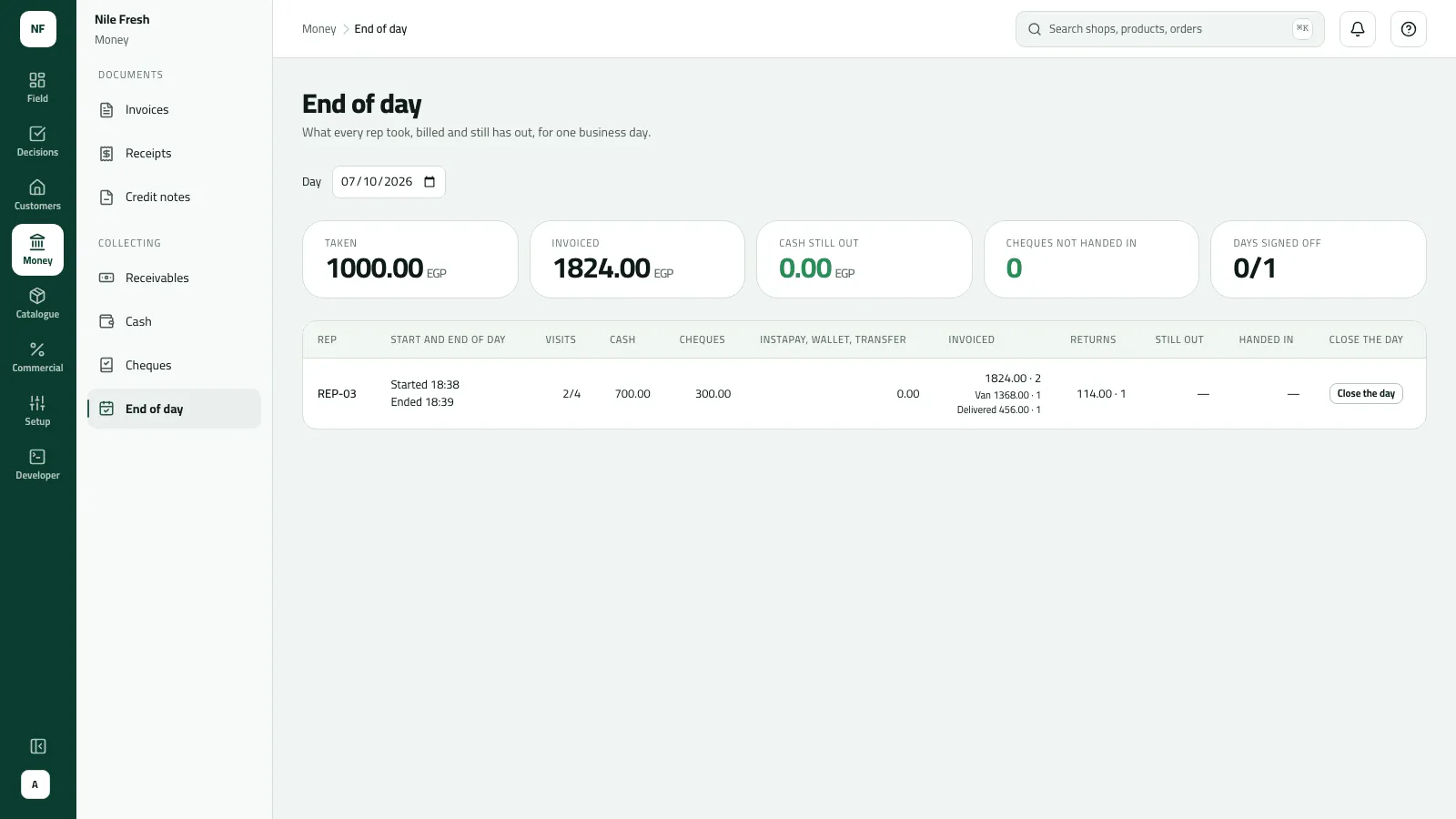
- The day in figures
- REP-03
- Close the day
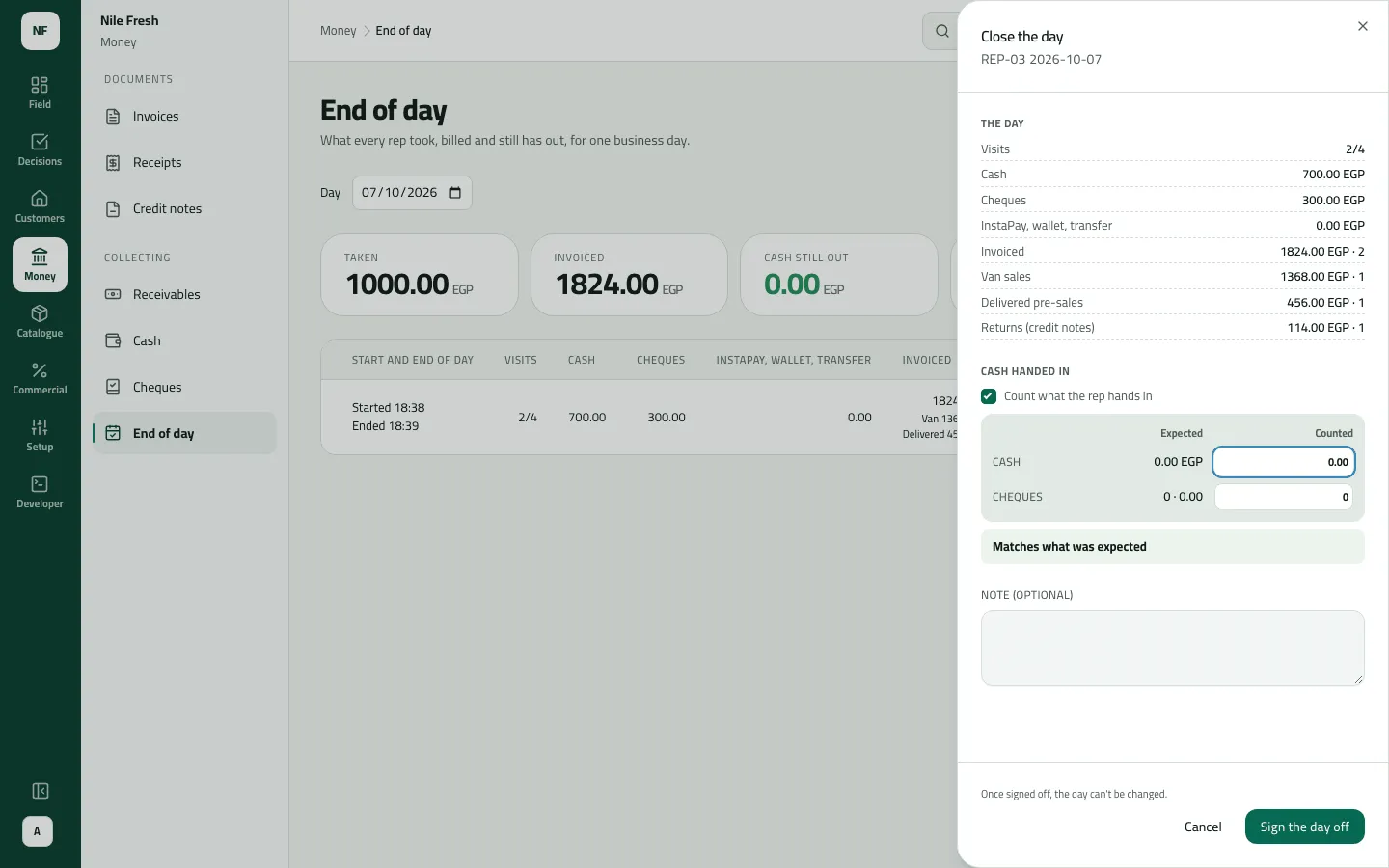
- The day
- Count
- The verdict
A day signed off with a difference reads To sort out and appears under Differences to sort out and in Needs you. When you know what happened, press Sort out, write What became of the difference and Mark as sorted out. Sorting out moves no money.
Example
Section titled “Example”Omar ends his day on the phone at 18:05; Sara signs it off at 18:10.
Omar ends his day. The 2 stops he did not reach are marked skipped.
| Item | Before | After | Change |
|---|---|---|---|
| Visits done / planned | — | 2/4 | — |
| Van sales | — | 1,368.00 EGP | — |
| Delivered invoices | — | 456.00 EGP | — |
| Returns | — | 114.00 EGP | — |
Visits, van sales, returns and cash line up with the documents behind them. The supervisor signs the day off; anything later counts tomorrow.
| Item | Before | After | Change |
|---|---|---|---|
| Expected cash | — | 0.00 EGP | — |
| Counted cash | — | 0.00 EGP | — |
| Cash difference | — | 0.00 EGP | — |
| Signed off | no | yes | — |
REP-03’s row read: Visits 2/4 · Cash 700.00 · Cheques 300.00 · Invoiced 1,824.00 · 2 (Van 1,368.00 · 1, Delivered 456.00 · 1) · Returns 114.00 · 1 · Still out —. The cash was banked at 17:30 and the cheque handed in at 17:35, so the expected cash was 0.00. Sara ticked the count, typed 0.00 and 0 cheques, saw “Matches what was expected” and signed the day off.
What happens next
Section titled “What happens next”- The day is Signed off: its figures are kept as they stood. Anything the rep records later — money, invoices, a late sync — counts on the rep’s next day.
- The rep can no longer end that day on the phone.
- Nothing moves: signing off banks no cash and moves no cheque.
- Audit: “Closed a day” (and “Sorted a day’s difference”).
- ERP: sign-offs aren’t sent to your ERP.
If something goes wrong
Section titled “If something goes wrong”| What you see | What to do |
|---|---|
What was handed in differs from what was expected. Say why, then close the day. DIFFERENCE_REASON_REQUIRED | The count differs from what was expected. Write why, then sign off. |
This rep's day is already signed off, so it can't change. Refresh to see who signed it. DAY_ALREADY_SIGNED_OFF | Someone signed it off first. Refresh to see who. |
The count isn't valid. Enter the cash as an amount of zero or more, and the cheques as a whole number. HAND_IN_INVALID | Count the cash to the piastre and the cheques as a whole number. |
That day hasn't happened yet. Close a day once it is over or under way. DAY_IN_FUTURE | Pick today or an earlier day. |
This rep isn't active, so their day can't be closed here. REP_NOT_ACTIVE | The rep was taken off. Their day can't be closed here. |
Someone already sorted out this difference. Refresh to see what they wrote. DIFFERENCE_ALREADY_SORTED | Someone already sorted it out. Refresh to read what they wrote. |
Sign the day off stays grey | Count is ticked but Cash is empty. Type the cash counted, or untick the count. |
Expected cash is 0.00 and the count is unticked | The cash was banked before the sign-off. That is fine: sign off without a count. |
Start and end times show in your browser’s time zone, and the picked day isn’t kept in the address: a reload returns to today.