

Take an order a shop phoned in
When a shop calls the office instead of waiting for the rep, the office books the order in the rep’s name. It is a booked order: nothing leaves the warehouse until the office delivers it. Who: office · Where in the cycle: Sell.
Before you start
Section titled “Before you start”- Take orders (ORDER_SUBMIT) opens the form. The pickers need more: See customers (CUSTOMER_VIEW) for the shop list, Download data to the phone (SYNC_PULL) for products, and Manage people (USER_MANAGE) or Record returns (RETURN_RECORD) for the list of reps. After placing, the order opens on its page, which needs See reports.
- The customer has a price list, and the products have a price on it today.
- The rep you book it for is a Seller.
- Open Field › Orders and press New order.
- Shop: pick the customer. Branch: leave “Main branch” or choose another.
- Whose order: the rep whose shop it is. Nothing is filled in for you.
- On each line choose the Product, the Unit and the Quantity. Add a product for each further line.
- Check Estimate, before VAT — quantity × today’s price, before VAT, promotions and discounts.
- Press Place order. If the button is grey, the reason is written beside it.
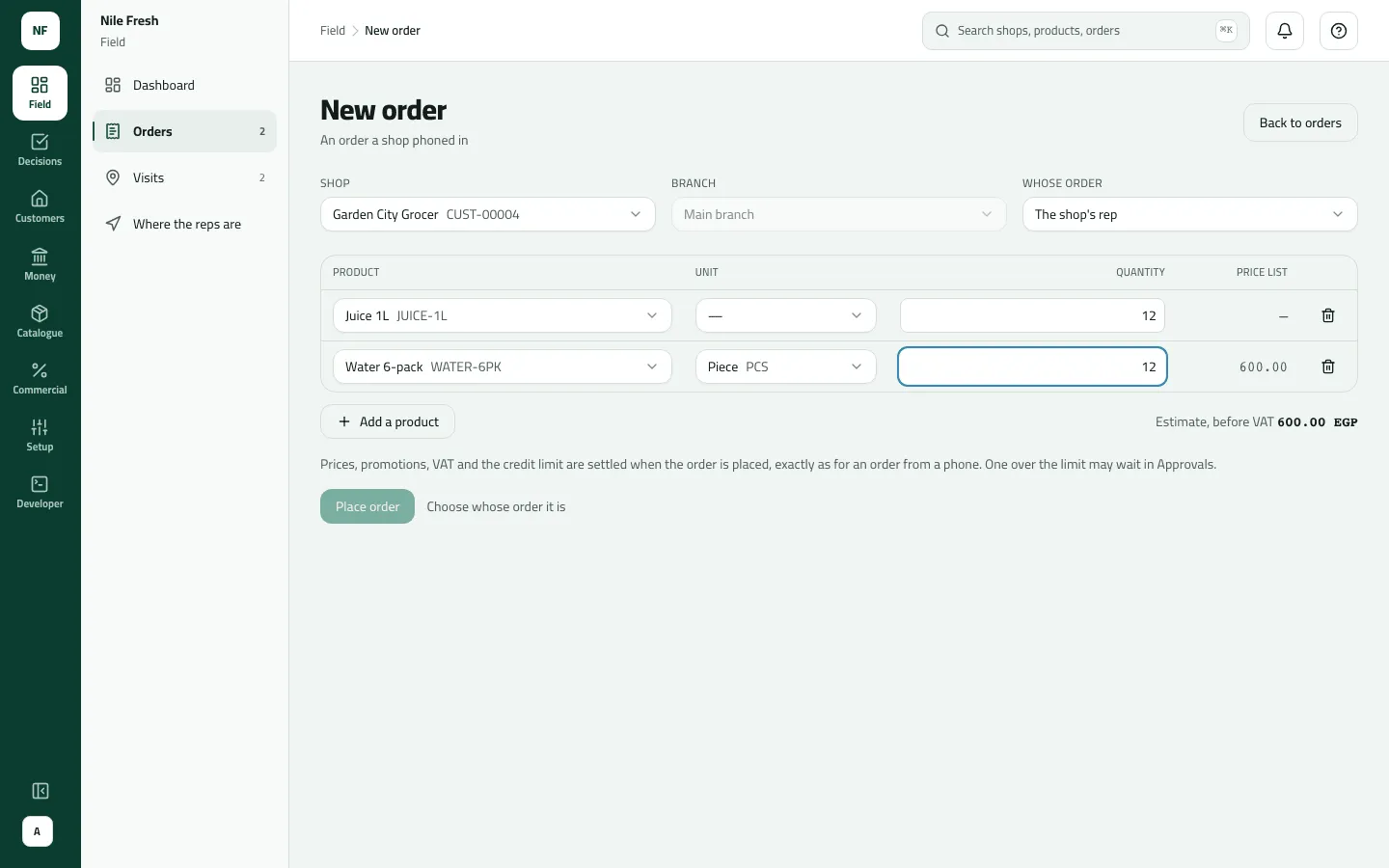
- Shop
- Whose order
- The lines
- Estimate, before VAT
- Place order
“Prices, promotions, VAT and the credit limit are settled when the order is placed, exactly as for an order from a phone. One over the limit may wait in Approvals.” There is no discount field.
Example
Section titled “Example”Suppose Garden City Grocer (credit limit 2,000.00, owing nothing) phones in 12 Juice 1L and 12 Water 6-pack for Omar’s round. The office picks Garden City Grocer, Whose order REP-03, and the two lines. The estimate reads EGP 1,800.00 before VAT (12 × 100.00 + 12 × 50.00).
On Place order Slflo prices it for real: 1,800.00 + VAT 252.00 = 2,052.00. That is 52.00 over the limit, and Nile Fresh lets such orders wait, so the order opens as Waiting approval — Over the credit limit by EGP 52.00 and goes to Approvals. Under Block it would have been refused; under Allow it would go through marked “over credit”.
What happens next
Section titled “What happens next”- Documents: a sales order numbered SO- in the rep’s name. No invoice yet.
- Stock and money: nothing moves. The order counts against the customer’s credit while it is open. Stock leaves the warehouse and the invoice is issued when the office delivers it (Confirm, deliver or cancel an order).
- The rep: sees the order in Orders on the phone at the next sync.
- ERP: if your ERP collects orders, the order goes to it instead of waiting for Confirm.
If something goes wrong
Section titled “If something goes wrong”The refusals are worded for a rep on the phone; here is what they mean at the office.
| What you see | What to do |
|---|---|
This order goes over the shop's credit limit. Collect a payment first, or take a smaller order. CREDIT_LIMIT_EXCEEDED | Your company blocks orders over the limit. Take a payment first, or a smaller order. |
This shop is on hold. Ask your supervisor before selling. CUSTOMER_BLOCKED | The customer is on hold. Ask a supervisor before booking. |
This shop has no price list. Ask the office to assign one. NO_PRICE_LIST | Give the customer a price list on its page first. |
A product has no price today. Remove it or ask the office to set a price. NO_VALID_PRICE | A product has no price on the customer's list today. Remove it, or set a price. |
This shop isn't on your round, so it wasn't recorded for you. Sync, and ask your supervisor if it should be yours. OUTLET_OUT_OF_REACH | The shop isn't one the chosen rep (or you) can reach. Pick the shop's own rep. |
Your account can't take orders. Ask your supervisor. NOT_A_SELLER | The chosen rep delivers or collects but doesn't sell. Pick a Seller. |
Could not place the order. Check the connection and try again. | Press Place order again: the same request is sent, so the order is never placed twice. |
The shop isn't in the Shop list | Blocked customers aren't offered, and the list holds the first 200 customers. A customer after the first 200 can't be picked here yet. |
A product isn't in the Product list | It has no price on this customer's price list today. |
The Whose order list is empty | Your role needs Manage people or Record returns to list the reps. |