

My sale or order was refused
A sale can stop in two places. On the phone, before it is saved: Save order stays grey, a product says it has no price, or the order screen says van selling waits for the load. At the office, after a sync: the order comes back in red on Orders with the reason and Fix. Nothing is taken off the van for a refused sale. Who it happens to: reps, and the office when it takes a phoned order. Where in the cycle: Sell.
Check, in this order
Section titled “Check, in this order”-
Read the reason. On the phone, Orders lists refused orders first, in red, with the reason; open the order for the full message and Fix and resend or Discard (Follow your orders). In the office, an administrator sees the same refusal under Developer › Events › From the phones (What did the phones send?). Then find the message in the table below.
-
“No price for Juice 1L” on the order screen — the shop’s price list has no price for that product in that unit. The office adds one (Make price lists and set prices); the rep syncs, then sells it. A shop with no price list at all can’t be sold to.
-
Save order is grey — the order is empty, a % off is outside 0–100, or the order goes over the shop’s credit and the company blocks that. Remove the line, fix the discount, collect a payment first or take less.
-
“Van selling waits for the load” — the company asks reps to accept the morning load before selling from the van. Tap Check the load on Today and accept it (Check your van load). Until then the order is booked for delivery.
-
Credit. The phone judges credit on what it knew at the last sync; the office judges it again on arrival, on the total with VAT. If the shop’s balance moved in between, the order is refused (company rule Block) or waits for approval (Needs approval, An order is still waiting).
-
A shop the office just approved. A shop approved from the console starts as cash only: every order on credit goes over its limit. The office opens the customer and sets its credit limit straight after approving (Approve a shop a rep found).
-
The rep’s own set-up. A Delivery or Collector rep can’t take orders; a Seller who doesn’t sell from a van can’t make van sales; a van seller needs a van. An administrator changes it in Setup › Users › On a round (Put someone on a round with a van).
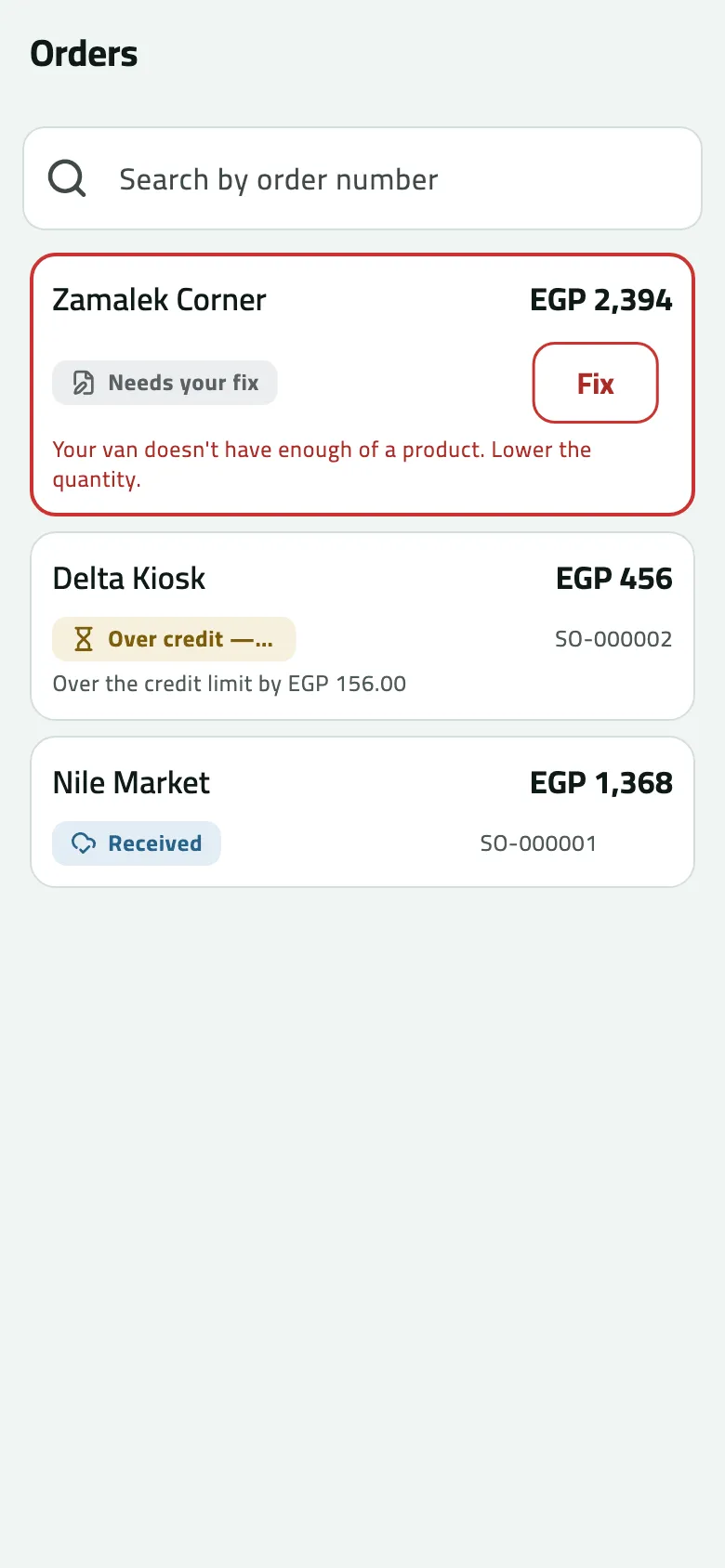
- Needs your fix
- Fix and send again
If something goes wrong
Section titled “If something goes wrong”| What you see | What to do |
|---|---|
A product has no price today. Remove it or ask the office to set a price. NO_VALID_PRICE | A price ended or hasn't started. Remove the product, or ask the office to set a price; then sync. |
This shop has no price list. Ask the office to assign one. NO_PRICE_LIST | The office gives the shop a price list on the customer page. |
Your van doesn't have enough of a product. Lower the quantity. INSUFFICIENT_VAN_STOCK | The van held less than the phone thought. Fix and resend with less. |
This order goes over the shop's credit limit. Collect a payment first, or take a smaller order. CREDIT_LIMIT_EXCEEDED | Collect a payment first, or take a smaller order. The office can raise the limit. |
Van sales can't wait for approval. Lower the discount, or send it as an order for delivery so your supervisor can approve it in Approvals. APPROVAL_NEEDS_A_WAIT | A van sale can't wait for approval. Lower the discount to your allowance, or book the order for delivery. |
You can't give discounts. Remove the discount and send again. DISCOUNT_NOT_PERMITTED | Your role gives no discounts. Remove it; an administrator can give you a discount limit. |
A discount is too large. Lower it and send again. INVALID_DISCOUNT | Lower the discount and send again. |
A price is below the minimum allowed. Raise it and send again. BELOW_MINIMUM_PRICE | The discount takes a price under its floor. Lower the discount. |
Your company sells only inside a visit. Check in at the shop, then take it again. CHECK_IN_REQUIRED | Your company sells only inside a visit. Check in, then take the order again. |
This shop is on hold. Ask your supervisor before selling. CUSTOMER_BLOCKED | The office put the shop on hold. You can still visit and collect; ask your supervisor before selling. |
This branch is on hold. Ask your supervisor before selling. BRANCH_BLOCKED | The same, for this branch only. |
Your company asks you to accept the van load before selling from the van. Check the load, or book the order for delivery. LOAD_NOT_ACCEPTED | Accept the van load first, or book the order for delivery. |
Your account can't take orders. Ask your supervisor. NOT_A_SELLER | Your job doesn't take orders. Ask your supervisor to make you a Seller. |
This order can't be filled any more. CANNOT_FULFIL | You no longer sell from a van. Book the order for delivery instead. |
You have no van assigned. Ask your supervisor. NO_VAN | You sell from a van but have none. Ask your supervisor. |
This sale couldn't be invoiced. Tell your supervisor; nothing was taken from the van. BILLING_FAILED | Tell your supervisor; nothing was taken from the van. |
When to contact Slflo
Section titled “When to contact Slflo”When BILLING_FAILED comes back more than once, or a refusal shows only in English with no code you can find on Look up an error message. Give the order number (or the rep, the shop and the time) — an administrator finds it on Developer › Events.