

Load a van
The office loads the van before the rep leaves. The stock moves the moment you save the load; the rep then checks it on the phone. Who: office (the storekeeper’s job) · Where in the cycle: Load.
Before you start
Section titled “Before you start”- You need Move stock (STOCK_MOVE) to load and unload. Anyone with Download data to the phone (SYNC_PULL) can open Catalogue › Stock and read it.
- The rep is on a round and sells from a van: that is what creates the van (Put someone on a round). A van has no card on the strip until then.
- The goods are in the warehouse (Receive goods).
The Stock screen
Section titled “The Stock screen”Catalogue › Stock, top to bottom:
- The location strip — one card per warehouse and van: units, items, and “reconciles” or the count differences. A warehouse’s held-back goods sit under it with a Write off button.
- Van loads waiting for you — loads the office has to act on (see Sort out a refused load).
- What disagreed — count differences, newest first.
- Running out of life — lots that expire within 30 days or already have.
- Everything, everywhere — a link to Holdings.
- Open Catalogue › Stock and press Move stock.
- Under What are you doing, choose Load a van.
- From: the warehouse. To: the van (VAN- followed by the rep code unless it was named otherwise).
- On each line choose the Product and the quantity. To load cartons, pick the carton under Counted in; it shows the pieces it stands for. Press Another line for each product.
- Press Load a van at the foot of the sheet (it stays grey until From, To and a line are filled). The notice says “Stock loaded.”
- The van’s load card appears under Van loads waiting for you, with its number (LD-…) and “Not checked by the rep yet”.
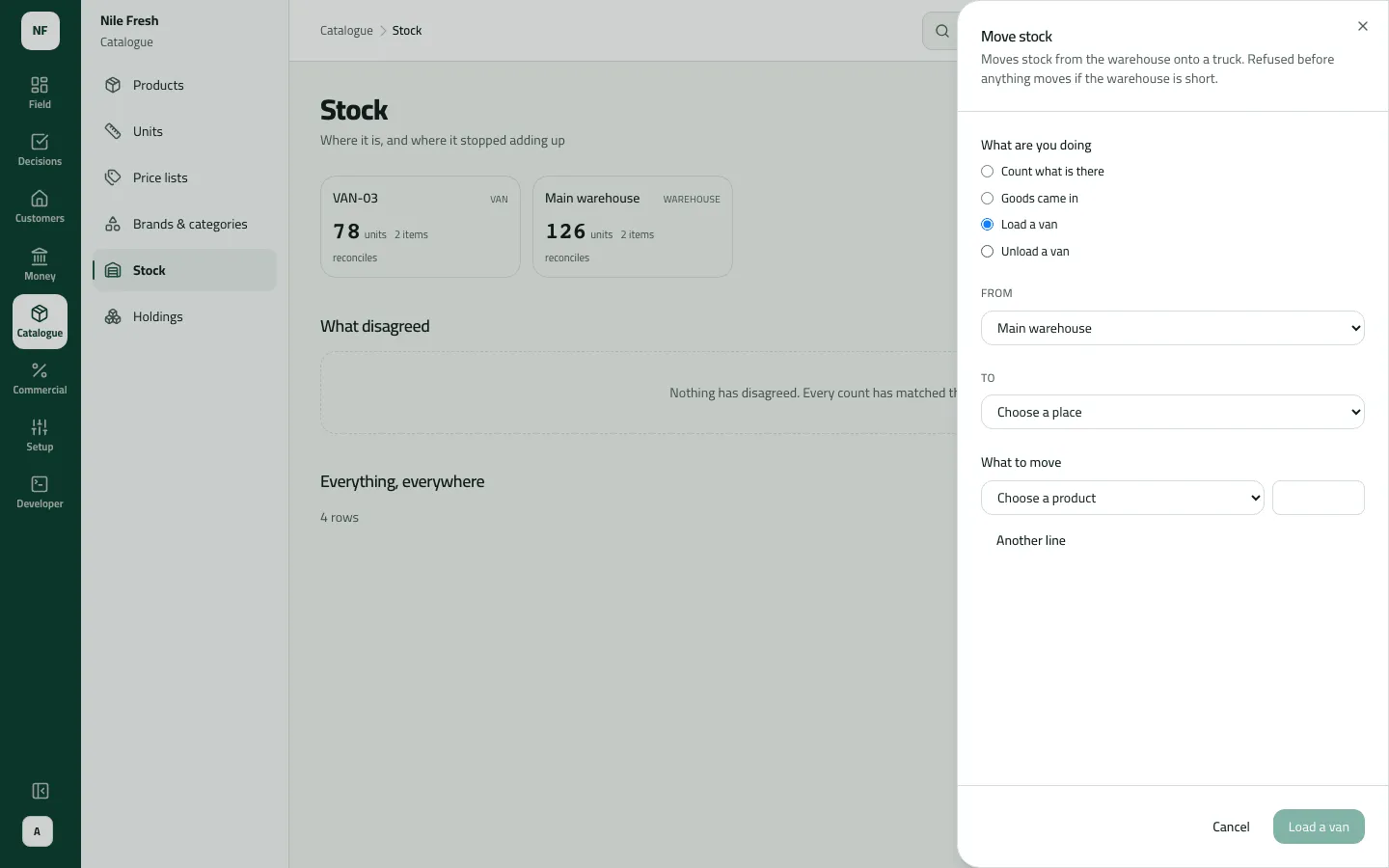
- What are you doing
- From and to
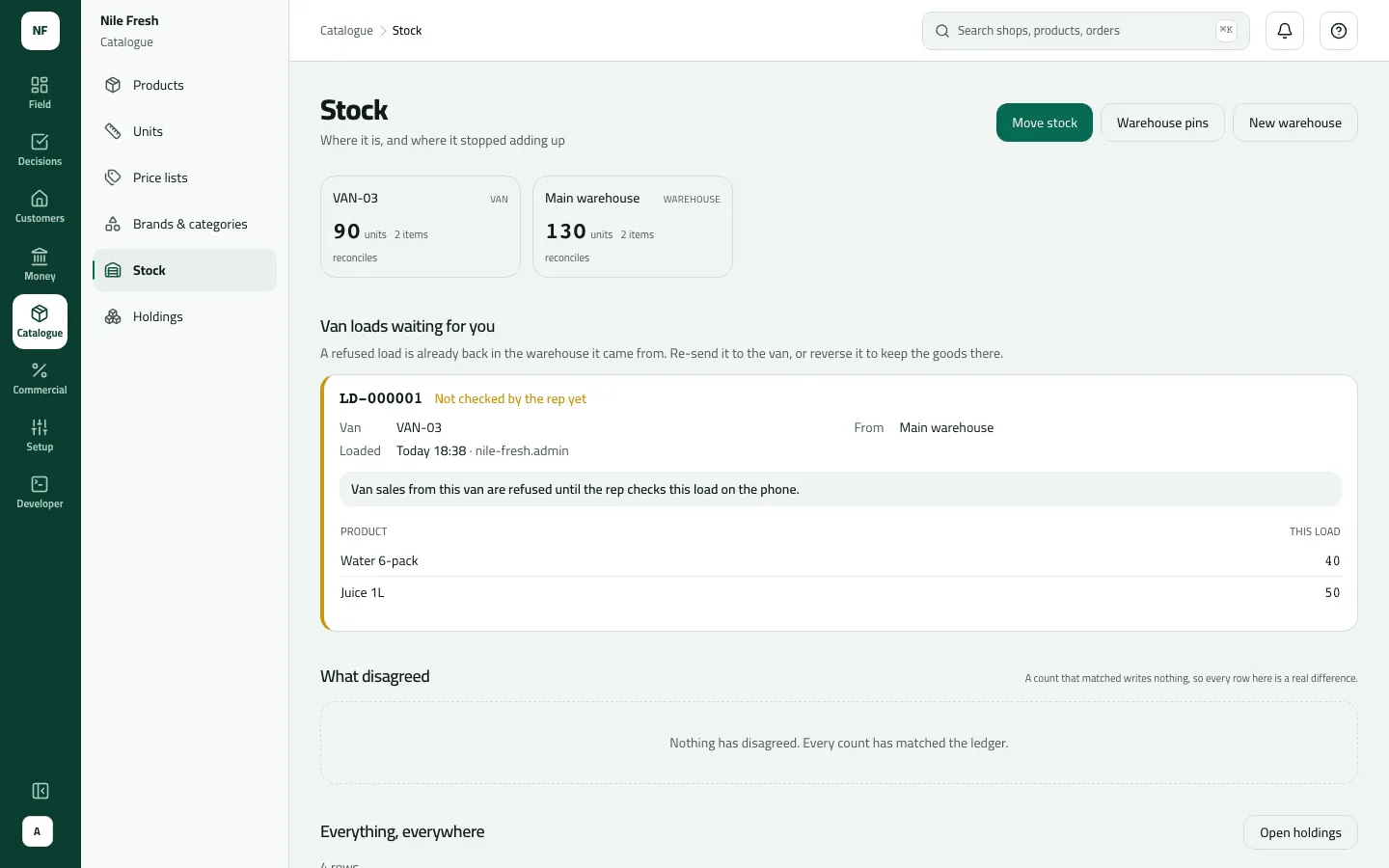
- Every place and what it holds
- The van load card
To bring stock back at the end of a round, choose Unload a van instead: From the van, To the warehouse, then press Unload a van.
Example
Section titled “Example”At 08:30 the storekeeper loads Omar’s van for the day:
VAN-03 is loaded from the main warehouse: 50 Juice 1L and 40 Water 6-pack. The load waits for Omar to check it.
Van load LD-000001 — state: waiting
| Item | Before | After | Change |
|---|---|---|---|
| Main warehouse · Juice 1L | 120 PCS | 70 PCS | −50 |
| Main warehouse · Water 6-pack | 100 PCS | 60 PCS | −40 |
| VAN-03 · Juice 1L | 0 PCS | 50 PCS | +50 |
| VAN-03 · Water 6-pack | 0 PCS | 40 PCS | +40 |
Omar starts his day, counts the van and accepts the whole load. Van sales open.
Van load LD-000001 — state: accepted
The stock moved at 08:30, when the load was saved — not at 08:40, when Omar accepted it. Because Nile Fresh asks reps to accept the load before selling, Omar’s van sales opened only after 08:40.
What happens next
Section titled “What happens next”- Stock: the warehouse goes down and the van goes up at once, in pieces.
- Documents: a van load numbered LD- (LD-000001 on the day). The number isn’t shown when you save; find it on the load card or on Movements.
- The rep: sees Check your van load on the phone at the next sync, and accepts it, counts it or refuses it. Accepted loads leave the waiting list; refused loads and counts that differ stay for you.
- Audit: “Loaded a van” in the audit trail.
- ERP: nothing is sent; van stock is Slflo’s own.
If something goes wrong
Section titled “If something goes wrong”| What you see | What to do |
|---|---|
There isn't enough stock at that location. INSUFFICIENT_STOCK | The warehouse holds less than you are loading. Record the goods in first, or load less. |
Choose two different locations. SAME_LOCATION | From and To are the same place. Choose the van under To. |
Nothing to move. Add at least one line. NOTHING_TO_MOVE | Every line is zero. Enter a quantity on at least one line. |
This product is tracked by lot. Choose its lot on that line, or type a new one. BATCH_REQUIRED | This product is tracked by lot. Pick the lot on that line. |
That product isn't kept in that unit. Choose one of its units, or enter the quantity in its base unit. UNIT_NOT_OF_PRODUCT | Choose one of the product's own units under Counted in. |
This product is tracked by serial number, which this screen cannot move. Record it from the phone. SERIAL_TRACKED | Serial-numbered products can't be loaded from the console. |
The load has no LD- number and no card. | You loaded to a warehouse, which is a transfer. Only a warehouse-to-van load is a van load. |
A product is missing from the Product list. | The list offers the first 500 products. Products beyond them can't be moved from this sheet yet. |