

See what is where
Holdings answers “how much is where”; Movements answers “why is it that number”. Who: office, supervisor · Where in the cycle: Load.
Before you start
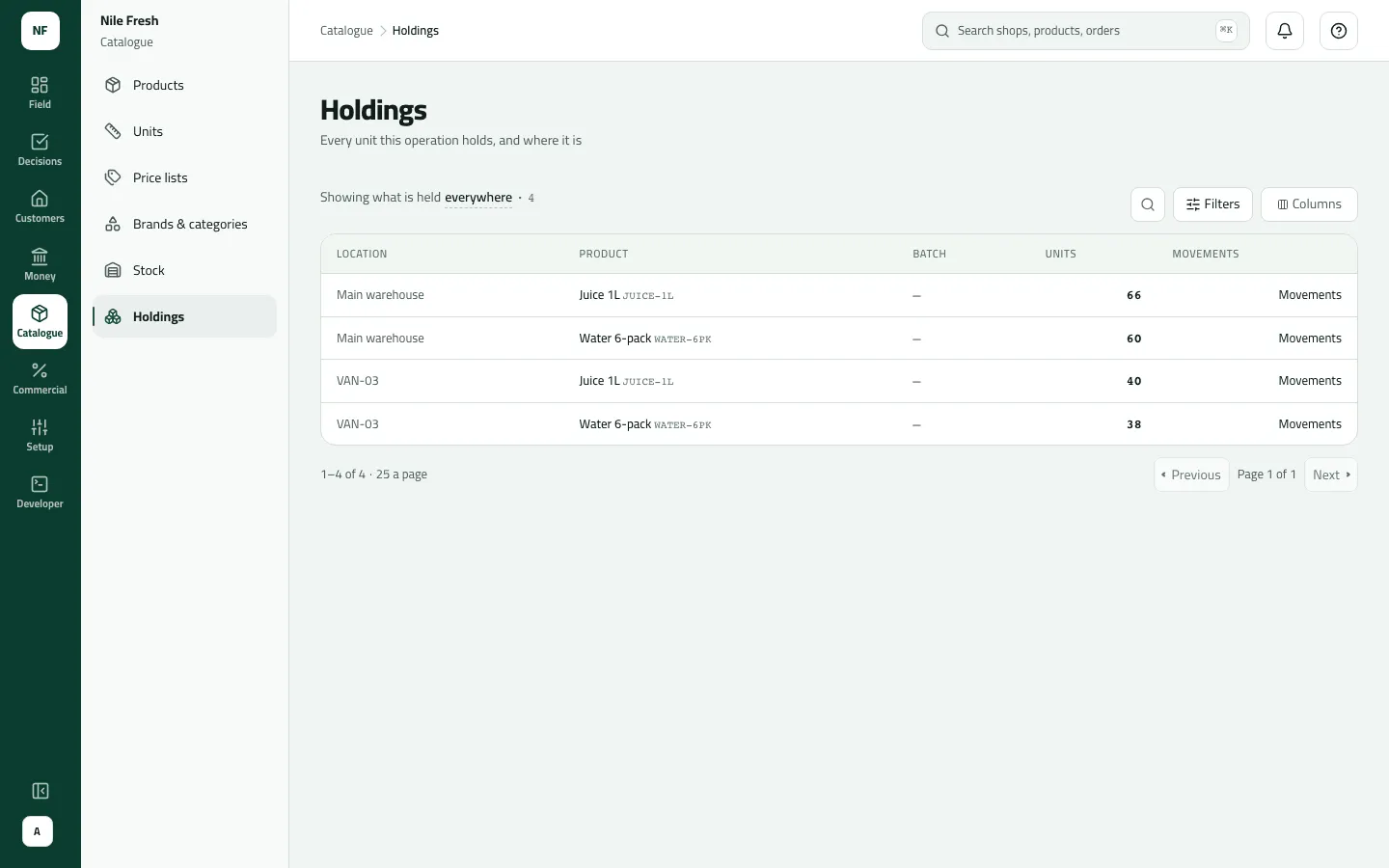
Section titled “Before you start”- Download data to the phone (SYNC_PULL) shows Catalogue › Holdings. Nothing here changes stock.
- What you see depends on your reach: office people with stock rights and no round see every place; someone on a round sees the warehouses and their own van.
- Open Catalogue › Holdings. The sentence reads “Showing what is held everywhere”.
- Pick a place with the Location chips, or search by product code or name.
- Read Units — always in pieces (the product’s base unit), never in cartons. Lots of the same product are listed earliest expiry first.
- To see why a figure is what it is, press Movements on its row.
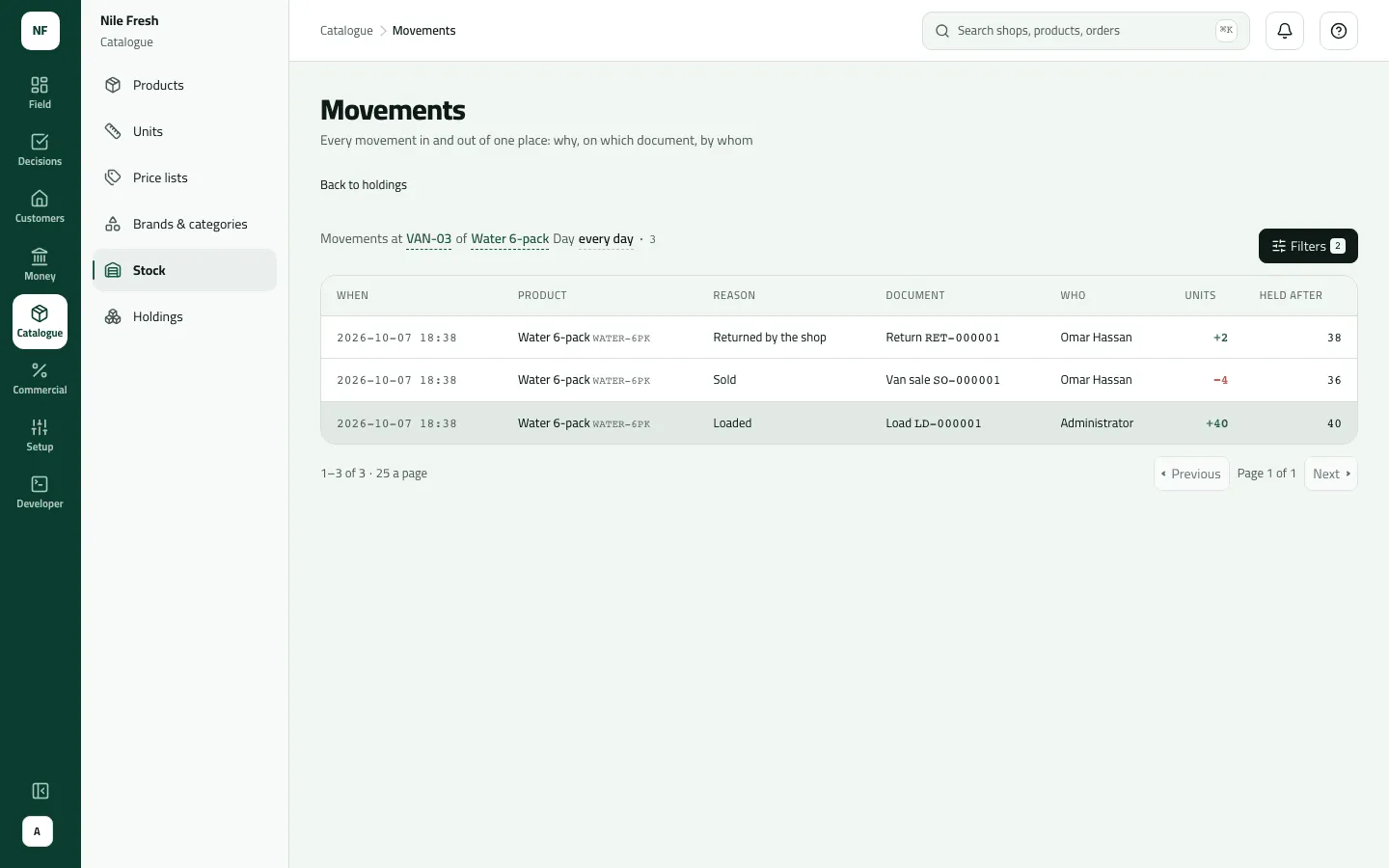
- On Movements, each line shows When, Product, Reason, Document, Who, the signed Units and Held after — the running figure for that product at that place. Narrow it with the product chips or a day range; Back to holdings returns.
- Units, in pieces
- Movements
- Reason
- Document
- Held after
The reasons you will see: Goods received, Loaded, Unloaded, Moved, Sold, Returned by the shop, Count difference, Written off. The document is the load (LD-…), “Refused load, back”, the delivery, the van sale’s order number, the return, the delivery note you typed, or the write-off’s reason.
Example
Section titled “Example”At the end of the Nile Fresh day, Holdings filtered to VAN-03 shows Juice 1L 40 and Water 6-pack 38. Movements for VAN-03 › Water 6-pack explains the 38 (newest first, as the screen lists them):
| Reason | Document | Units | Held after |
|---|---|---|---|
| Returned by the shop | Return RET-000001 | +2 | 38 |
| Sold | Van sale SO-000001 | −4 | 36 |
| Loaded | Load LD-000001 | +40 | 40 |
MAIN still holds 66 Juice 1L: 120 came in, 50 went onto the van and 4 left with the delivery to Delta Kiosk.
What happens next
Section titled “What happens next”- Nothing changes from here. To correct a figure, count the place (Receive goods, count stock and write off).
- Phones get the same movements at their next sync; a rep’s Van tab can still show goods sold but not yet synced.
If something goes wrong
Section titled “If something goes wrong”| What you see | What to do |
|---|---|
Nothing held | Zero holdings are hidden. A place that received ten and sold ten holds nothing and isn't listed. |
Choose a stock place first: movements are shown one place at a time. LOCATION_REQUIRED | Movements show one place at a time. Open them from a Holdings row, or choose a place. |
The start date is after the end date. Pick an earlier start or a later end. DATE_RANGE_REVERSED | The start of the day range is after its end. Swap them. |
No stock place like that within your reach | That place is outside the stock your role reaches. Ask someone who sees it. |