

See what changes when your company waits for its ERP
Nile Fresh runs without an ERP. Suppose instead its ERP collects booked orders: Slflo is set to wait for it. This example replays two orders of the Nile Fresh day under that setting — the van sale, which doesn’t change, and the booked order, which does. Who: office and administrator · Where in the cycle: Hand the day to your ERP.
Before you start
Section titled “Before you start”- Your ERP is connected with a token that may read and answer orders (Connect your ERP with a token).
- Slflo has switched your company to wait for its ERP.
What waits, and what doesn’t
Section titled “What waits, and what doesn’t”| Without an ERP that collects orders | Waiting for the ERP | |
|---|---|---|
| A van sale | Delivered and invoiced at once | The same: it never waits |
| A booked order, once received or approved | Waits for the office: Confirm, then Delivered | Goes to the ERP: With ERP |
| Invoices, receipts, credit notes | Issued and numbered by Slflo | The same; your ERP reads them by sequence number |
The example, step by step
Section titled “The example, step by step”1 · 09:35 · The van sale — nothing changes
Section titled “1 · 09:35 · The van sale — nothing changes”Omar’s van sale at Nile Market is delivered and invoiced at once, exactly as on the real day: SO-000001, INV-000001.
10 Juice 1L at 100.00 and 4 Water 6-pack at 50.00 from the van. The invoice is issued at once and the van drops by what was sold.
Nile Fresh
INVOICE · INV-000001
- Net
- 1,200.00
- VAT
- 168.00
- 10 PCS Juice 1L × 100.001,000.00
- VAT 14%140.00
- 4 PCS Water 6-pack × 50.00200.00
- VAT 14%28.00
TotalEGP 1,368.00
| Item | Before | After | Change |
|---|---|---|---|
| VAN-03 · Juice 1L | 50 PCS | 40 PCS | −10 |
| VAN-03 · Water 6-pack | 40 PCS | 36 PCS | −4 |
| Nile Market owes | 0.00 EGP | 1,368.00 EGP | +1,368.00 |
- The shopkeeper gets the invoice as a shared PDF; the phone does not print.
2 · 11:05 – 11:20 · The booked order goes to the ERP
Section titled “2 · 11:05 – 11:20 · The booked order goes to the ERP”Delta Kiosk’s order is held over its credit limit, as on the day:
Delta Kiosk wants 4 Juice 1L, 456.00 with VAT, on a 300.00 limit. The company asks for approval, so the order waits for the supervisor.
Sales order SO-000002 — status: pending approval · total: 456.00 · reason: credit limit exceeded (over 156.00)
| Item | Before | After | Change |
|---|---|---|---|
| Delta Kiosk credit limit | 300.00 EGP | 300.00 EGP | 0 |
| Order over the limit by | 0.00 EGP | 156.00 EGP | +156.00 |
- Nothing moves while the order waits: no stock, no invoice, nothing owed.
At 11:20 Sara approves it on Decisions › Approvals, as on the day. The difference comes now. On approval SO-000002 doesn’t wait for Confirm: it goes to the ERP. On Field › Orders its Status is With ERP (see order states), and its page shows ERP “Waiting for the ERP to collect it”. There is no Confirm, Delivered or Cancel order. While it waits it still counts against Delta Kiosk’s credit. Omar’s phone shows it as Received.
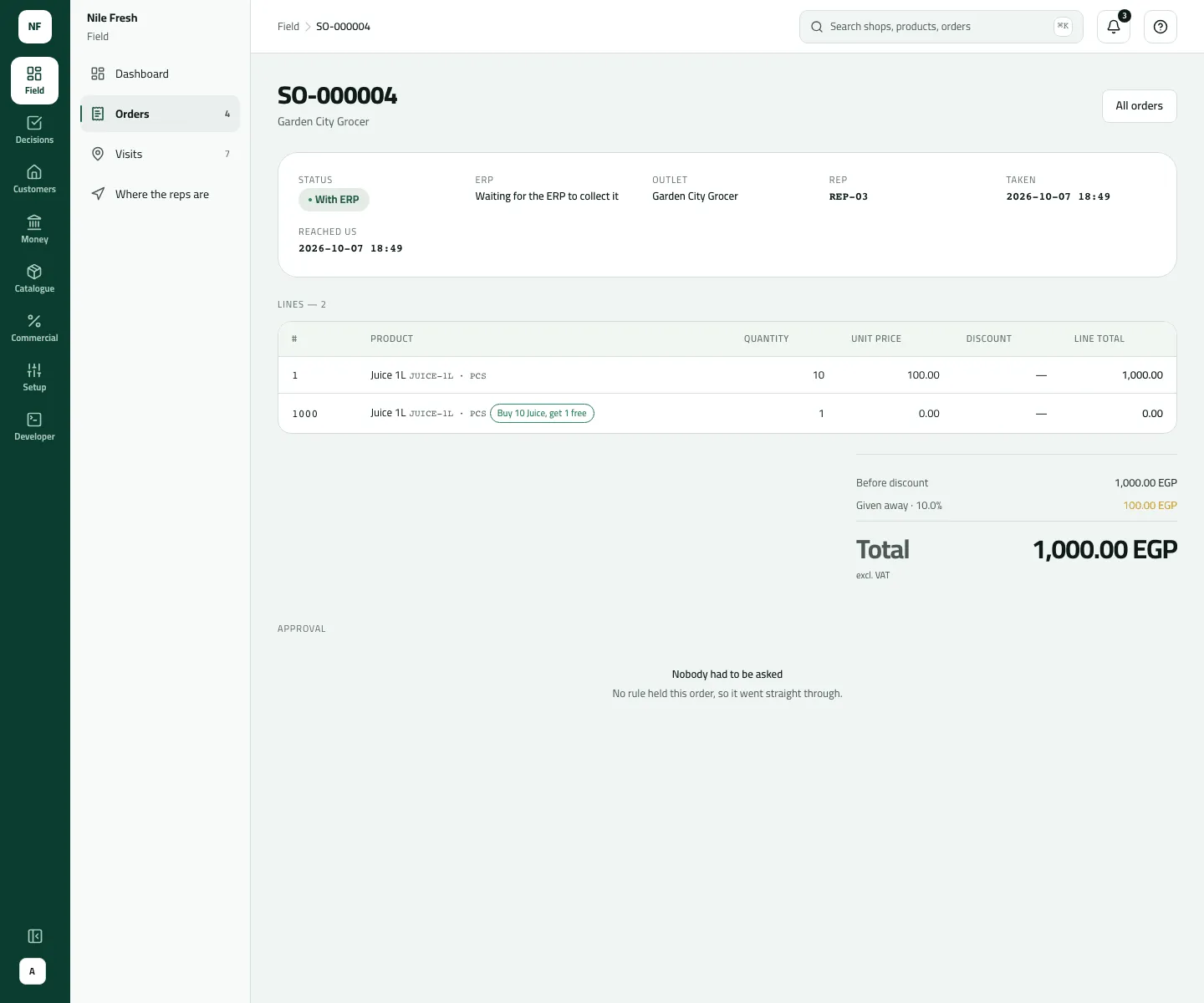
On the docs company the order sent to the ERP is a later booked order, SO-000004 for Garden City Grocer.
- Status With ERP
- Waiting for the ERP to collect it
3 · The ERP accepts it — Closed
Section titled “3 · The ERP accepts it — Closed”The ERP reads the orders waiting for it, books SO-000002 under its own number, say SO-D365-104882, and answers accepted. In Slflo the order is Closed, and its page shows ERP number SO-D365-104882.
Nothing more happens to a Closed order in the console: no Confirm, Delivered or Cancel. Slflo moves no stock for it and issues no invoice; delivering and billing it happen in your ERP. The order stops counting against Delta Kiosk’s credit. Omar’s phone shows it as Delivered.
| Item | Before | After | Change |
|---|---|---|---|
| Delta Kiosk's open orders (count against credit) | 456.00 EGP | 0.00 EGP | −456.00 |
| Main warehouse · Juice 1L | 70 PCS | 70 PCS | 0 |
| Delta Kiosk owes (in Slflo) | 0.00 EGP | 0.00 EGP | 0 |
On the real day, without an ERP, the office delivered it instead: MAIN 70 → 66 and INV-000002 for 456.00 (Take an order over the credit limit through to its invoice).
Or the ERP refuses it — ERP failed
Section titled “Or the ERP refuses it — ERP failed”Suppose the ERP answers rejected with “Customer on hold in D365”. The order is ERP failed. Its page opens with “The ERP refused it: Customer on hold in D365” and shows ERP “Refused by the ERP”. Omar’s phone shows it as Rejected.
Once the cause is fixed in the ERP, the office presses Send to ERP again (it needs Deliver orders, ORDER_FULFIL): the order is With ERP again and the ERP can answer afresh. Or the office cancels it with a reason. An ERP-failed order still counts against the shop’s credit until it is closed or cancelled.
4 · Overnight · The ERP reads the documents
Section titled “4 · Overnight · The ERP reads the documents”Whatever the setting, the ERP reads the invoices, receipts and credit notes Slflo issued, in order, by a counter with no gaps: on this day the invoice feed holds INV-000001 only (seq 1), since SO-000002 was never invoiced in Slflo; the payments feed RC-000001 and RC-000002; the returns feed RET-000001. The ERP keeps the last number it read and asks for what comes after it.
What happens next
Section titled “What happens next”- Find the orders: on Field › Orders use the Table view and sort by Status. The Board by status view has no lanes for With ERP, Closed or ERP failed, and the State filter doesn’t offer them yet.
- The rep sees With ERP as Received, Closed as Delivered and ERP failed as Rejected, at the next sync.
- Your ERP developer has the details: the integration API.
If something goes wrong
Section titled “If something goes wrong”| What you see | What to do |
|---|---|
This company's orders are not set to be collected by its ERP, so the ERP cannot answer for them. ERP_MODE_NOT_API | The ERP answered an order while the company wasn't set to wait for it. Ask Slflo to switch the setting before the ERP answers orders. |
This order is not waiting for the ERP, so there is nothing for the ERP to answer. ORDER_NOT_AWAITING_ACK | The order isn't With ERP. The ERP should only answer the orders waiting for it. |
The ERP already answered this order differently. It can answer again only after the order is sent to the ERP again. ALREADY_ACKNOWLEDGED | The ERP already answered this order differently. Send it to the ERP again first. |
That step isn't possible for this order now. Refresh to see its current state. INVALID_TRANSITION | Send to ERP again works only on an ERP-failed order. Refresh to see its state. |
An order vanished from the Board by status view | Board by status doesn't show With ERP, Closed or ERP failed. Use the Table. |