

Give one person an exception or a limit
When one person needs more (or less) than their roles give, add an exception instead of a new role. Who: administrator · Where in the cycle: Set up.
Before you start
Section titled “Before you start”- You need Manage people (USER_MANAGE); to see what the person’s roles already give, also Manage roles.
- You can only give what you hold yourself. Taking away is always allowed.
- Open Setup › Users, then the person’s row menu › Exceptions.
- Pick the Permission (“— a role gives this” marks the ones they already have).
- Choose the Effect: Give it to them or Take it away.
- For Give, set limits if the permission has them: Largest discount (%), Largest order, Largest payment, Whose records. Blank means “as their roles say”.
- Write Why (required) and, if it should end, Until (blank stands until removed).
- Press Save exception. The exception is listed with its effect in words, e.g. “Given · Up to 5 % discount”.
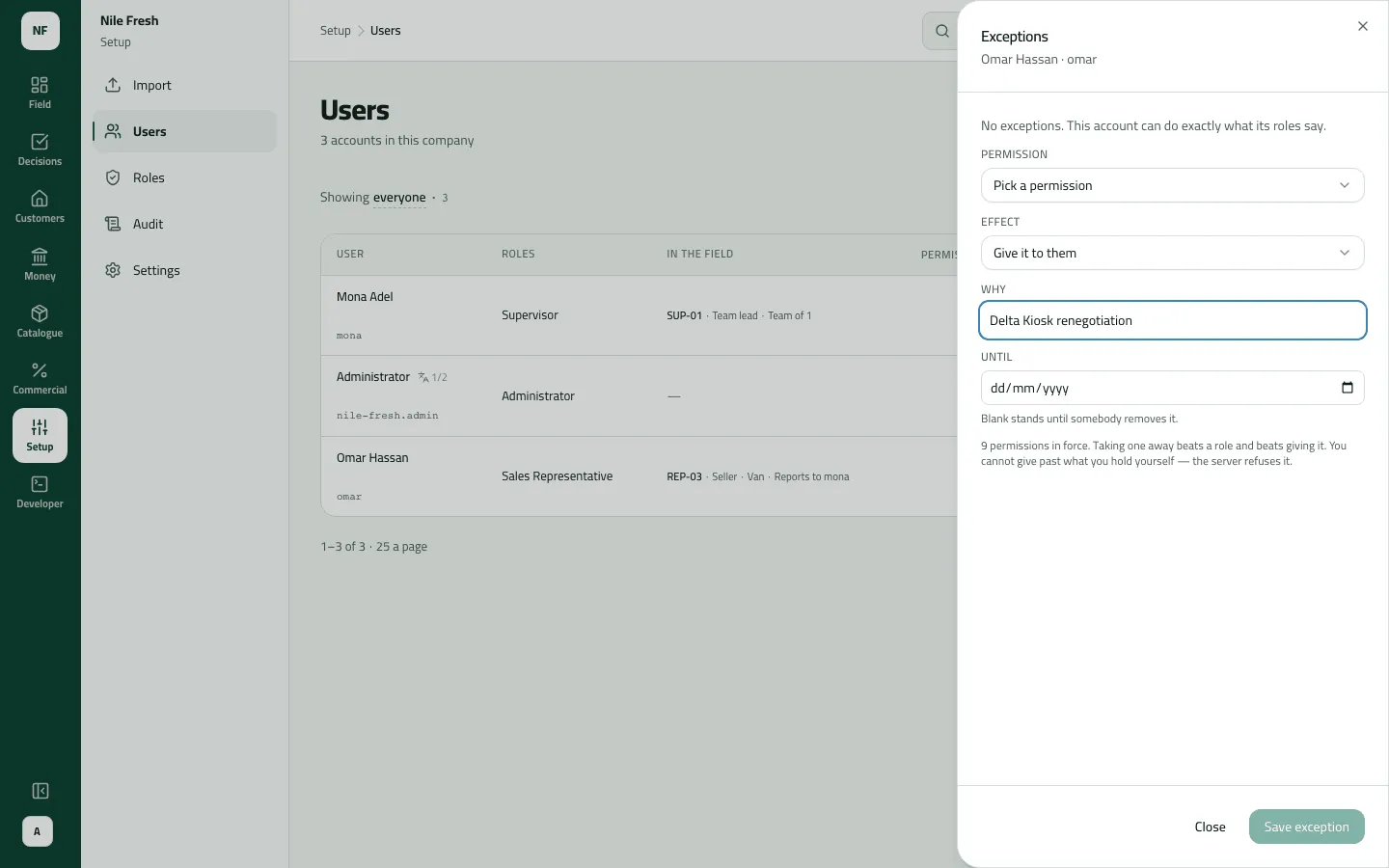
- Permission
- Effect
- Why
- Until
Example
Section titled “Example”Omar renegotiates Delta Kiosk’s terms. The administrator gives him Give a discount on an order, Largest discount 5, Why “Delta Kiosk renegotiation”, Until 2026-10-31.
- A booked order at 5% goes through.
- At 6% it waits in Approvals: “Discount of 6% is above the 5% this rep may give”.
- A van sale at 6% is refused (it can’t wait for approval).
After 31 October the exception lapses and Omar is back to what his role gives.
What happens next
Section titled “What happens next”- Take it away beats every role. One exception per permission per person; saving again replaces it.
- It reaches the person within an hour (their session renews).
- The phone doesn’t know the cap: the rep learns about a held or refused order when it syncs.
- A promotion’s discount counts toward the grant.
- Recorded in the audit trail (“Set an exception”).
If something goes wrong
Section titled “If something goes wrong”| What you see | What to do |
|---|---|
Add a reason, then send again. REASON_REQUIRED | Fill in Why. |
You cannot give more than you have yourself: a permission you do not hold, a wider reach or a higher limit than yours. ESCALATION | You don't hold that permission or that high a limit yourself. Ask an administrator. |
Van sales can't wait for approval. Lower the discount, or send it as an order for delivery so your supervisor can approve it in Approvals. APPROVAL_NEEDS_A_WAIT | The rep's van sale is over their discount grant. They lower the discount, or book the order for delivery so it can be approved. |
You can't give discounts. Remove the discount and send again. DISCOUNT_NOT_PERMITTED | The rep has no discount permission at all. Give the exception, or remove the discount. |
Every exception reads Given, or Denied, though no role gives it | Without Manage roles the sheet can't read the roles, so it can't say what they already give. The exception itself works. |