

Receive goods, count stock and write off
Three ways to put the stock ledger right at a warehouse: record goods that came in, count what is really there, and write off goods that can’t be sold. Who: office (the storekeeper’s job) · Where in the cycle: Load.
Before you start
Section titled “Before you start”- You need Count stock (STOCK_COUNT). The built-in Supervisor and Administrator have it; the Sales Representative does not. Slflo has no storekeeper role: the storekeeper is whoever holds this permission.
- The warehouse exists (Add a warehouse), and so do the products.
- For a product tracked by lot, have the lot code and expiry date from the supplier’s paper.
All three start on Catalogue › Stock.
- Press Move stock and choose Goods came in under What are you doing.
- Type the Delivery note — the number on your supplier’s paper. It is required, and Slflo doesn’t number it for you.
- Pick the warehouse under Where. Only warehouses are offered.
- On each line choose the Product, the quantity and, if you count in cartons, the unit under Counted in (it shows what that is in pieces). For a lot-tracked product, choose its lot or type a new lot code with its expiry.
- Press Another line for each further product, then press Goods came in at the foot of the sheet. The notice says “Received. It is recorded as goods arriving, not as a discrepancy.”
- Press Move stock and choose Count what is there.
- Pick the place you counted.
- Enter what you counted for each product (and lot).
- Press Count what is there at the foot of the sheet. “Counted. Anything that disagreed is recorded as an adjustment.”
- On the location strip, find the held-back line under the place (“… held back, cannot be sold”) and press Write off.
- Enter How much of each is gone.
- Type Why — it is required and kept with the record.
- Press Write off. “Written off. The quarantine is clear and the ledger records why.”
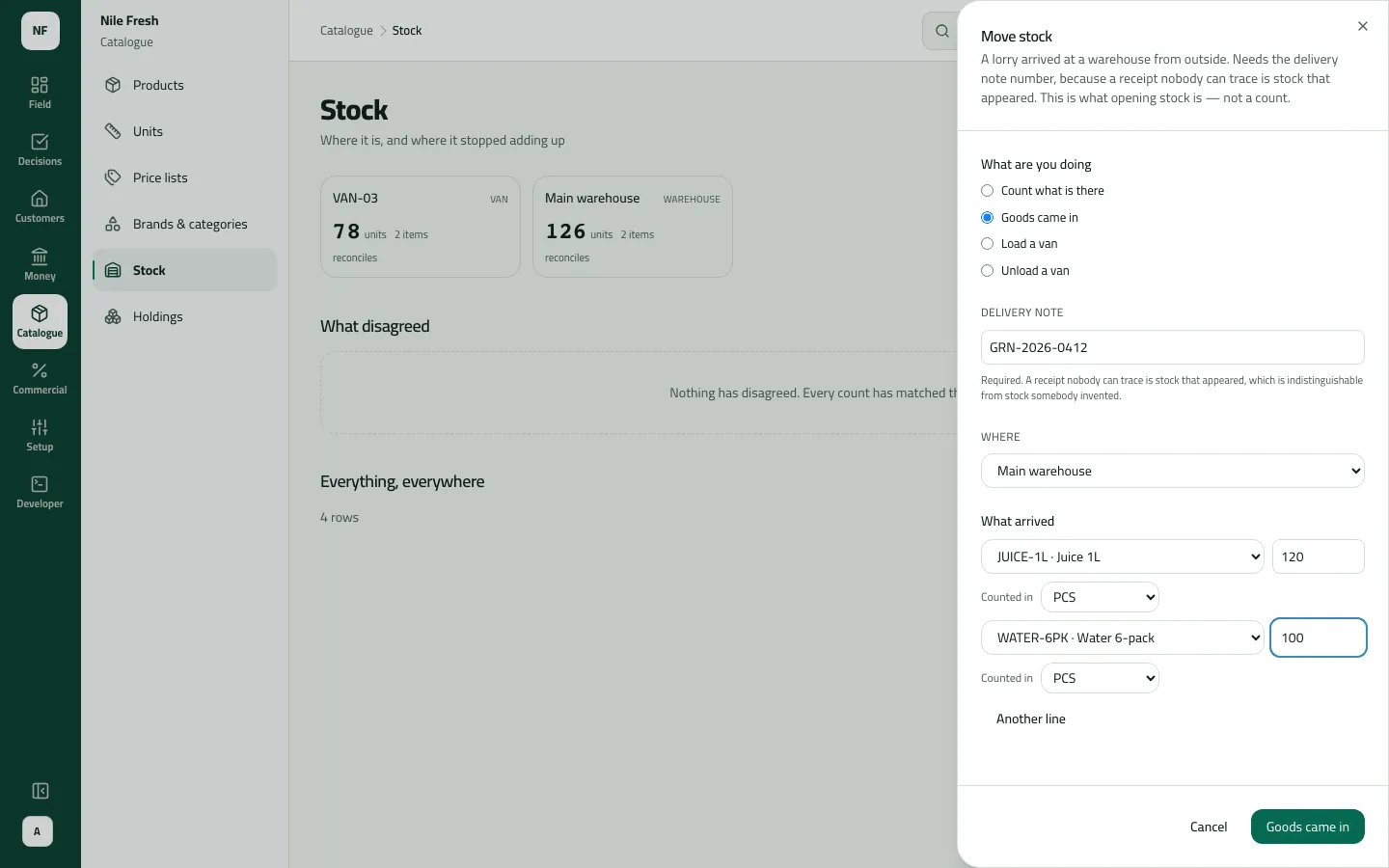
- Delivery note
- The lines
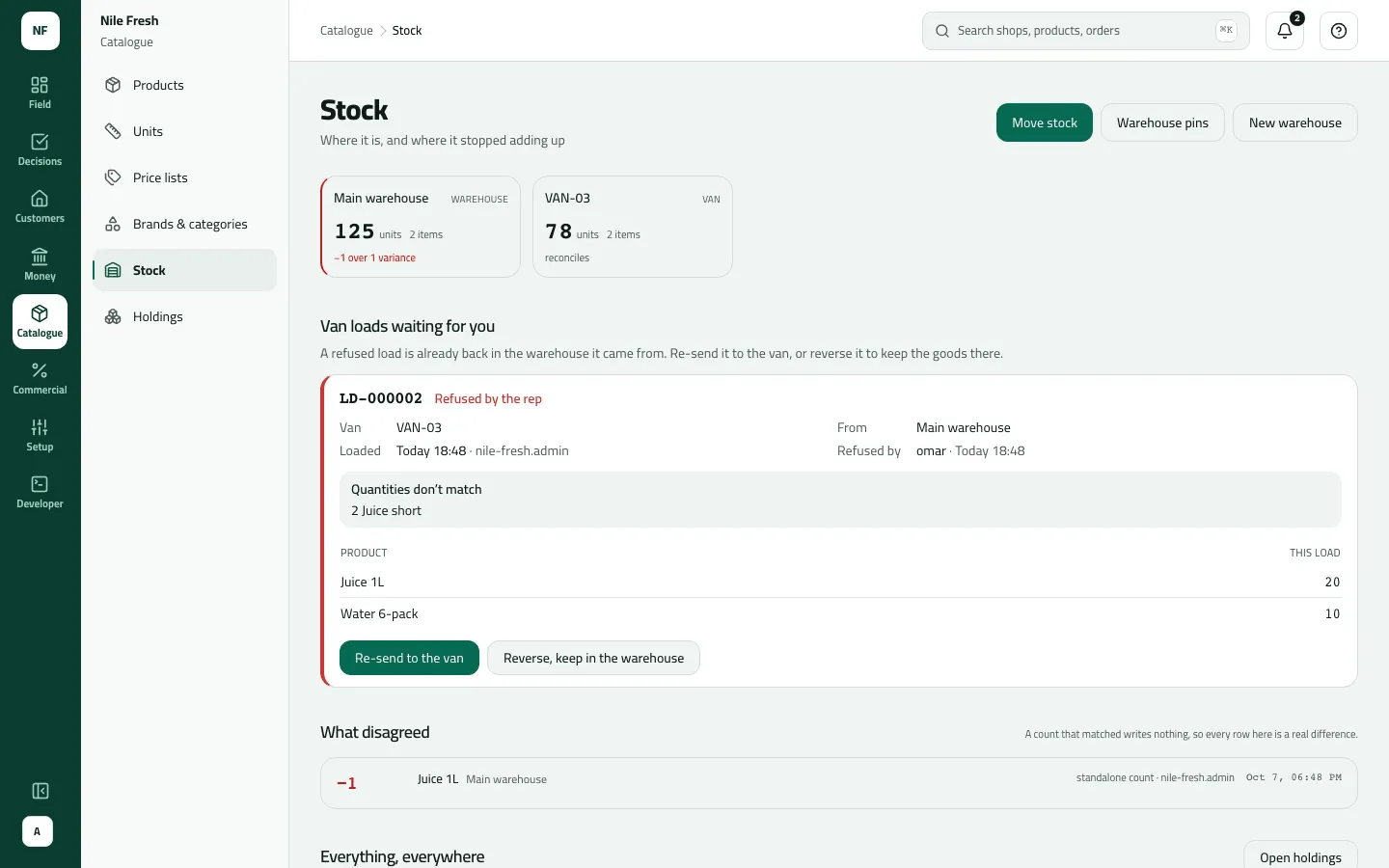
- What disagreed
Example
Section titled “Example”The Nile Fresh day starts at the main warehouse:
Goods arrive at the main warehouse: 120 Juice 1L and 100 Water 6-pack (supplier note GRN-2026-0412).
Goods received GRN-2026-0412 — numbered by: typed by the storekeeper
| Item | Before | After | Change |
|---|---|---|---|
| Main warehouse · Juice 1L | 0 PCS | 120 PCS | +120 |
| Main warehouse · Water 6-pack | 0 PCS | 100 PCS | +100 |
Suppose that evening the storekeeper counts Juice 1L at MAIN and finds 65 bottles where the ledger says 66. The count writes one line, “−1 Count difference”, and it appears at the top of What disagreed. A count that had matched would write nothing.
Suppose also that a crushed bottle came back from a shop into MAIN’s held-back place. The storekeeper presses Write off, enters 1 Juice 1L and writes “Crushed bottle”.
What happens next
Section titled “What happens next”- Stock: goods in add to the warehouse at once; a count changes only the products that differed; a write-off removes goods from the held-back place. Every figure is in pieces, the product’s base unit.
- Documents: none is numbered. Goods in carries the delivery-note number you typed; a write-off carries its reason. Both show on Movements.
- Who sees it: count differences show in What disagreed (the latest 25). Everything is in the audit trail (“Goods came in”, “Counted stock”, “Wrote stock off”).
- Phones: a rep’s van figures change only if you counted the van; the phone gets the new figures at its next sync.
- ERP: nothing is sent.
If something goes wrong
Section titled “If something goes wrong”| What you see | What to do |
|---|---|
VAN-03 is not a warehouse. Goods come in at a warehouse and are loaded onto a van from there. | Goods in goes to a warehouse. To put stock on a van, receive it at the warehouse, then load the van. |
Required. A receipt nobody can trace is stock that appeared… | Type the delivery note number from the supplier's paper. |
This product is tracked by lot. Choose its lot on that line, or type a new one. BATCH_REQUIRED | Pick the lot on that line, or type a new lot code with its expiry. |
That lot is not one of this product's here. Choose it again. UNKNOWN_BATCH | Choose the lot again from the list. |
This product is not tracked by lot. Leave its lot empty. NOT_TRACKED | This product isn't tracked by lot. Leave the lot empty. |
This product is tracked by serial number, which this screen cannot move. Record it from the phone. SERIAL_TRACKED | Serial-numbered products can't be moved from the console. |
That product isn't kept in that unit. Choose one of its units, or enter the quantity in its base unit. UNIT_NOT_OF_PRODUCT | Choose one of the product's own units. |
Add a reason, then send again. REASON_REQUIRED | A write-off needs a reason. Type it under Why. |
MAIN holds saleable stock. Count it instead of writing it off. | Only held-back (quarantine) goods can be written off. Goods that are fine are counted instead. |