

Approve or decline a held return
When your company sets return ceilings and asks for approval over them, a return that goes over waits here. Until someone approves it, nothing is credited and no stock moves. Who: supervisor · Where in the cycle: Approve.
Before you start
Section titled “Before you start”- Approve orders (ORDER_APPROVE) opens the tab and approves; Decline orders (ORDER_DECLINE) declines. Your approval limit applies to the return’s credit.
- The ceilings are set on Decisions › Returns (See a customer’s returns and set ceilings). Under Block, a return over a ceiling is refused at once and never comes here.
- Open Decisions › Approvals and the Returns tab, or press Returns to approve in the bell or on the dashboard.
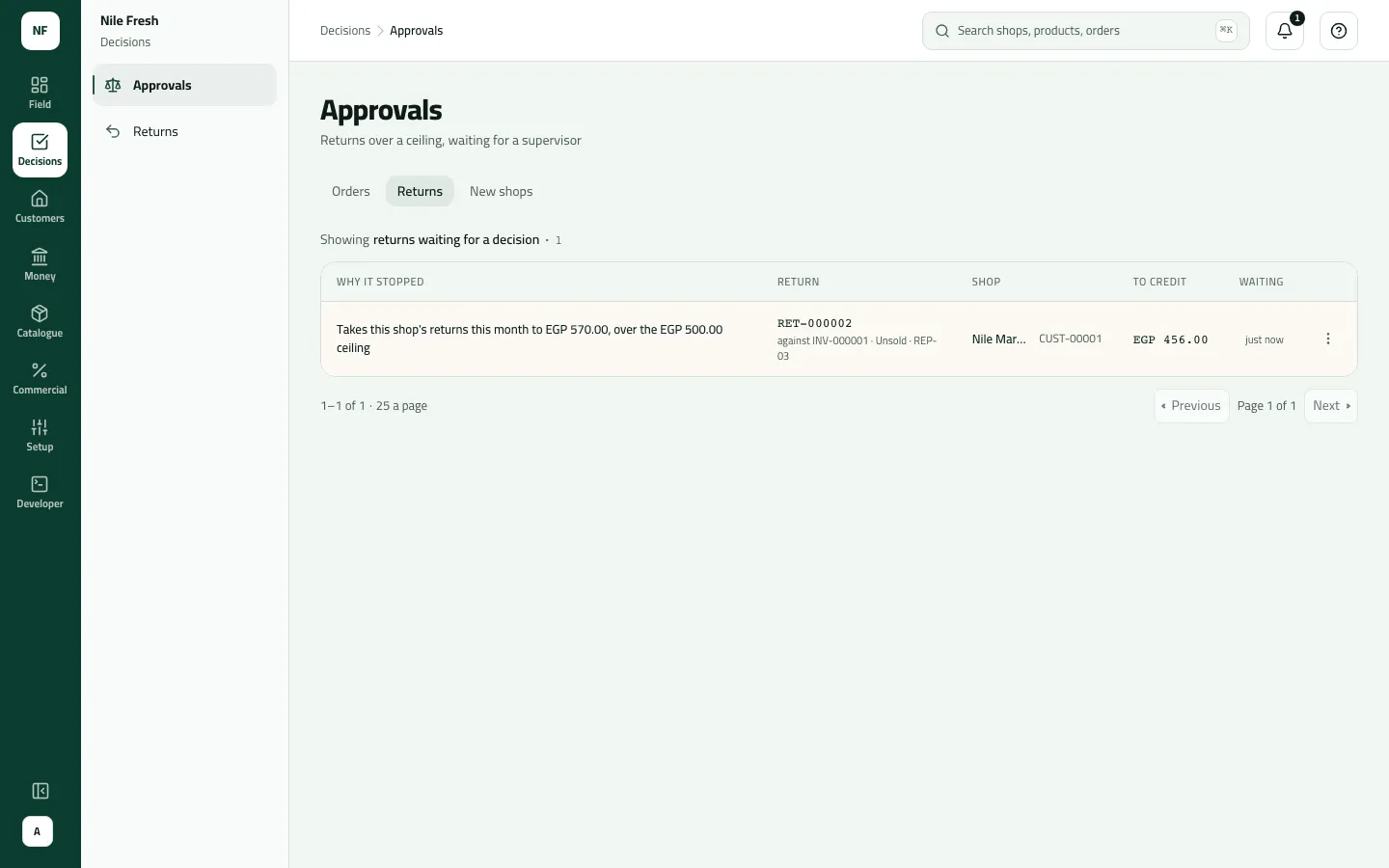
- Read the row: Why it stopped, Return (its RET number, the invoice it is against, the reason and the rep), Shop, To credit (with VAT) and Waiting. The oldest is first.
- In the row’s menu choose Approve (“Credits the shop and takes the goods into stock”) — or Decline, type the Reason and press Decline return.
- Why it stopped
- To credit
Example
Section titled “Example”Suppose Nile Fresh sets a monthly ceiling of EGP 500.00 with Needs approval. Nile Market has already returned 114.00 this month (RET-000001). The next day Omar takes back 4 unsold Juice 1L against INV-000001 — 4 × 100.00 + 14 % = 456.00. That would take the month to 570.00, so the return is numbered RET-000002 and waits:
Takes this shop’s returns this month to EGP 570.00, over the EGP 500.00 ceiling
Sara presses Approve. The notice says “RET-000002: Approved — the shop is credited”. Nile Market is credited 456.00 and the 4 bottles go back onto VAN-03.
What happens next
Section titled “What happens next”- While it waits: the return has its RET number, but no credit note and no stock movement. The goods stay set aside on the van, counted by nobody. The waiting return still counts towards the ceilings.
- Approve: the credit note is posted (it carries the RET number), what the customer owes goes down, unsold goods go back into stock and damaged or expired ones into the held-back place. The ERP can read the credit note from then on.
- Decline: nothing is credited and the goods go back to the shop. The RET number stays used, with no credit behind it.
- The rep: sees the decision at the next sync.
- Audit: “Approved a return” / “Declined a return”.
If something goes wrong
Section titled “If something goes wrong”| What you see | What to do |
|---|---|
There's nowhere set up to hold goods that can't be sold again. Ask the office to set one up. NO_QUARANTINE | The place the goods go to has no held-back place for damaged goods. Ask an administrator. |
This order is no longer waiting for approval. Refresh to see what happened to it. NOT_WAITING | Someone already decided this return (the message says order, but it means the return). Refresh. |
You took this yourself, so someone else has to decide it. SELF_APPROVAL | You took this return yourself. Someone else decides it. |
This is above the limit your role allows. Ask someone with a higher limit to do it. LIMIT_EXCEEDED | The credit is over your approval limit. Ask someone with a higher one. |
Add a reason, then send again. REASON_REQUIRED | A decline needs a reason; the rep sees it. |