

Sell from the van
A van sale hands the goods over now and issues the invoice at once. Who: a Seller who sells from a van · Where in the cycle: Sell.
Before you start
Section titled “Before you start”- You are a Seller who sells from a van (Put someone on a round with a van). Without a van every order is booked for delivery (Book an order for delivery).
- You checked in at the shop (Check in at a shop), unless your company lets you sell without a check-in.
- If your company asks you to accept the load before selling, you accepted it (Check your van load).
- The shop has a price list with prices for what you sell.
- In the visit, tap New order. The screen is titled New order with the shop’s name.
- Find a product in Search by name or code and tap +. Each product shows 40 on the van — what is left after this order. Tapping + again on a product already on the order adds one more.
- On each line, set the quantity with − and +, or tap the number: How many? takes up to 99,999; 0 removes the line.
- If the shop’s price list prices more than one unit, pick it on the line: Piece, Pack of 6, Carton of 12. The line shows the price × quantity and 38 left.
- If you may give discounts, type % off on the line (0 to 100). Without that permission the field isn’t shown.
- Read Promotions, if any: “Buy 10 get 1 · 1 free · Juice 1L” or “Saves EGP 20.00 · Water 6-pack”. They are estimates — “Promotions are confirmed when the order is received.”
- Read the summary bar: the total before VAT, and Billed EGP 1,368.00 with VAT — the credit check uses this, with Credit available EGP … or No credit limit.
- Tap Save order. The Provisional invoice opens at once (Share an invoice).
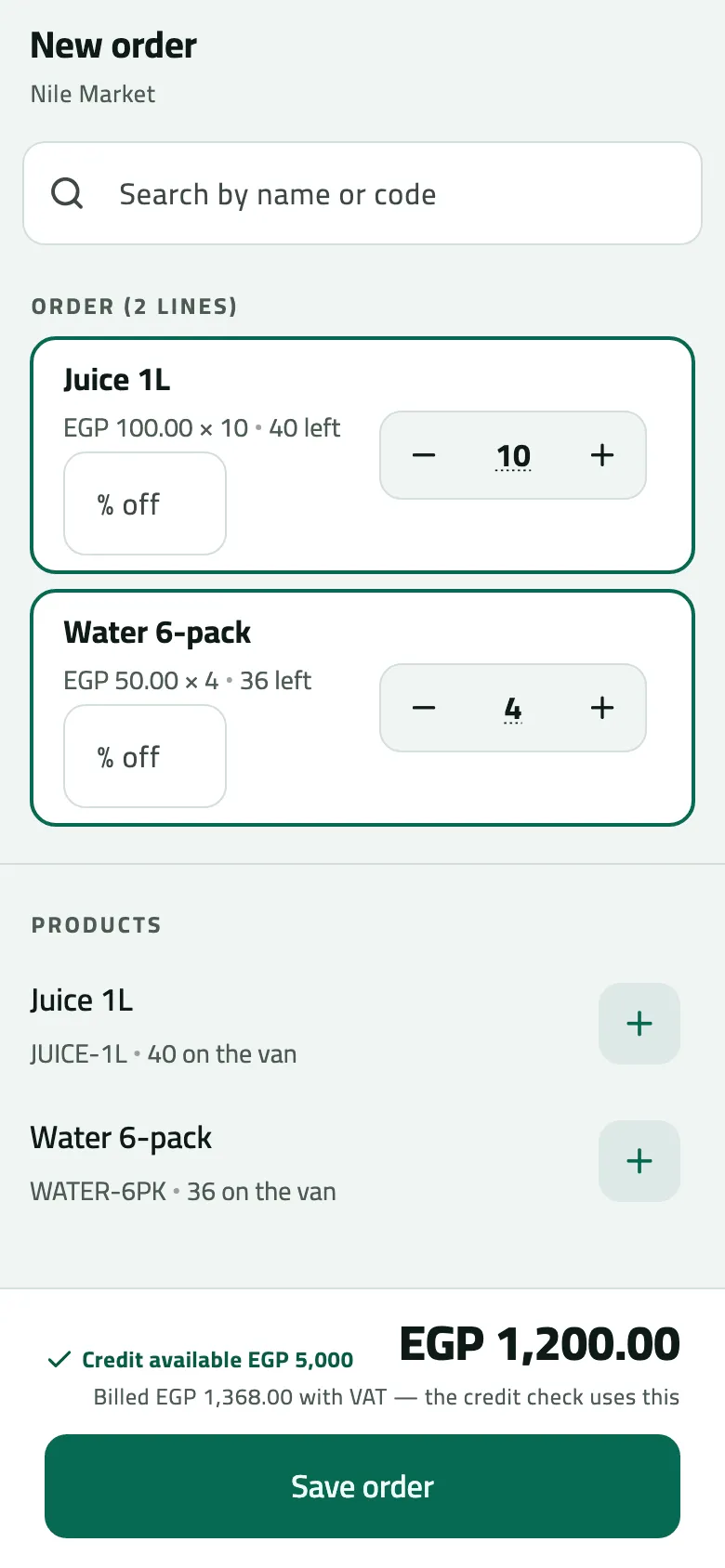
- What is left on the van after this line
- % off: only if your role may give a discount
- Billed with VAT: the credit check uses this
- Save order
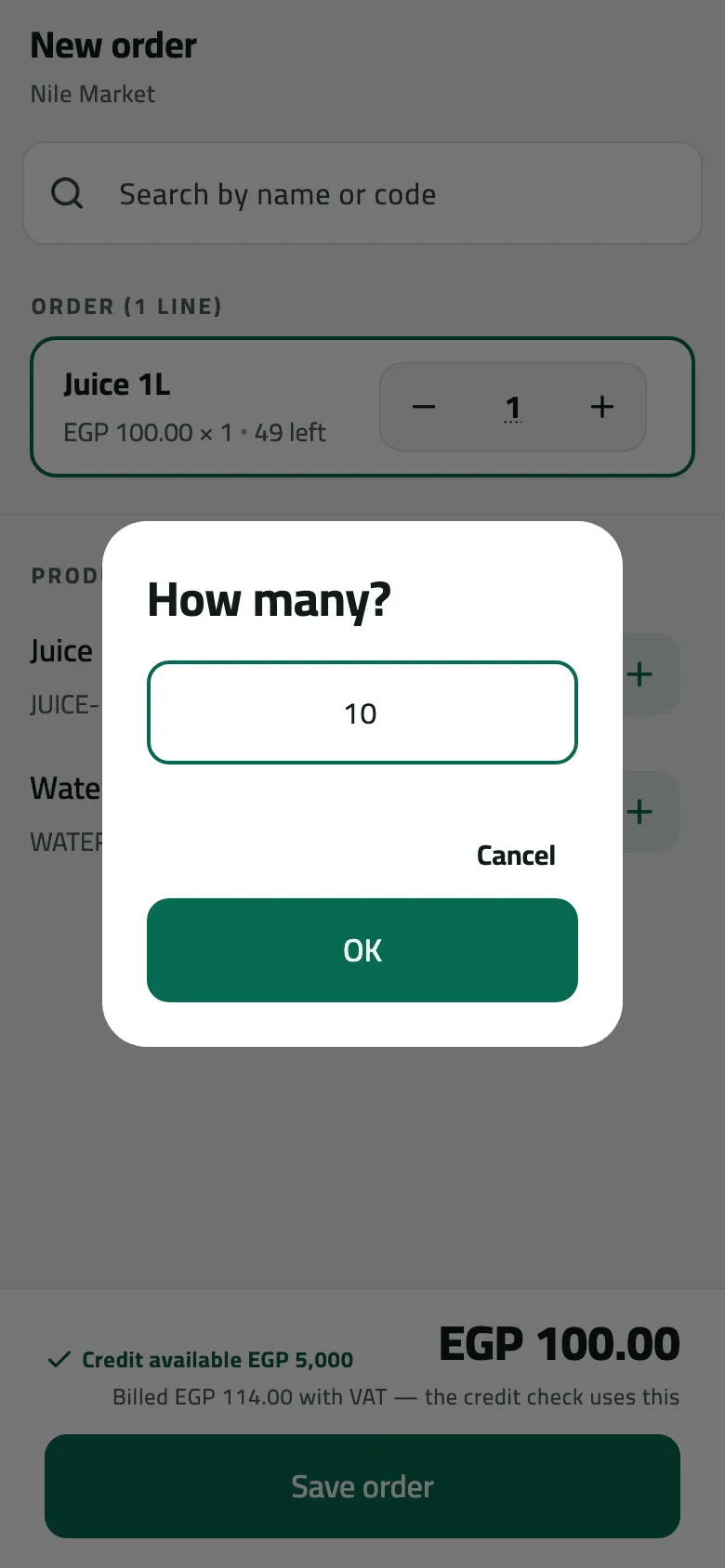
When the van is short
Section titled “When the van is short”If the order asks for more than the van holds, Save order opens The van cannot cover this: “4 Water 6-pack more than the truck holds. Sell what is on the van now and book the rest for delivery?” A table shows Product, From the van and Delivered later.
- Sell now, book the rest — two orders: an invoice for what is on the van, and a booked order for the rest. Saved as two shows both: Invoiced from the van (with View invoice) and Booked for delivery (with View order). Tap Done.
- Change the order — back to the lines.
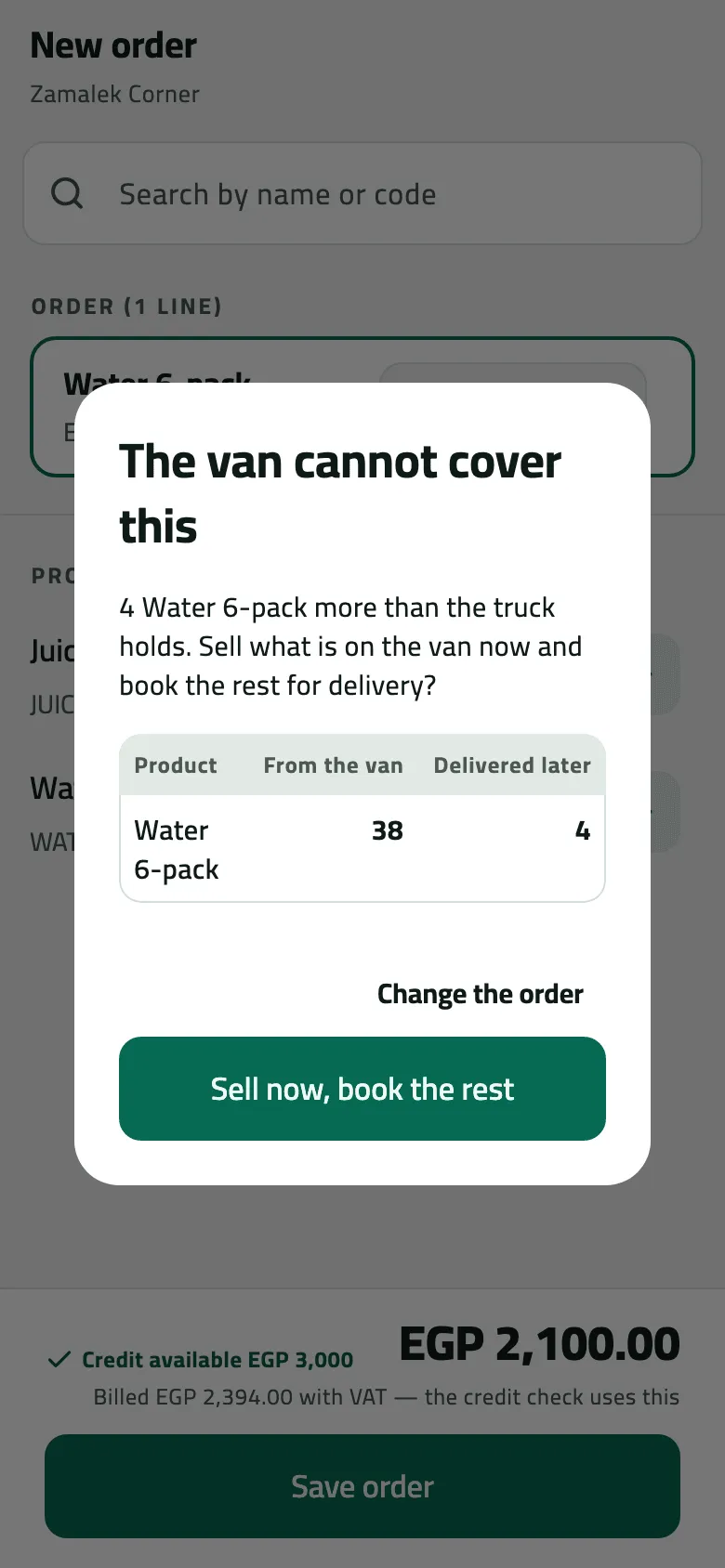
- Sell now, book the rest
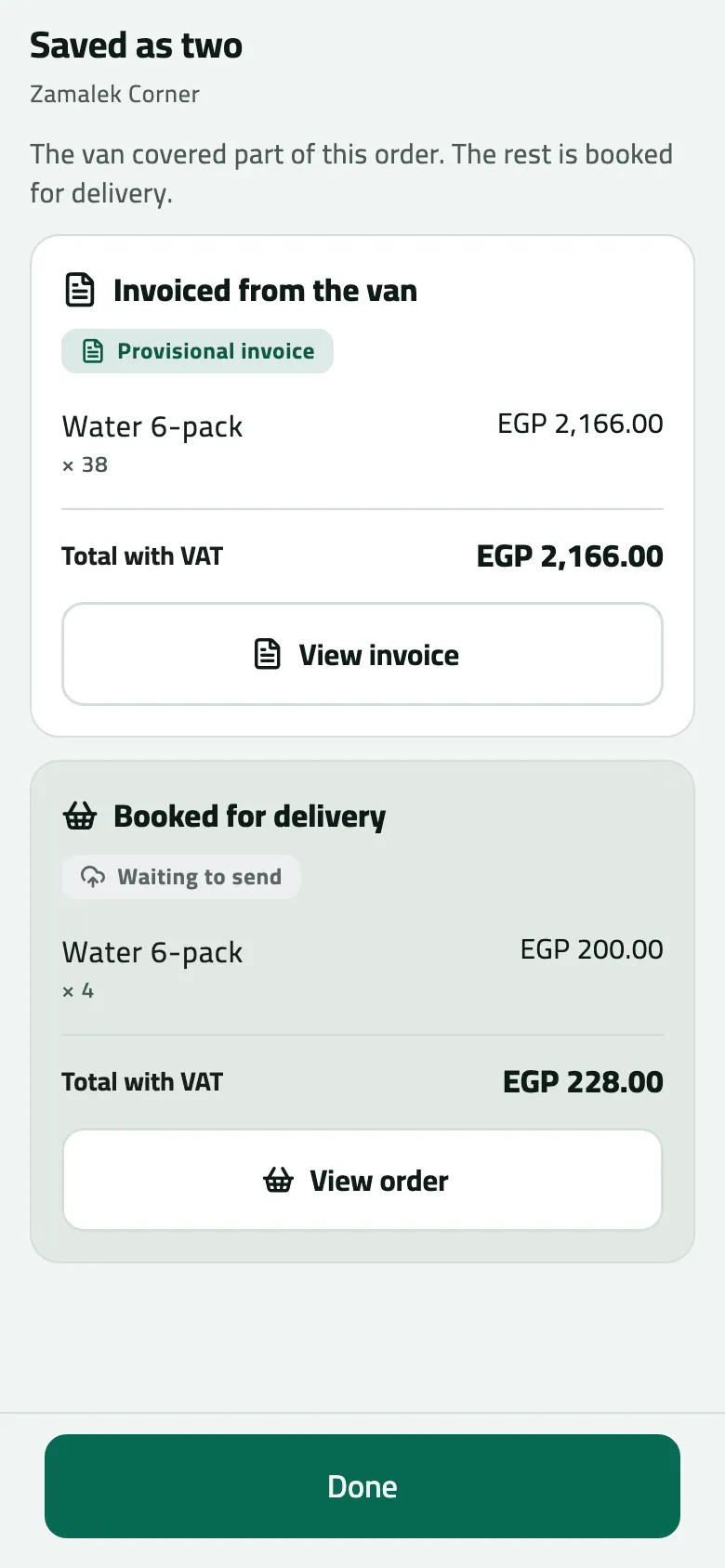
- One sale, two documents
Example
Section titled “Example”At 09:35 Omar sells Nile Market 10 Juice 1L and 4 Water 6-pack from VAN-03. The summary shows EGP 1,200.00 and Billed EGP 1,368.00 with VAT; he taps Save order and the provisional invoice opens. After the sale syncs it is INV-000001.
10 Juice 1L at 100.00 and 4 Water 6-pack at 50.00 from the van. The invoice is issued at once and the van drops by what was sold.
Nile Fresh
INVOICE · INV-000001
- Net
- 1,200.00
- VAT
- 168.00
- 10 PCS Juice 1L × 100.001,000.00
- VAT 14%140.00
- 4 PCS Water 6-pack × 50.00200.00
- VAT 14%28.00
TotalEGP 1,368.00
| Item | Before | After | Change |
|---|---|---|---|
| VAN-03 · Juice 1L | 50 PCS | 40 PCS | −10 |
| VAN-03 · Water 6-pack | 40 PCS | 36 PCS | −4 |
| Nile Market owes | 0.00 EGP | 1,368.00 EGP | +1,368.00 |
- The shopkeeper gets the invoice as a shared PDF; the phone does not print.
Suppose instead Zamalek Corner (credit limit 3,000.00) wants 42 Water 6-pack while 38 are on the van. Sell now, book the rest invoices 38 from the van — 1,900.00 + VAT 266.00 = 2,166.00 — and books 4 for delivery, 200.00 + VAT 28.00 = 228.00.
How the credit check works
Section titled “How the credit check works”The phone checks the order against the shop’s credit before you save, even offline: the credit limit, minus what the shop owes, minus its orders still open — judged on the total with VAT. What happens over the limit is your company’s rule:
- Block — Exceeds credit by EGP 156.00 and Save order stays grey. Collect a payment first, or sell less.
- Allow — saved as usual.
- Needs approval — Over credit — waits for approval. A van sale can’t wait, so the whole order is booked for delivery instead (Book an order for delivery).
What happens next
Section titled “What happens next”- On the phone: a provisional invoice at once; the van figure on New order drops at once.
- At the next sync: the office prices the order again, applies the promotions, takes the goods off your van and issues the invoice (INV-). The shop owes the total with VAT.
- The office sees it on Orders and Invoices.
If something goes wrong
Section titled “If something goes wrong”| What you see | What to do |
|---|---|
No price for Juice 1L | The shop's price list has no price for it. Ask the office to add one, then sync. |
Save order is grey | The order is empty, a % off is outside 0–100, or it is over the credit limit and your company blocks it. |
Van selling waits for the load | Accept the load first (Check the load). Until then the order is booked for delivery. |
Your van doesn't have enough of a product. Lower the quantity. INSUFFICIENT_VAN_STOCK | The van had less than the phone thought. Open the order on Orders, tap Fix and resend with less. |
This order goes over the shop's credit limit. Collect a payment first, or take a smaller order. CREDIT_LIMIT_EXCEEDED | The shop's balance changed since your last sync. Collect a payment, or take a smaller order. |
Van sales can't wait for approval. Lower the discount, or send it as an order for delivery so your supervisor can approve it in Approvals. APPROVAL_NEEDS_A_WAIT | Your discount is above your allowance. Lower it, or let the order be booked for delivery. |
You can't give discounts. Remove the discount and send again. DISCOUNT_NOT_PERMITTED | Remove the discount and send again. |
Your company sells only inside a visit. Check in at the shop, then take it again. CHECK_IN_REQUIRED | Check in at the shop, then take the order again. |
This shop is on hold. Ask your supervisor before selling. CUSTOMER_BLOCKED | The office put the shop on hold. Ask your supervisor. |
Your company asks you to accept the van load before selling from the van. Check the load, or book the order for delivery. LOAD_NOT_ACCEPTED | Check the load, or book the order for delivery. |
A product has no price today. Remove it or ask the office to set a price. NO_VALID_PRICE | A price ended. Remove the product or ask the office to set a price. |
A refused order comes back first on Orders, in red with the reason and Fix (Follow your orders). Nothing was taken off the van.