

Set and track targets
A target is a number for one rep, route, customer or product over a period. Commercial › Targets sets them and shows how each is doing against where today should be. Who: supervisor · Where in the cycle: across the whole day.
Before you start
Section titled “Before you start”- See reports (REPORT_VIEW) opens the list. Set targets (TARGET_MANAGE) shows Set a target and the row menu. The built-in Supervisor has both, for her team.
- What a target counts:
- Order value delivered, with VAT — the invoices issued in the period, VAT included. An order counts once it is delivered and invoiced, not when it is taken. Returns aren’t taken off.
- Orders — orders invoiced in the period.
- Visits — check-ins in the period.
- Strike rate — visits that ended in an order, as a %. Products can only have Order value delivered, with VAT or Orders.
- Open Commercial › Targets. It opens on Reps and this month.
- Change the sentence (“Showing targets measured on … over … at …”) to see routes, customers or products, another period, or only those Behind pace, Short or Met.
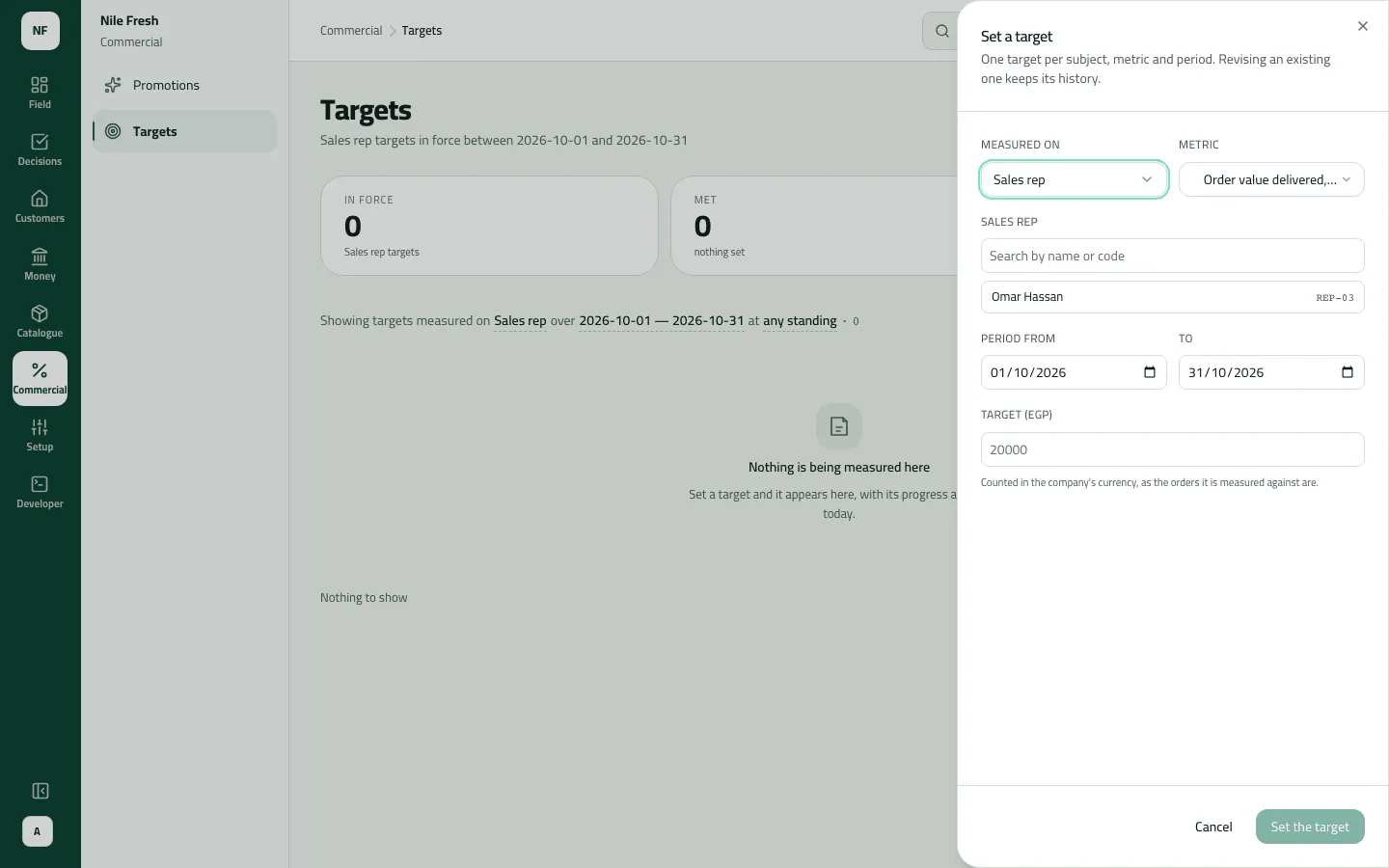
- Press Set a target.
- Measured on: Sales rep, Route, Outlet or Product. Pick the Metric and who or what it is for.
- Set Period from and To, and the Target (Target (%) for a strike rate).
- Press Set the target. The notice says “Set the … target for …”.
- To change one, use Revise in its row menu; to stop one, Withdraw.
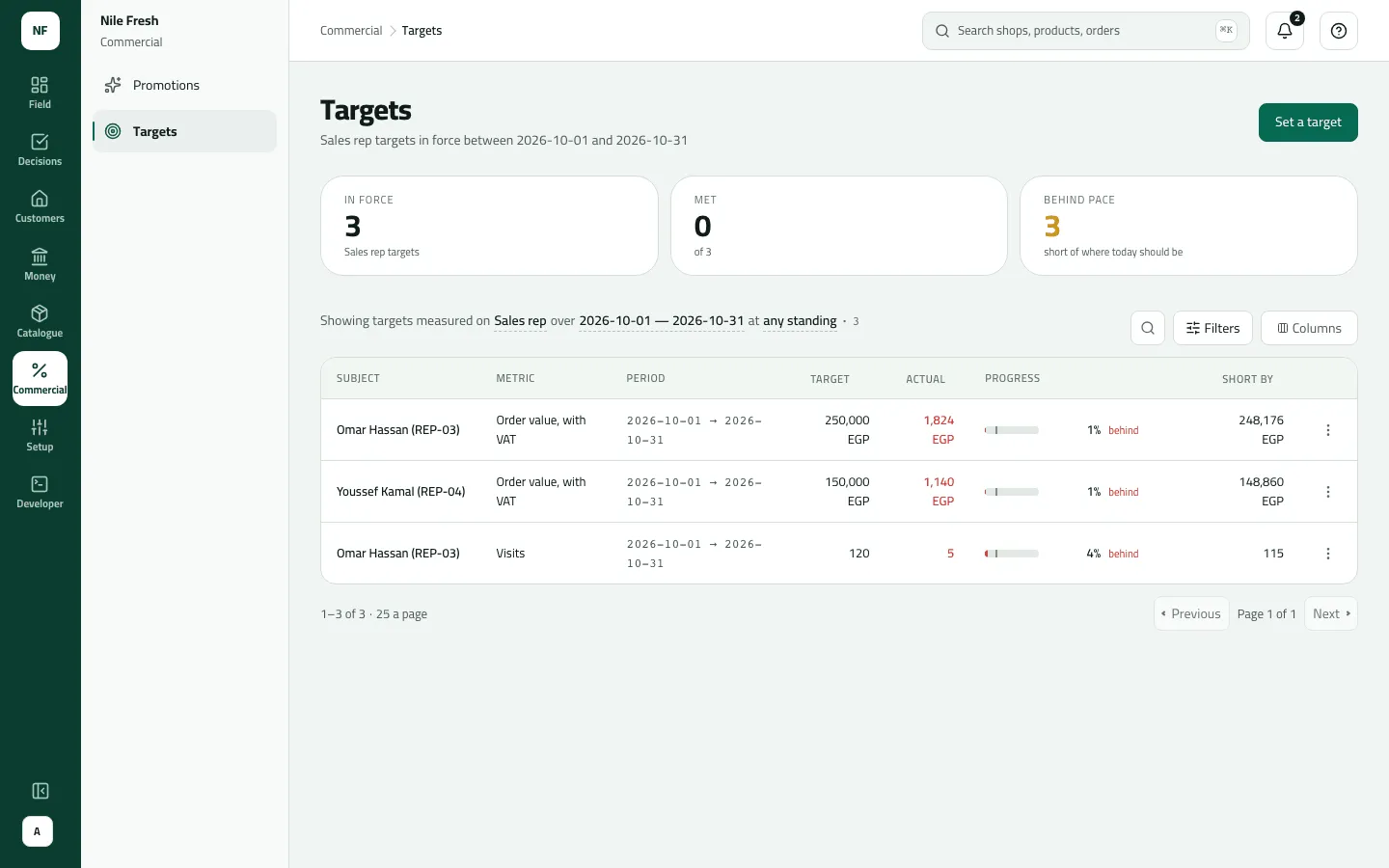
- Progress, with a notch for today
- Short by
Each row shows Target, Actual, Progress (a bar with a notch for today, the %, and ahead, on course or behind) and Short by.
Example
Section titled “Example”Suppose Sara gives Omar an Order value delivered, with VAT target of 250,000 EGP for 1–31 October. On 7 October his invoices come to 40,000 EGP with VAT: 16 % achieved, while 19.4 % of the month has gone. The row reads behind, Short by 210,000.
What happens next
Section titled “What happens next”- Omar sees his own targets in My targets on the phone; they refresh at each sync.
- Actuals are worked out from invoices and visits each time you open the list; nothing is stored but the target.
- Audit: “Set a target” / “Withdrew a target”.
If something goes wrong
Section titled “If something goes wrong”| What you see | What to do |
|---|---|
There is already a target for this, on the same measure and period. Revise that one instead. TARGET_EXISTS | There's already a target for this, on the same measure and period. Revise that one. |
Choose who or what this target is for from the list. Only those you look after can be chosen. TARGET_SUBJECT_UNKNOWN | Pick from the list: only reps, routes and customers you look after are offered. |
A money target is counted in the company's currency. Leave the currency as it is. TARGET_CURRENCY | Money targets are in the company's currency. |
A date can't be read. Write it as yyyy-mm-dd, for example 2026-10-10. INVALID_DATE | Pick the dates from the date fields. |
A target I set isn't listed | The list starts on Reps and this month. Change the sentence to its subject and period. |
Order value hasn't moved, though Omar sold today | Booked orders count once they are delivered and invoiced. Van sales count at once. |