

Find and reprint an invoice
Invoices are never typed in. Slflo issues one when goods change hands: at a van sale, or when the office delivers a booked order. This screen finds them and prints them again. Who: office · Where in the cycle: Sell.
Before you start
Section titled “Before you start”- See reports (REPORT_VIEW) opens Money › Invoices and each invoice, for the customers your reach covers.
- The two tax-authority buttons need Invoice orders (ORDER_INVOICE); see Send invoices to the tax authority.
- Open Money › Invoices. The newest is first.
- Search by invoice number, order number or the customer’s code (not its name).
- Read the row: Invoice, Issued, Outlet, From (the delivery, or the order followed by “· van sale”), VAT, Total, Still owed (“paid” when nothing is) and Tax authority.
- Open an invoice to see the paper: the lines, Subtotal, VAT, Total due, and the tax authority’s state above it.
- Press Print. To keep a PDF, choose Save as PDF in your browser’s print window.
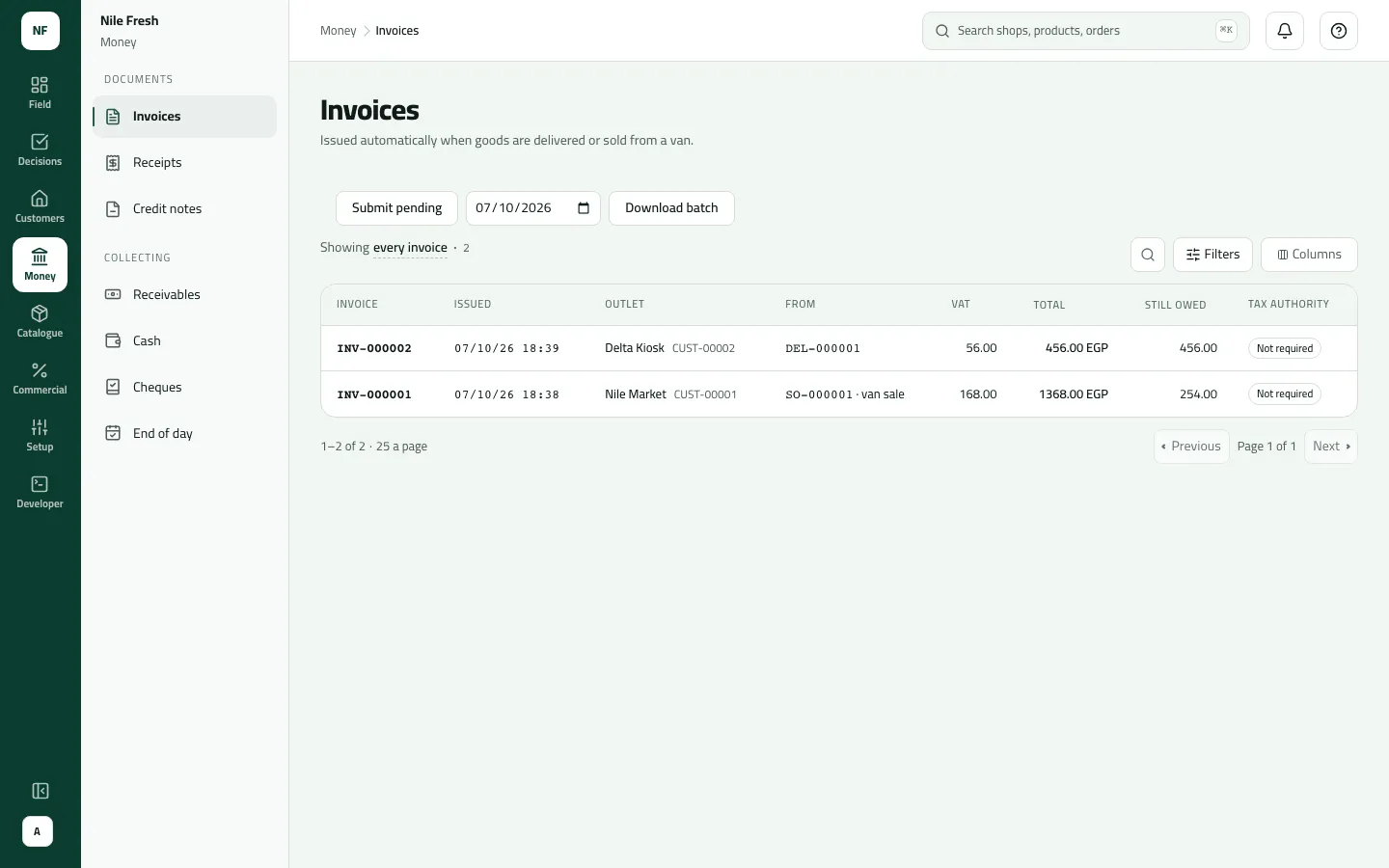
- From
- Still owed
- Tax authority
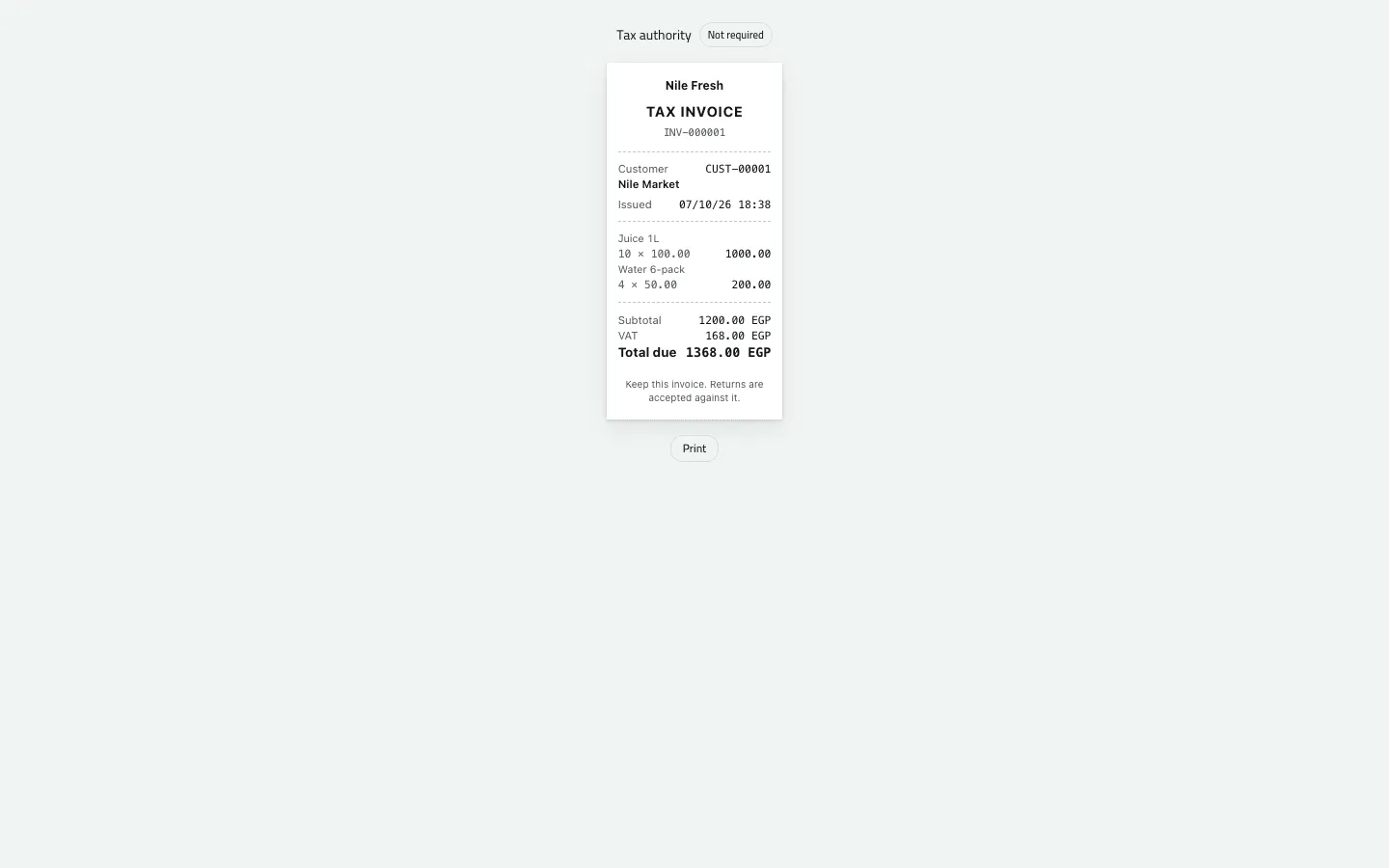
- The lines
- VAT 168.00
Example
Section titled “Example”Omar’s van sale at Nile Market issued the day’s first invoice on the spot:
10 Juice 1L at 100.00 and 4 Water 6-pack at 50.00 from the van. The invoice is issued at once and the van drops by what was sold.
Nile Fresh
INVOICE · INV-000001
- Net
- 1,200.00
- VAT
- 168.00
- 10 PCS Juice 1L × 100.001,000.00
- VAT 14%140.00
- 4 PCS Water 6-pack × 50.00200.00
- VAT 14%28.00
TotalEGP 1,368.00
| Item | Before | After | Change |
|---|---|---|---|
| VAN-03 · Juice 1L | 50 PCS | 40 PCS | −10 |
| VAN-03 · Water 6-pack | 40 PCS | 36 PCS | −4 |
| Nile Market owes | 0.00 EGP | 1,368.00 EGP | +1,368.00 |
- The shopkeeper gets the invoice as a shared PDF; the phone does not print.
On Invoices that evening:
| Invoice | Outlet | From | VAT | Total | Still owed |
|---|---|---|---|---|---|
| INV-000002 | Delta Kiosk | DEL-000001 | 56.00 | 456.00 | 456.00 |
| INV-000001 | Nile Market | SO-000001 · van sale | 168.00 | 1,368.00 | 254.00 |
INV-000001’s 254.00 is what is left after 700.00 cash, the 300.00 cheque and the 114.00 credit note. The paper reads 10 × 100.00 = 1,000.00; 4 × 50.00 = 200.00; Subtotal 1,200.00; VAT 168.00; Total due 1,368.00.
What happens next
Section titled “What happens next”- An invoice can’t be cancelled or edited. A correction is a return, which makes a credit note (Record a return at the counter).
- Still owed falls as payments, credit notes and money on account are set against it.
- ERP: your ERP reads every invoice from the invoice feed, by its sequence number.
- Phones: the rep shares the van-sale invoice as a PDF from the phone; the phone doesn’t print. Any invoice can be printed from here.
If something goes wrong
Section titled “If something goes wrong”| What you see | What to do |
|---|---|
A van sale's invoice isn't listed yet | It appears after the rep's phone syncs. |
Still owed dropped, but nobody paid | A credit note or money on account was set against it automatically. The customer's statement shows which. |
That invoice could not be found. | Also shown when the customer is outside your reach. Ask someone who reaches it. |
Searching a shop's name finds nothing | Search by the customer's code, the invoice number or the order number. |
There is no date filter yet: sort by Issued, or search.