

Fix work the office did not accept
The office checks everything your phone sends against your company’s rules. What it refuses comes back with a reason. Orders and payments show their refusal where they live; everything else gathers under one red banner on Today. Who: rep · Where in the cycle: any stage.
Where a refusal shows
Section titled “Where a refusal shows”| What was refused | Where you see it | What you can do |
|---|---|---|
| An order | Orders, first, in red | Fix and resend, or Discard (Follow your orders) |
| A payment | The shop, in red | Record again, or Dismiss (Collect a payment) |
| A shop you proposed | Shops, as Declined | Remove from my list |
| A return, a load check or refusal, a skipped stop, a shelf check, the start or end of your day | The red banner on Today | Read the reason; talk to the office or do it again |
- On Today, tap Review on 2 items the office did not accept.
- Not accepted by the office lists each item — End of day, Start of day, Van load count, Refusing the van load, Shelf check, Goods taken back, A skipped stop or Other work — with the reason in your language.
- Do what the reason says: call the office, start the day again, check the load again.
- Tap Dismiss on each item you have dealt with.
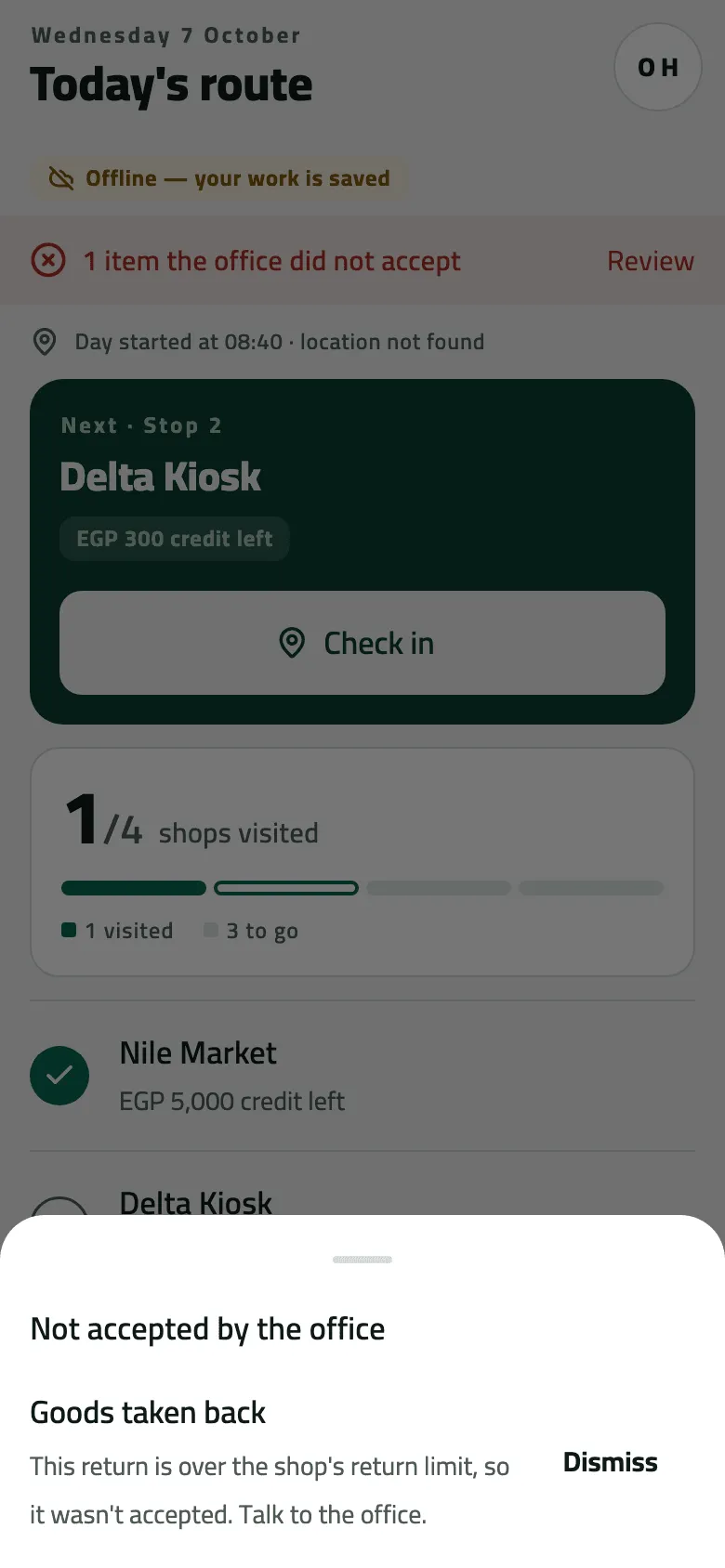
- What the office refused, and why
When the office refuses something, the phone undoes its own change: a refused skip opens the stop again, a refused start brings back Start your day, a refused load check asks for the load again, and a refused end of day reopens the round — “Your round is open again.” — unless the office had already signed the day off.
Example
Section titled “Example”Suppose Nile Market’s returns are capped at 500.00 a month and Omar takes back goods worth more. Nile Fresh refuses returns over the cap, so after the sync Today shows 1 item the office did not accept. Goods taken back reads “This return is over the shop’s return limit, so it wasn’t accepted. Talk to the office.” Omar calls the office, then taps Dismiss.
If something goes wrong
Section titled “If something goes wrong”| What you see | What to do |
|---|---|
This return is over the shop's return limit, so it wasn't accepted. Talk to the office. RETURN_REFUSED | Talk to the office. You can't record the return again from the phone. |
The office already signed this day off, so it is closed as it stood then. Anything you did after it counts on your next day. DAY_SIGNED_OFF | The office signed the day off already. Anything you did after counts on your next day. |
That day is more than a week ago; the office has already closed it. DAY_TOO_OLD | Nothing to do; the office closed that day. |
That stop is no longer on your round. Pull down to refresh. STOP_NOT_FOUND | Pull down on Today; the stop left your round. |
Some of this load has already been sold from the van, so it can't be refused. Tell the office. LOAD_PARTLY_SOLD | Tell the office what is wrong with the load. |
The app needs an update to send this. Update the app. UNKNOWN_OPERATION | Update the app, then sync again. |