

Copy a price list at +5 % from a date
Suppose Nile Fresh wants a second price list for its bigger shops, 5 % above RETAIL, from 1 November. This example builds the list in one step, moves a shop onto it, and follows the first order at the new price. Who: administrator · Where in the cycle: Set up.
Before you start
Section titled “Before you start”- Manage products and prices (CATALOG_MANAGE) to make lists and copy prices; Add and change customers (CUSTOMER_MANAGE) to give a shop another list.
- The source list exists. Nile Fresh’s RETAIL, in EGP, from 2026-10-01: Juice 1L PCS 100.00 and CTN 1,150.00; Water 6-pack PCS 50.00 (Make price lists and set prices).
- VAT is 14 %, added on top of prices.
The example, step by step
Section titled “The example, step by step”1 · Make the new list — administrator, console
Section titled “1 · Make the new list — administrator, console”Open Catalogue › Price lists and press New price list: Code KEY-ACCOUNTS, Name
Key accounts, Currency EGP. Save. The list is empty: a shop on it has no price yet.
2 · Copy RETAIL into it at +5 %
Section titled “2 · Copy RETAIL into it at +5 %”On KEY-ACCOUNTS’s row choose Prices, then Copy from another list:
- the source list RETAIL (it must be in the same currency);
- Change %
5; - Round to
0.25; - First day
2026-11-01.
Check the three preview lines, then press Copy prices.
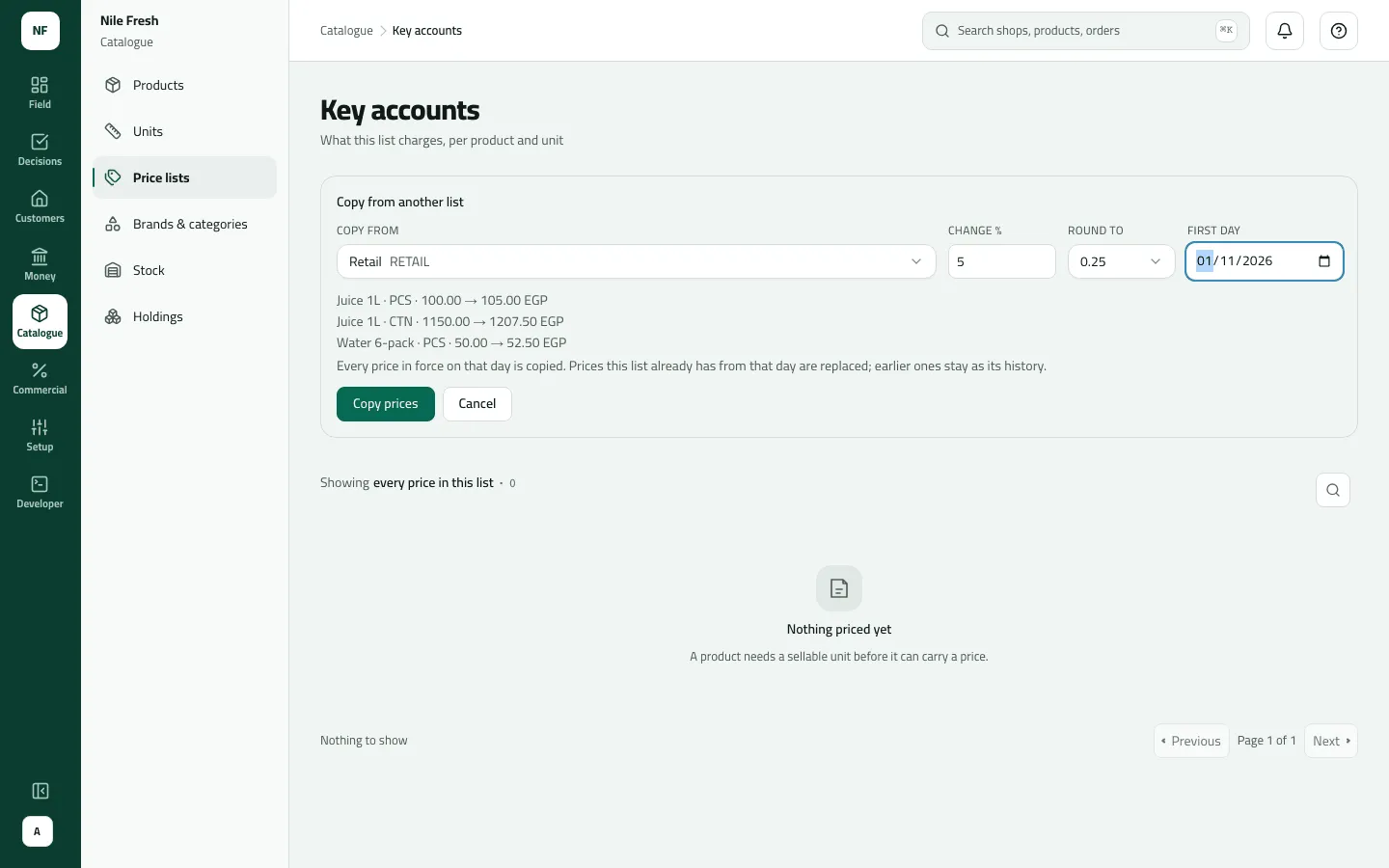
Slflo takes the price RETAIL charges on the first day, multiplies it, rounds it to the nearest step (halves go up) and saves it in KEY-ACCOUNTS from that day, with no last day:
| Product | Unit | RETAIL | × 1.05 | KEY-ACCOUNTS from 1 Nov |
|---|---|---|---|---|
| Juice 1L | PCS | 100.00 | 105.00 | 105.00 |
| Juice 1L | CTN | 1,150.00 | 1,207.50 | 1,207.50 |
| Water 6-pack | PCS | 50.00 | 52.50 | 52.50 |
All three are already multiples of 0.25, so rounding changes nothing here; 101.30 would have become 101.25. Each row on KEY-ACCOUNTS reads Starts 1 Nov. Nothing moves: no stock, no money.
3 · Give Zamalek Corner the new list — administrator, on 1 November
Section titled “3 · Give Zamalek Corner the new list — administrator, on 1 November”On 1 November, open Customers › Outlets, the row menu of Zamalek Corner › Edit, set Price list to KEY-ACCOUNTS and Save.
Do it on the first day, not before. Until 1 November KEY-ACCOUNTS has no price in force, so every
order for a shop already on it is refused with NO_VALID_PRICE. If the shop must move today,
copy with today as the First day instead.
4 · The first order at the new price — Omar, on the phone
Section titled “4 · The first order at the new price — Omar, on the phone”Omar’s phone gets the new list at his next sync. On 1 November he sells Zamalek Corner 10 Juice 1L from VAN-03 (a van sale). The invoice uses the price in force that day on the shop’s list:
Nile Fresh
INVOICE · INV-000003
- Customer
- Zamalek Corner
- Price list
- KEY-ACCOUNTS
- Date
- 1 Nov 2026
- Net
- 1,050.00
- VAT
- 147.00
- 10 PCS Juice 1L × 105.001,050.00
- VAT 14%147.00
TotalEGP 1,197.00
| Item | Before | After | Change |
|---|---|---|---|
| VAN-03 · Juice 1L | 40 PCS | 30 PCS | −10 |
| Zamalek Corner owes | 0.00 EGP | 1,197.00 EGP | +1,197.00 |
On RETAIL the same order would have been 1,000.00 + VAT 140.00 = 1,140.00, so the new list costs Zamalek Corner 57.00 more for these 10 bottles. (Invoice numbers in this example are illustrative.)
Who pays which price, and when
Section titled “Who pays which price, and when”The price is found the same way for every order: the shop’s list (its branch’s own list if it has one), then the price for that product and unit in force on the order’s day, the latest first day winning.
| Shop and day | The shop’s list | Juice 1L PCS | Why |
|---|---|---|---|
| Nile Market, 31 October or 1 November | RETAIL | 100.00 | RETAIL didn’t change |
| A shop moved to KEY-ACCOUNTS on 25 October, ordering on 31 October | KEY-ACCOUNTS | none — refused | Nothing on that list is in force before 1 November |
| Zamalek Corner, 1 November | KEY-ACCOUNTS | 105.00 | The copied price starts that day |
| An order taken on 31 October | whichever it had | keeps its price | Orders already taken keep their price |
To raise RETAIL itself
Section titled “To raise RETAIL itself”A list can’t copy into itself. To put RETAIL up by 5 % from 1 November, open RETAIL’s prices, press Enter as a grid, type 105.00, 1,207.50 and 52.50, set the First day to 2026-11-01 and press Save prices. The old rows show Replaced by a later price from 1 November.
What happens next
Section titled “What happens next”- Phones get KEY-ACCOUNTS’s prices at their next sync.
- Orders and invoices from 1 November use the new prices for shops on the list; orders already taken keep theirs.
- Audit: one line for the whole copy — “Copied 3 prices from ‘RETAIL’ into ‘KEY-ACCOUNTS’ at +5 %, rounded to 0.25, from 2026-11-01”.
- Stock and money: nothing moves until a shop orders.
If something goes wrong
Section titled “If something goes wrong”| What you see | What to do |
|---|---|
A list cannot be copied into itself. Pick another list to copy from. PRICE_COPY_SAME_LIST | You tried to copy RETAIL into RETAIL. Raise its prices with the grid instead. |
That list is in another currency. Copy from a list in the same currency. PRICE_COPY_CURRENCY | Copy only between lists in the same currency. |
That list has no price in force on that day, so there is nothing to copy. PRICE_COPY_NOTHING | RETAIL has no price in force on the first day you chose. Pick a day on which it has prices. |
Round to a step above zero, such as 0.05 or 0.25. PRICE_COPY_STEP | Type a rounding step above zero, such as 0.05 or 0.25. |
The change must be above -100 % and at most 1000 %. PRICE_COPY_PERCENT | Keep the change above −100 % and at most 1,000 %. |
A product has no price today. Remove it or ask the office to set a price. NO_VALID_PRICE | The shop is on a list with nothing in force today. Move it back, or copy with today as the first day. |