

See who owes and open a statement
Money › Receivables lists every customer who owes money (receivables), the oldest debt first, and opens each one’s statement. The screen calls customers outlets, as the Customers › Outlets menu does. Who: office (collections, accounts) · Where in the cycle: Reconcile.
Before you start
Section titled “Before you start”- See customers (CUSTOMER_VIEW) opens the list and statements, for the customers your reach covers. Recording a payment needs Take payments; reversing one needs Reverse payments (Record or reverse a payment).
- A debt opens when an invoice is issued — at a van sale, or when the office delivers an order.
- Open Money › Receivables.
- Read the tiles: Outstanding, Outlets owing, Over their limit and Overdue.
- Read the list: Outlet, Oldest (days since the oldest open item; amber after 14, red after 30), Status (Not yet due, Due, 1–30 days … Over 90 days), Items, Outstanding (⚠ when over the credit limit). Search by code or name.
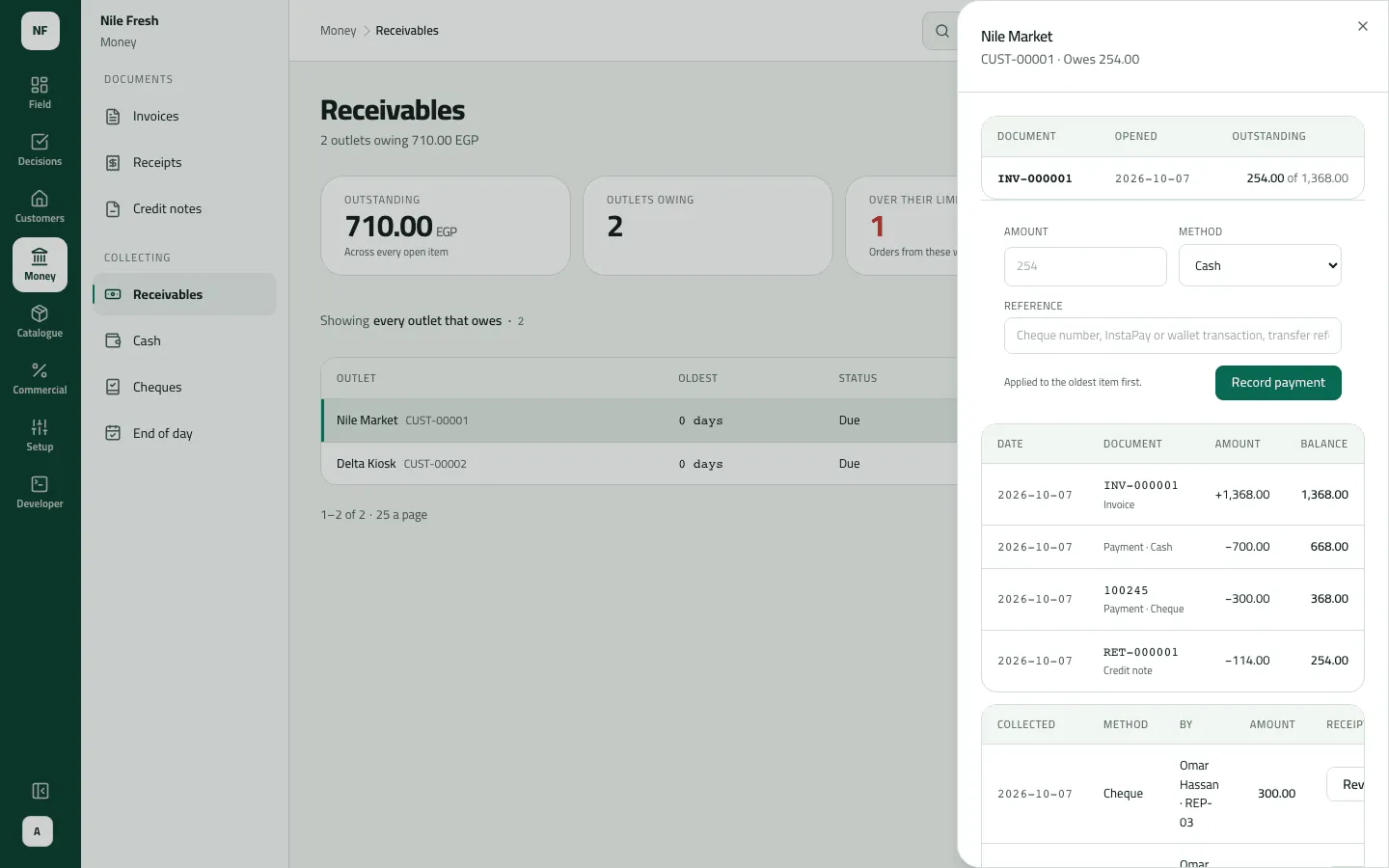
- Click a customer to open the statement panel. From top to bottom:
- the open items — what is still owed, item by item: Document, Opened, Outstanding (“254.00 of 1,368.00” when part-paid);
- the payment form;
- the statement — every invoice, credit note and payment, oldest first: Date, Document, Amount and a running Balance;
- the payments — Collected, Method, By, Amount, and Open under Receipt for its receipt.
- For a customer that owes nothing or is in credit, press Any outlet and search for it.
- Open items
- Payment form
- Statement
Example
Section titled “Example”The next morning at Nile Fresh, Outstanding reads 710.00, Outlets owing 2 and Over their limit 1 — Delta Kiosk, 456.00 on a 300.00 limit. Nile Market’s statement:
Each shop's statement lists its invoices, credit notes and payments; what is still owed is the sum of the open items.
Statement line INV-000001 — shop: Nile Market · amount: 1368.00 · outstanding: 254.00
Statement line RET-000001 — shop: Nile Market · amount: -114.00 · outstanding: 0.00
Statement line INV-000002 — shop: Delta Kiosk · amount: 456.00 · outstanding: 456.00
| Item | Before | After | Change |
|---|---|---|---|
| Nile Market owes | — | 254.00 EGP | — |
| Delta Kiosk owes | — | 456.00 EGP | — |
| Document | Amount | Balance |
|---|---|---|
| INV-000001 · Invoice | +1,368.00 | 1,368.00 |
| Payment · Cash (RC-000001) | −700.00 | 668.00 |
| Payment · Cheque (RC-000002) | −300.00 | 368.00 |
| RET-000001 · Credit note | −114.00 | 254.00 |
The open items show one line: INV-000001, “254.00 of 1,368.00”.
What happens next
Section titled “What happens next”- Nothing changes from the list. Payments and reversals are recorded from the statement panel.
- Customers’ balances on the reps’ phones follow at the next sync.
- Reconciling with your ERP: there is no comparison report. Your ERP reads the invoices, payments and credit notes by their sequence numbers; compare its customer balances with these statements.
If something goes wrong
Section titled “If something goes wrong”| What you see | What to do |
|---|---|
A customer is missing from the list | Only customers who owe more than zero are listed. One in credit or owing nothing is found with Any outlet. |
The tiles don't change when I search | The tiles always cover everyone you reach. |
The statement starts part-way, not at zero | It shows the newest 50 documents and 50 payments, counted back from today's balance. |
What is owed fell, with no payment | A credit note or money on account was set against it. The statement shows which. |
There is no print or export of a statement yet. In Arabic, the Open link on a payment reads مفتوحة; it opens the receipt.