

Start your day and share your location
Some companies ask you to start your day on the phone, so the office knows where and when you began. Some also ask to see where you are while the day is open. Who: rep · Where in the cycle: Visit.
Before you start
Section titled “Before you start”- Your company decides how much of your location it records
(Choose how reps work on the road):
- Check-ins only — there is no Start day card. Skip this page.
- Start and end of day — Start day records one place and time.
- Live during the day — the same, and the phone shares where you are every 5 minutes until you end your day.
- Location is on in the phone.
- On Today, find the dark card BEFORE THE FIRST SHOP · Start your day — “Records where and when you start.” Under the live rule it adds “Location sharing turns on until you end your day.”
- Tap Start day. The card says Finding where you are… while the phone reads its place.
- Under the live rule, the first time on this phone, Share your location during working hours opens first. Read the four promises and tap Allow location — or Not now — the office will see that tracking is off.
- Android asks next. Choose While using the app. On Android 13 or later it also asks to show notifications; allow it, so the sharing notice can stay on.
- The card folds to Day started at 08:40. While sharing is on, the phone shows the notice Sharing your location · Until you end your day · every 5 minutes.
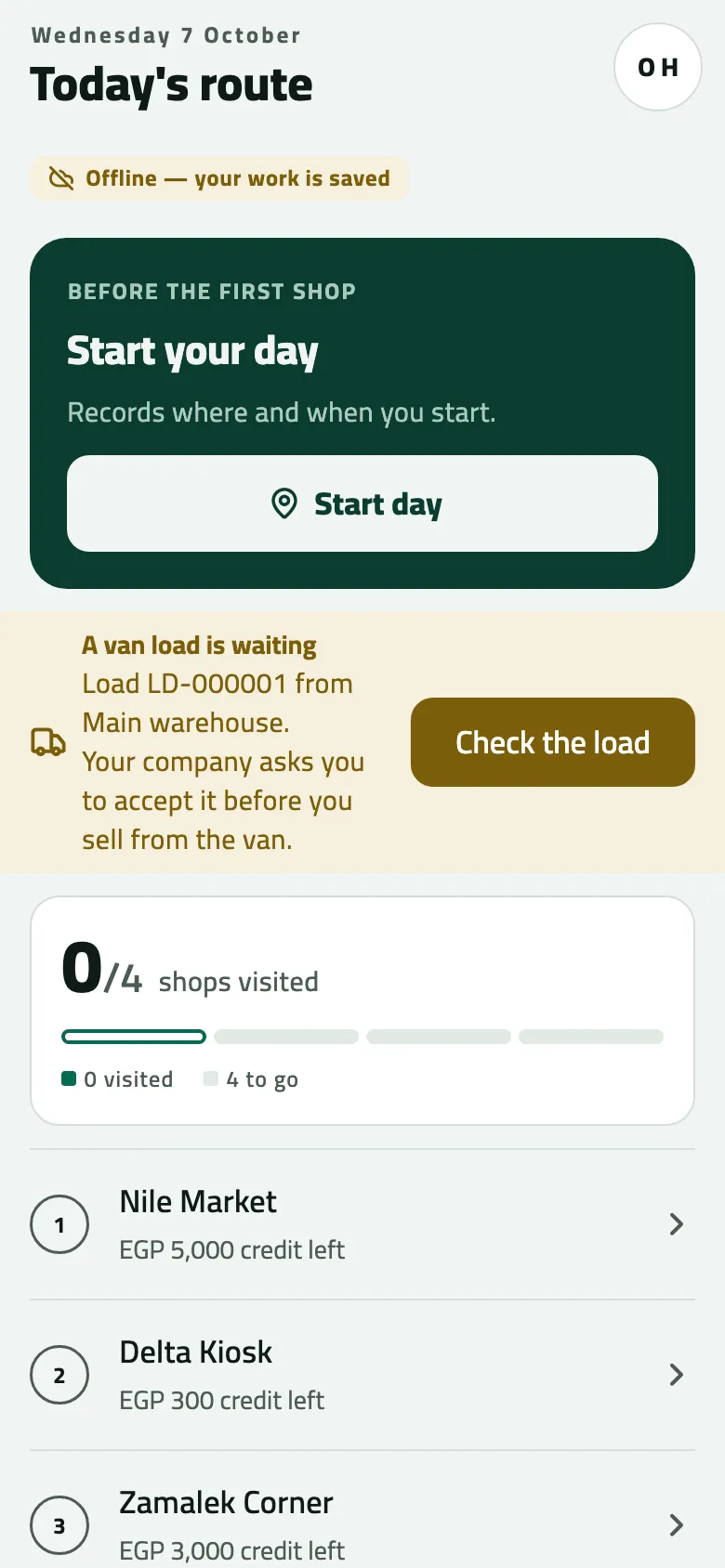
- Sync pill: whether your work has reached the office
- Start your day (it stands in for the next stop until you start)
- A van load is waiting: check it before you sell
- The round: visited and still to go
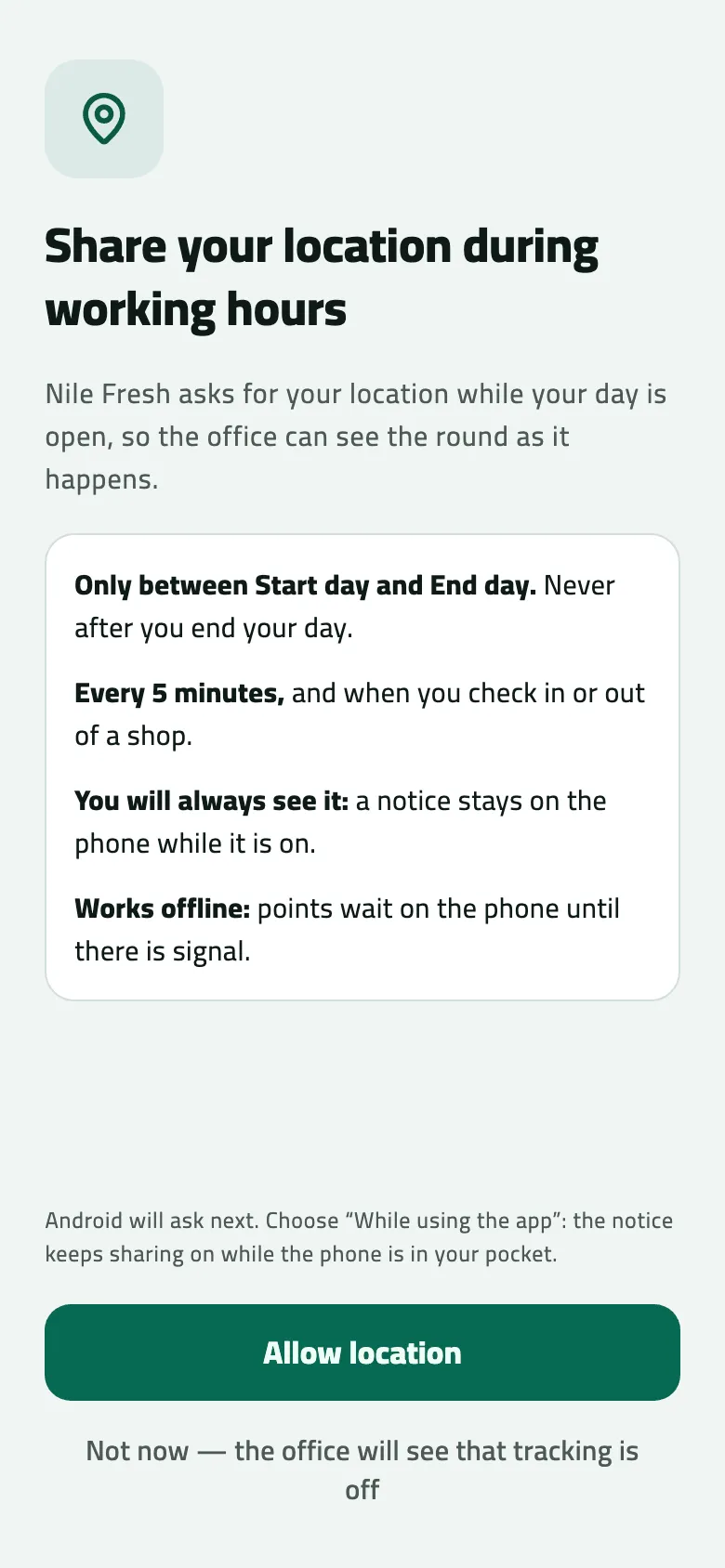
- The four promises: only while your day is open, how often, always visible, works offline
- Allow location
- Not now: the office sees that sharing is off
If you go straight to a shop and check in, the check-in starts the day for you, with the same time and the same questions.
What you agree to
Section titled “What you agree to”The screen’s promises are what the app does:
- Only between Start day and End day. Never after you end your day.
- Every 5 minutes, and when you check in or out of a shop.
- You will always see it: a notice stays on the phone while it is on.
- Works offline: points wait on the phone until there is signal.
The title says “during working hours”; it means while your day is open — from Start day to End day.
Example
Section titled “Example”Nile Fresh records live location. At 08:40 Omar taps Start day, then Allow location, then While using the app. Today reads Day started at 08:40 and the notice says Sharing your location. He checks his van load next (Check your van load).
What happens next
Section titled “What happens next”- The office sees your day’s start on End of day and, under the live rule, your round on the reps’ map, after the phone syncs. Starting the day sends what is waiting.
- Not now: the day still starts. Today shows “Location sharing is off on this phone.” with Share location, and the office sees that tracking is off. Tap Share location to turn it on later.
- Sharing stops at End day, at sign-out, or if your company turns the live rule off.
If something goes wrong
Section titled “If something goes wrong”| What you see | What to do |
|---|---|
Android did not allow location, so sharing is off. You can allow it in the phone's settings. | Open the phone's Settings › Apps › Slflo › Location and choose Allow only while using the app. Then tap Share location on Today. |
Day started at 08:40 · location not found | The phone had no GPS fix. The start is recorded without a place; nothing else to do. |
No Start day card on Today | Your company records check-ins only, or the day was already started. Go to your first shop. |
Start your day keeps coming back | The office did not accept the start. Read the reason in the red banner (Fix work the office did not accept). |
You already ended this day, so it can't start again. Your next day starts tomorrow. DAY_ALREADY_ENDED | You ended this day already. Your next day starts tomorrow. |
That day hasn't started yet. Check the date on your phone. DAY_NOT_STARTED | The phone's date is wrong. Set the phone to the right date and time. |