

Collect a payment
Record every payment the shop makes on the phone, by method, and give the shop the receipt. Who: rep · Where in the cycle: Collect.
Before you start
Section titled “Before you start”- You checked in at the shop (Check in at a shop), unless your company lets you collect without a check-in.
- For anything but cash, have the reference: the cheque number, or the transfer, InstaPay or wallet transaction number.
- In the visit, tap Collect payment. The sheet shows what the shop owes, e.g. Owes EGP 1,368.
- Type the Amount. To take the whole balance, tap the chip All EGP 1,368.00.
- Choose the method: Cash, InstaPay, Wallet, Transfer or Cheque.
- For anything but cash, type the reference — Cheque number, InstaPay transaction number, Wallet number or transaction ID or Transfer reference. It is required.
- For a cheque, add the Bank if you like, and the Date on the cheque — “Leave empty if it can be banked today”.
- Tap Record payment. The sheet turns into Payment recorded with a receipt marked Provisional.
- Tap Share receipt to send the A6 PDF to the shopkeeper (WhatsApp, for example), then Done.
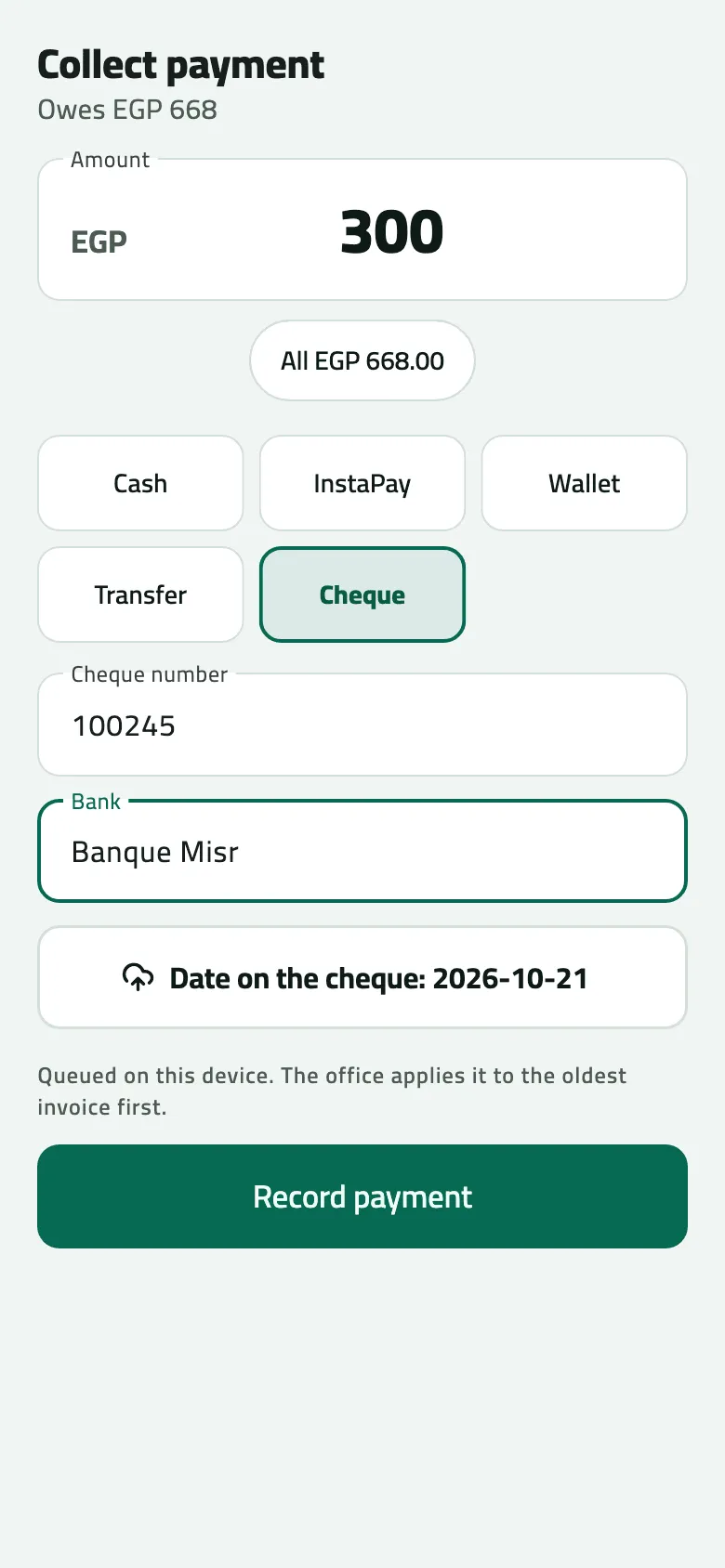
- Amount: type what you were handed
- How it was paid
- Cheque number
- Date on the cheque
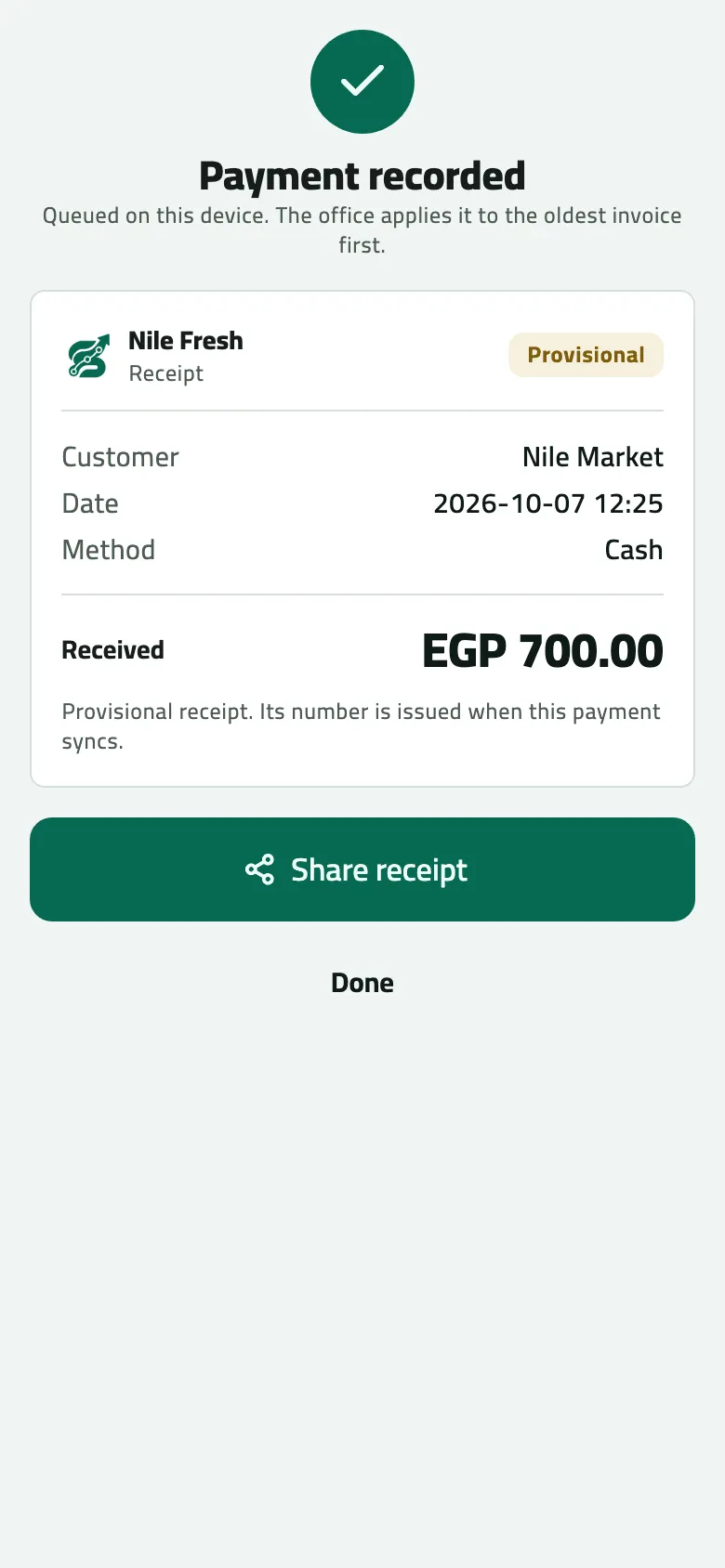
- Provisional receipt: its number comes at sync
- Share receipt
The shop’s screen lists the payment under Collected on this visit, as Queued and later Accepted.
Example
Section titled “Example”At 09:38 Nile Market owes 1,368.00. Omar takes 700 in Cash, then at 09:39 300 by Cheque: Cheque number 100245, Bank Banque Misr, Date on the cheque 14 days ahead.
Nile Market pays EGP 700.00 in cash. It goes against the oldest open invoice first.
Receipt RC-000001 — method: cash · amount: 700.00 · balance after: 668.00
| Item | Before | After | Change |
|---|---|---|---|
| Nile Market owes | 1,368.00 EGP | 668.00 EGP | −700.00 |
| Cash in Omar's hand | 0.00 EGP | 700.00 EGP | +700.00 |
And a post-dated cheque for EGP 300.00 (Banque Misr no. 100245, due in 14 days).
Receipt RC-000002 — method: cheque · amount: 300.00 · balance after: 368.00
| Item | Before | After | Change |
|---|---|---|---|
| Nile Market owes | 668.00 EGP | 368.00 EGP | −300.00 |
| Cheques in Omar's hand | 0.00 EGP | 300.00 EGP | +300.00 |
What happens next
Section titled “What happens next”- At the next sync the office applies the payment to the shop’s oldest open invoice first and issues the receipt (RC-000001 and RC-000002 on the day).
- Cash is counted as cash in your hand until the office banks it (Bank a rep’s cash). A cheque stays with you until you hand it to the office (Follow a cheque to the bank).
- More than the shop owes is kept on the shop’s account and used against its next invoices. There is no separate “advance” — just take the money and record it.
If something goes wrong
Section titled “If something goes wrong”| What you see | What to do |
|---|---|
Enter an amount greater than zero | Type the amount. |
Add the reference so the office can match this payment | Every method but cash needs its reference: the cheque number or the transaction number. |
Amounts have at most two decimals (piastres). Round it and enter it again. AMOUNT_TOO_PRECISE | You typed more than two decimals. On the shop, tap Record again and round it. |
Add the reference from the cheque, transfer, InstaPay or wallet message. REFERENCE_REQUIRED | Tap Record again and add the reference. |
That amount is too large to be one payment. Check the digits and enter it again. AMOUNT_TOO_LARGE | Check the digits. Tap Record again with the right amount. |
Your company sells only inside a visit. Check in at the shop, then take it again. CHECK_IN_REQUIRED | Your company collects only inside a visit. Check in, then record it again. |
EGP 700.00 was not accepted: … | The shop shows a refused payment in red. Tap Record again (the sheet opens filled in) or Dismiss if it was a mistake. |
This payment has already changed. Nothing was done. | It was already recorded again or dismissed. Nothing to do. |
- Collected on this visit lists every payment your phone holds for this shop, including ones from earlier visits.
- Outside a visit, at a branch, a payment is filed to the customer’s main branch. To pay a branch that has its own credit, check in at that branch first.