

Confirm, deliver or cancel an order
A van sale is delivered and invoiced on the spot. A booked order isn’t: the office delivers it, from a warehouse, and that delivery issues the invoice. The phone can’t deliver a booked order. Who: office (dispatch) · Where in the cycle: Sell.
Before you start
Section titled “Before you start”- See reports (REPORT_VIEW) opens an order; Deliver orders (ORDER_FULFIL) shows the steps.
- The order is Received or Approved. A held order is decided first (Approve or decline a held order).
- The goods are in a warehouse. A van is never a delivery source.
- This is for a company without an ERP that collects orders. With one, the ERP takes the order instead and the page shows where it stands with the ERP.
The order’s page
Section titled “The order’s page”Open an order number on Field › Orders. The page shows the reason it was held (if it was), the facts (Status, Outlet, Rep, Taken, Reached us), Lines with Before discount, Given away and Total excl. VAT, the Approval panel, and — when the next step is a delivery — Leaves from (several warehouses only) and What arrived. What happens next holds the buttons.
- Press Confirm. The order is Confirmed: the office is filling it. Delivered is offered only after Confirm.
- If your company has several warehouses, choose Leaves from. It starts on the rep’s route warehouse.
- When everything arrived, press Delivered.
- When only part arrived, type each line’s quantity under What arrived (it shows “N still to come of M”), add a Note if the driver said something, and press Record what arrived. The order stays Confirmed until every line has arrived.
- To cancel instead, type Why, if cancelling and press Cancel order, then confirm. Cancelling is possible only while nothing has been handed over.
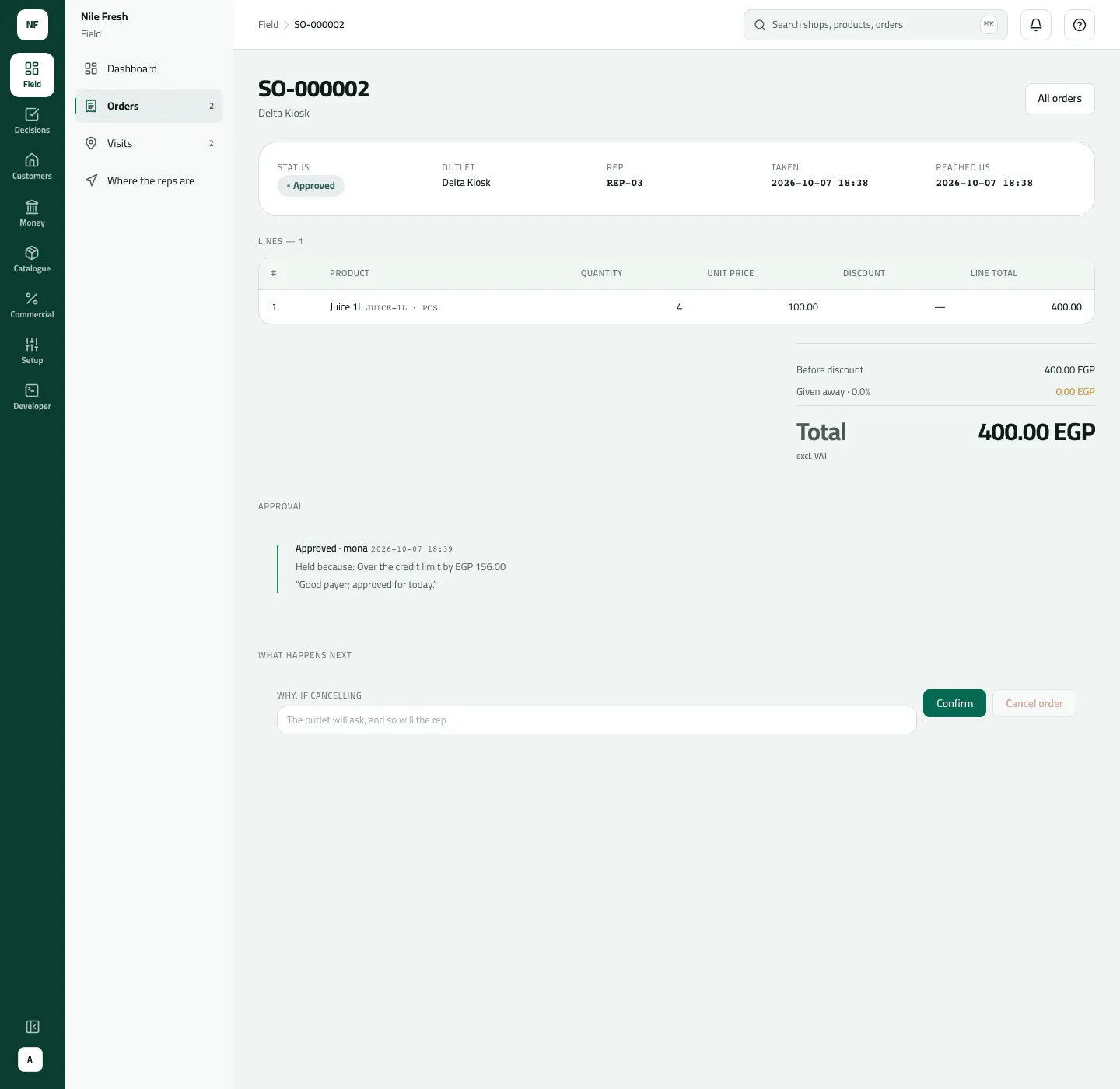
- Approval
- Confirm
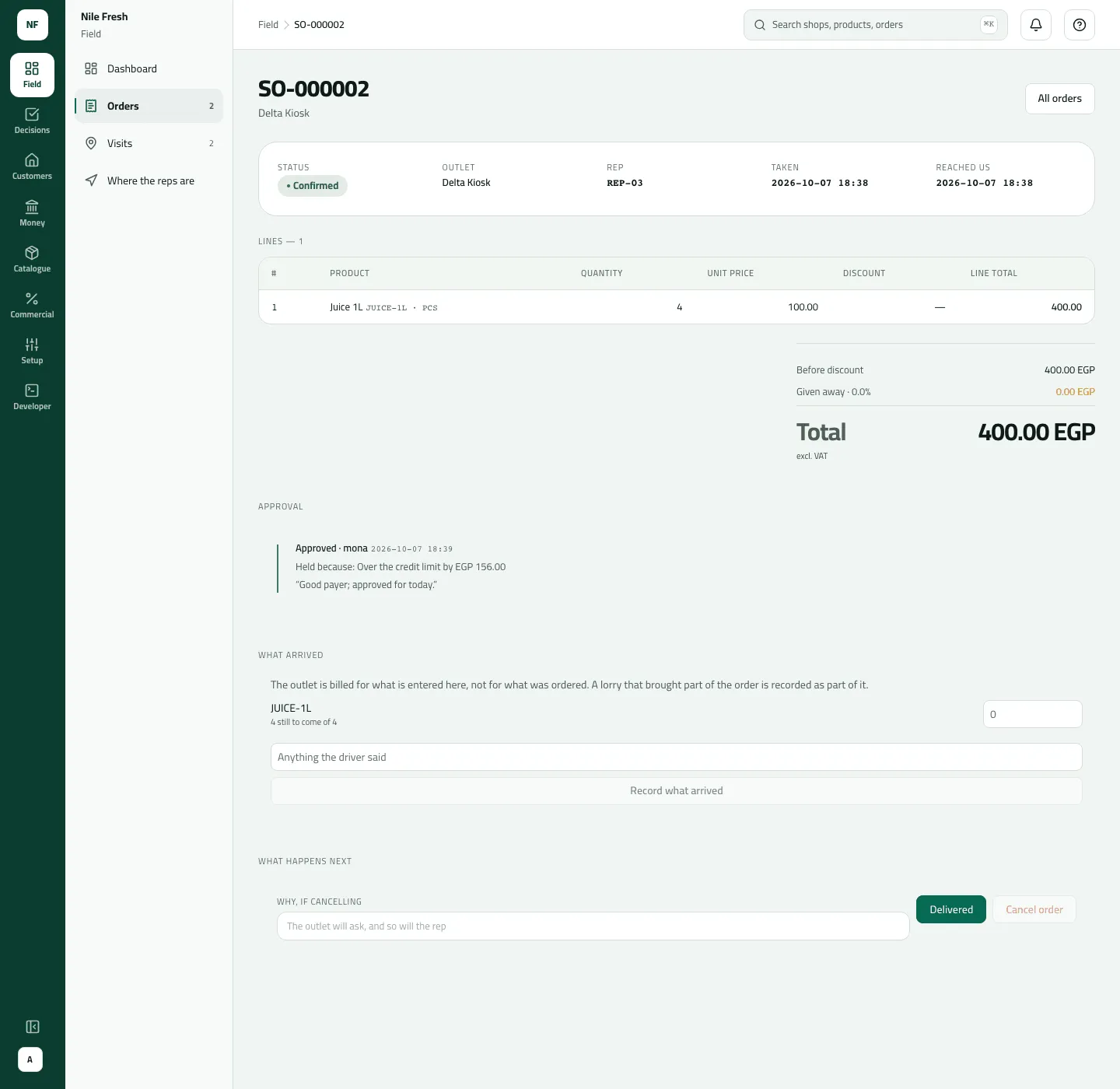
- What arrived
- Delivered
Example
Section titled “Example”At 11:30 on the Nile Fresh day the office delivers Delta Kiosk’s approved order: Confirm, then Delivered. Nile Fresh has one warehouse, so there is no Leaves from.
The office delivers the approved order from MAIN; the invoice is issued on delivery.
Sales order SO-000002 — status: delivered
Nile Fresh
INVOICE · INV-000002
- Net
- 400.00
- VAT
- 56.00
- 4 PCS Juice 1L × 100.00400.00
- VAT 14%56.00
TotalEGP 456.00
| Item | Before | After | Change |
|---|---|---|---|
| Main warehouse · Juice 1L | 70 PCS | 66 PCS | −4 |
| Delta Kiosk owes | 0.00 EGP | 456.00 EGP | +456.00 |
The delivery is DEL-000001 and the invoice INV-000002. Delivering from VAN-03 would have been refused, so the 4 bottles left MAIN and Omar’s van kept its 40.
Suppose part of an order arrives. Zamalek Corner phoned in 20 Juice 1L (2,000.00 before VAT). The lorry brings 15: the office types 15 under What arrived and presses Record what arrived. Invoice one is 1,500.00 + VAT 210.00 = 1,710.00, and the order stays Confirmed with “5 still to come of 20”. The next day Delivered sends the other 5: a second invoice, 500.00 + 70.00 = 570.00, and the order is Delivered.
What happens next
Section titled “What happens next”Each delivery, in one step:
- Documents: a delivery DEL- and an invoice INV- for what arrived, VAT added.
- Stock: the delivered quantities leave the warehouse.
- Money: the customer owes the invoice; it appears on Receivables.
- The rep: sees the order as delivered at the next sync.
- ERP: the invoice joins the invoice feed your ERP reads by its sequence number.
- Audit: “Confirmed an order”, “Delivered an order”, “Cancelled an order”.
The page has no link to the invoice. Find it on Invoices: its From column shows the delivery number.
If something goes wrong
Section titled “If something goes wrong”| What you see | What to do |
|---|---|
Choose which warehouse the goods left from, then deliver again. STOCK_SOURCE_REQUIRED | Choose Leaves from, then deliver again. |
That location can't be delivered from. Choose an active warehouse. STOCK_SOURCE_INVALID | A van can't deliver a booked order. Choose a warehouse. To sell from the van, the rep makes a van sale instead. |
There isn't enough stock at that location. INSUFFICIENT_STOCK | The warehouse doesn't hold enough. Receive the goods, or record what arrived. |
That's more than was ordered. Lower the delivered quantity. OVER_DELIVERED | You typed more than is still owed on a line. Lower it. |
Goods were already handed over for this order. Take them back as a return instead. ALREADY_HANDED_OVER | Goods were already delivered, so the order can't be cancelled. Take them back as a return. |
That step isn't possible for this order now. Refresh to see its current state. INVALID_TRANSITION | That step isn't possible now — a held order is declined in Approvals, and Delivered needs Confirm first. Refresh. |
Add a reason, then send again. REASON_REQUIRED | Say why you are cancelling. The rep and the shop will ask. |
No such order — It may belong to another rep, or the link may be stale. | Also shown when your role can't open orders. Check you have See reports and the rep is in your reach. |
The What arrived panel is in English on an Arabic console for now.