

Follow a cheque to the bank
A cheque lowers what the customer owes on the day it is taken. Money › Cheques then follows the paper until the bank pays it — or doesn’t. Who: office; an administrator for bounces · Where in the cycle: Bank.
Before you start
Section titled “Before you start”- Take payments (PAYMENT_RECORD) opens the board and moves cheques, for the reps your reach covers. Bounced needs Reverse payments (PAYMENT_REVERSE) — the Administrator only, by default.
- The cheque’s number, bank and date were typed where the payment was taken (on the phone, or at the office). They aren’t changed here.
- Open Money › Cheques. Three lanes, in travel order: With the rep, At the office, At the bank. Each card shows the customer, the amount, “#number · bank · held by …” and, for a post-dated cheque, “Post-dated until” and its date (“Due” once the date has come).
- When the rep hands a cheque in, press Received at office on its card.
- On or after the cheque’s date, take it to the bank and press Deposited. Before its date there is no Deposited button.
- When the bank pays, press Cleared.
- If the bank returns it, an administrator presses Bounced, types Why did the bank return it? and confirms.
- To see finished cheques, press Show cleared and bounced below the board.
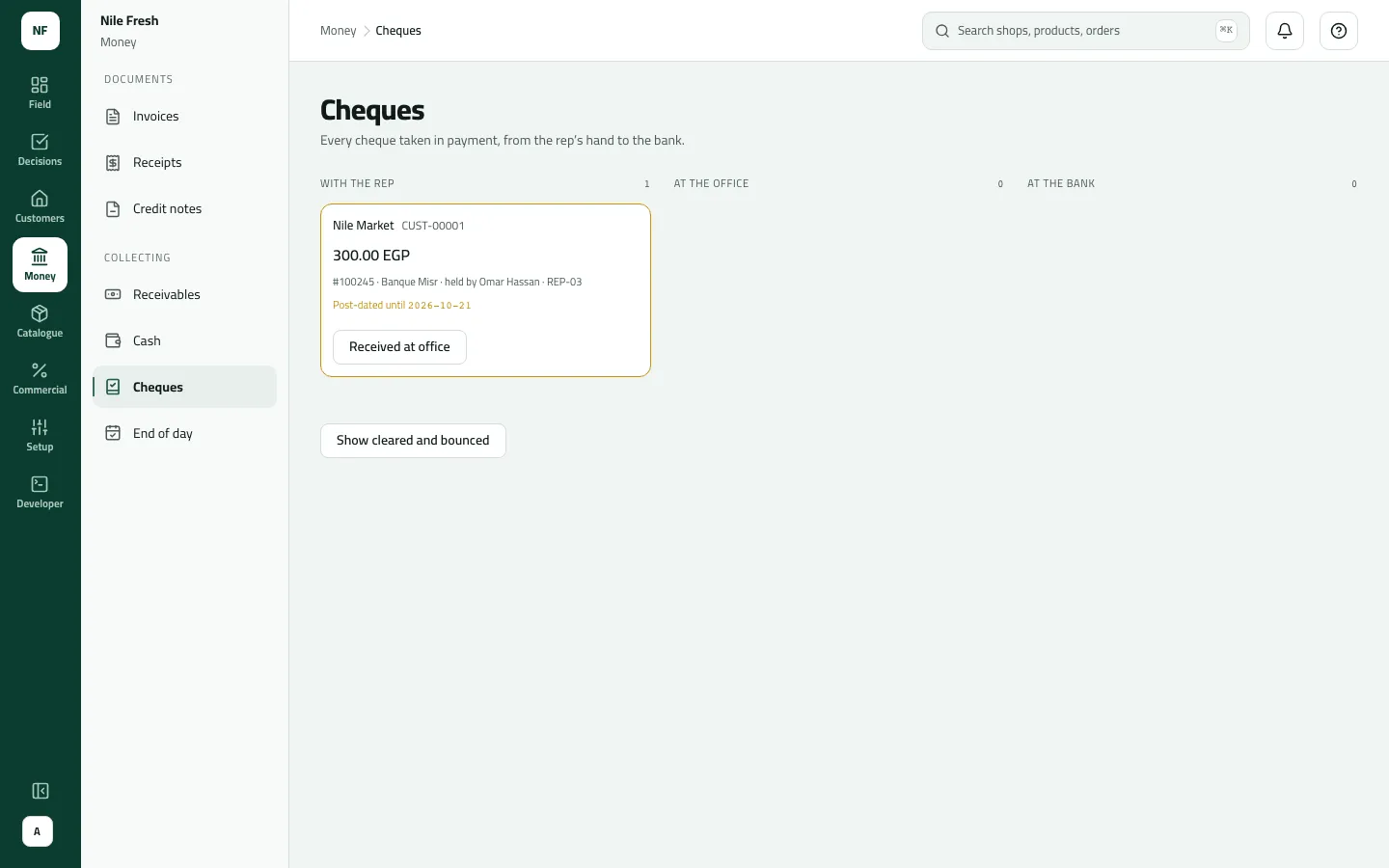
- With the rep
- At the office
- At the bank
A cheque taken at the office counter starts At the office.
Example
Section titled “Example”At 09:39 Nile Market gives Omar cheque 100245 on Banque Misr for 300.00, dated 21 October. Its card appears in With the rep: “#100245 · Banque Misr · held by Omar Hassan · REP-03”. At 17:35 Omar hands it in:
Omar hands the post-dated cheque to the office. It cannot be deposited before its due date; on that day the office deposits it, then marks it cleared or bounced.
Cheque 100245 — bank: Banque Misr · amount: 300.00 · status: handed over
| Item | Before | After | Change |
|---|---|---|---|
| Cheques in Omar's hand | 300.00 EGP | 0.00 EGP | −300.00 |
The card is now At the office, “Post-dated until 2026-10-21”, with no Deposited button. On 21 October the office deposits it, and when the bank pays, presses Cleared.
Had the bank returned it, the administrator’s Bounced with “Insufficient funds” would reverse the payment: Nile Market would owe the 300.00 again and RC-000002 would turn Void.
What happens next
Section titled “What happens next”- Received at office, Deposited, Cleared: the cheque moves; no money changes — the customer paid when the cheque was taken.
- Bounced: the payment is reversed, what it paid off is owed again, and its receipt is voided. “Bounced. The outlet owes it again.”
- End of day: a cheque still With the rep counts as still out until you press Received at office.
- ERP: the payments feed carries each cheque’s state and any bounce.
- Audit: “Moved a cheque on” (and “Reversed a payment” for a bounce).
If something goes wrong
Section titled “If something goes wrong”| What you see | What to do |
|---|---|
That step isn't possible for this order now. Refresh to see its current state. INVALID_TRANSITION | That step isn't possible for this cheque now (the message says order) — most often depositing before its date. Refresh and take the next step on or after the date. |
Add a reason, then send again. REASON_REQUIRED | Type why the bank returned it. |
There is no Bounced button | Recording a bounce needs Reverse payments, which only the Administrator has by default. |
A cheque disappeared from the board | Its payment was reversed on the statement, which voids the cheque. Voided cheques aren't listed. |
Cheque 100245 was moved by somebody else; refresh to see where it is | Refresh the board. |
The board shows up to 200 cheques.