

Put someone on a round with a van
A user becomes a rep when you put them on a round. That is what gives them routes, a van and a day on the phone. Who: administrator · Where in the cycle: Set up.
Before you start
Section titled “Before you start”- You need Manage people (USER_MANAGE).
- The person has an account (Invite people). Being on a round doesn’t change what they may do — that is their roles — only the round they are given and how their orders behave.
- The person they report to is on a round too (a supervisor who works no round is a Team lead).
- Open Setup › Users, then the person’s row menu › On a round.
- Rep code — how they appear on routes, targets and stock. Fixed once saved.
- Job:
- Seller — takes orders; the only job that can;
- Delivery — delivers what was ordered elsewhere;
- Collector — collects money against invoices;
- Team lead — leads reps, works no round.
- Sells from a van (Sellers only). On: van sales from a van created with them. Off: booked orders, delivered by the office.
- Van code — optional. Left blank, the van is coded VAN- followed by the rep code.
- Reports to — the rep row of their supervisor, or Nobody.
- Press Put on a round (Make team lead for a team lead).
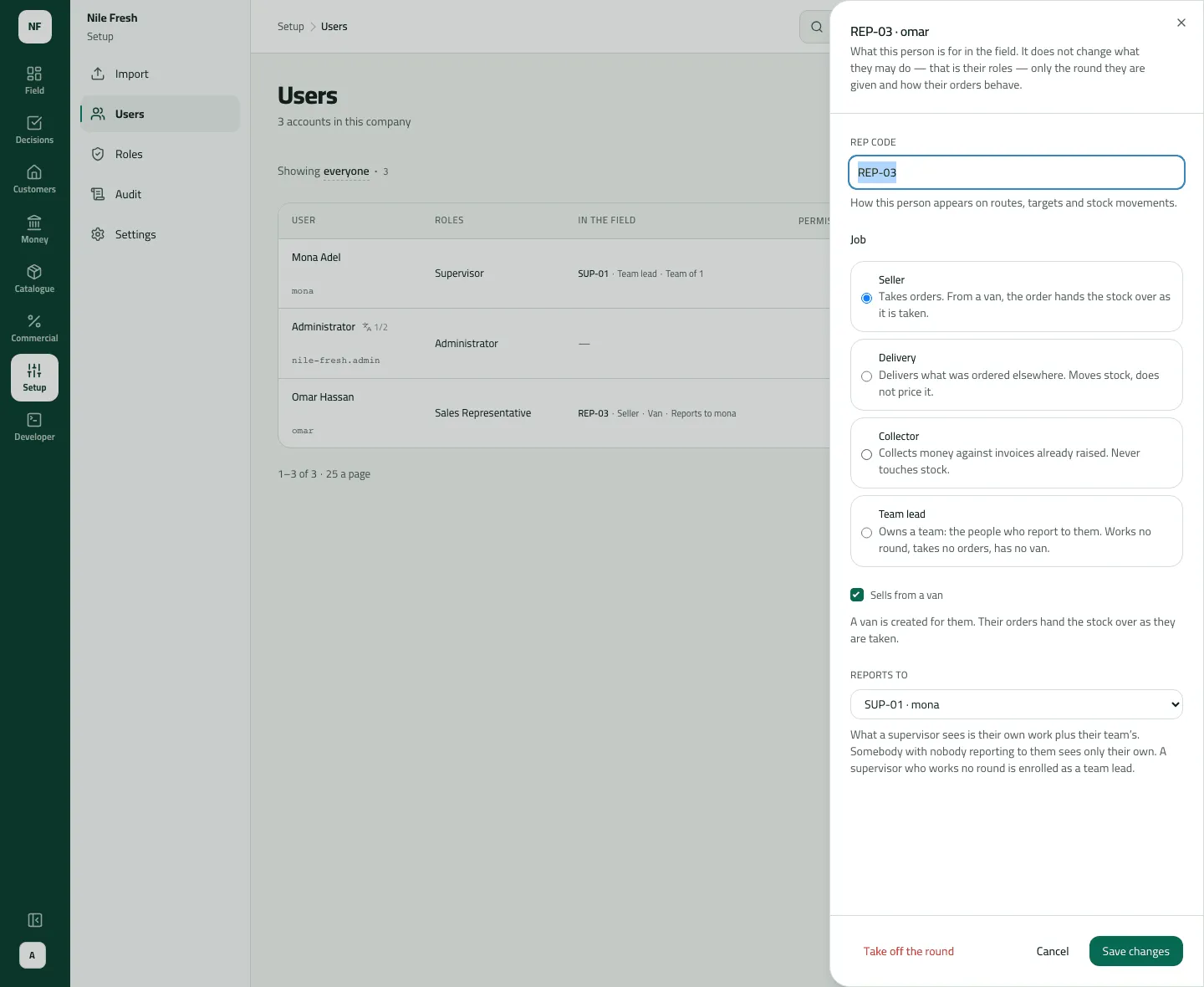
Omar’s sheet once his van exists: the Van code field shows only while a van is being added.
- Rep code
- Job
- Sells from a van
- Reports to
To change it later, open On a round again and Save changes. To take someone off, press Take off the round and confirm.
Example
Section titled “Example”Omar: Rep code REP-03, Job Seller, Sells from a van on, Van code VAN-03 (blank would have made VAN-REP-03), Reports to SUP-01. The notice says “omar works a round as REP-03, with a van”, and the In the field column reads “REP-03 · Seller · Van · Reports to sara.sup”.
Taking Omar off is refused while VAN-03 still holds stock or he still holds cash or cheques.
What happens next
Section titled “What happens next”- The van appears on Catalogue › Stock as a place stock can be loaded to.
- Routes can now be given to REP-03, and his supervisor’s Their team reach includes him.
- Taking someone off keeps their history; putting them back revives the same rep.
- Recorded in the audit trail (“Put someone on a round”).
If something goes wrong
Section titled “If something goes wrong”| What you see | What to do |
|---|---|
That combination isn't allowed: only a seller can sell from a van. INVALID_REP | Only a Seller sells from a van. Change the job, or untick Sells from a van. |
This person already works a round. Change their round instead. ALREADY_A_REP | They are already on a round. Open On a round to change it. |
Another record already has this code. Choose another code. DUPLICATE_CODE | The rep code or van code is taken. Choose another. |
A rep can't report to themselves or to someone who reports to them. SUPERVISOR_LOOP | A rep can't report to themselves or to someone who reports to them. |
That supervisor isn't an active rep in this company. NO_SUCH_SUPERVISOR | The supervisor isn't an active rep. Put them on a round (as Team lead) first. |
The van still has stock on it. Unload it to the warehouse first. VAN_NOT_EMPTY | Unload the van to the warehouse first (Catalogue › Stock › Move stock). |
This rep still holds cash or cheques. Settle them before removing the rep. MONEY_IN_HAND | Settle the cash and cheques they hold (Money › Cash, Cheques) first. |
Other reps report to this one. Give them a new supervisor first. HAS_TEAM | Give the reps who report to them a new supervisor first. |
This rep has orders waiting for approval. Decide or withdraw them first. HAS_OPEN_ORDERS | Decide or withdraw their orders waiting in Approvals first. |