

Bank a rep's cash
Cash a rep collects stays “in hand” until the office records it banked. Money › Cash shows what each rep holds and records each deposit. Who: office (the cashier’s job) · Where in the cycle: Bank.
Before you start
Section titled “Before you start”- Take payments (PAYMENT_RECORD) opens the screen and records deposits, for the reps your reach covers. Reversing a deposit needs Reverse payments (PAYMENT_REVERSE) — the Administrator only, by default.
- Only cash is here. Cheques follow their own path (Follow a cheque to the bank); transfers, InstaPay and wallet payments never pass through a rep’s hand.
- If your supervisor counts the cash at End of day, close the day first. Banking before the count leaves End of day nothing to count.
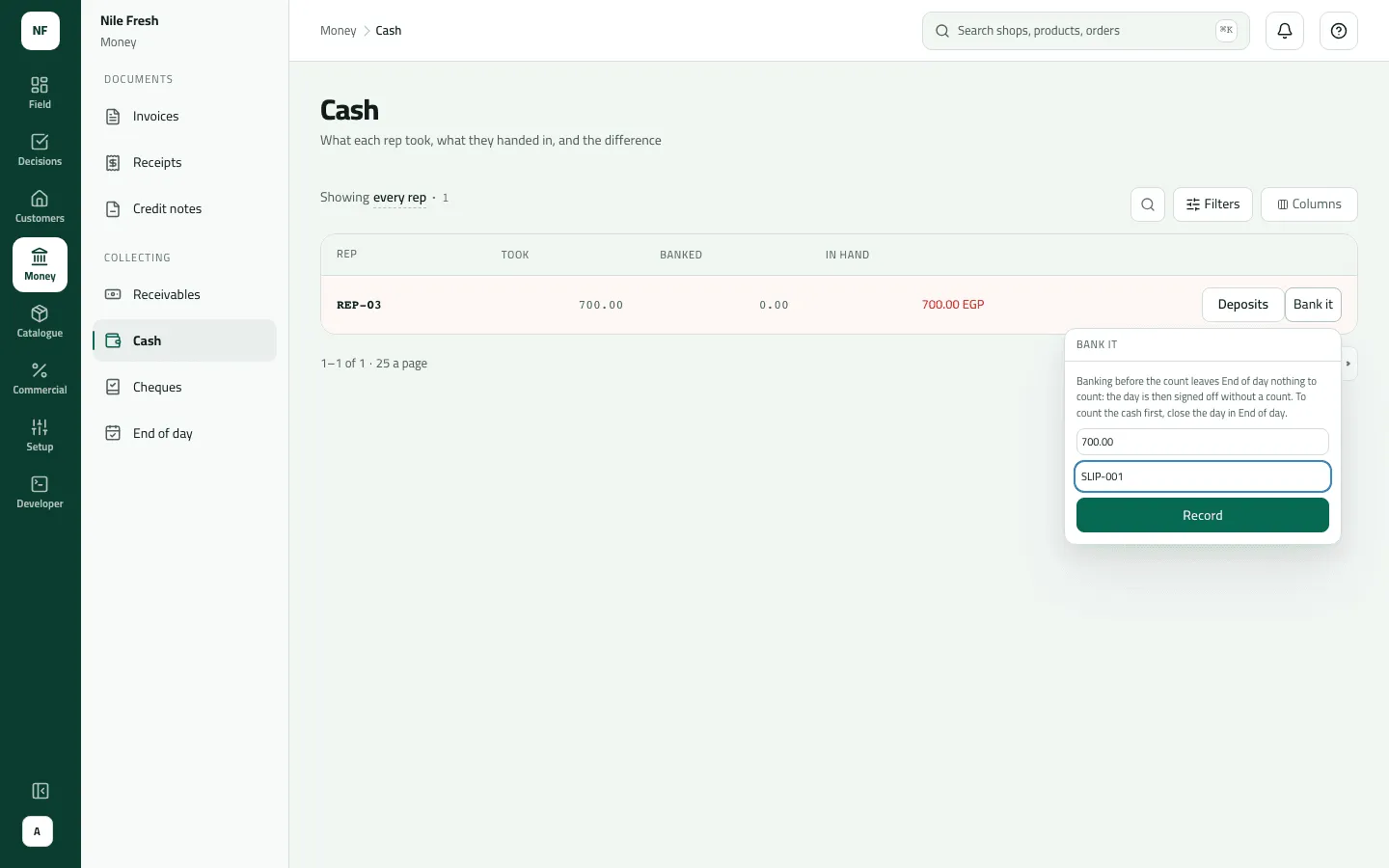
- Open Money › Cash. The reps holding the most come first.
- Read the row: Took (all cash collected), Banked, and In hand — red while the rep carries cash, “settled” at zero.
- Press Bank it on the rep’s row.
- Type the Amount banked. It isn’t filled in for you — the grey figure is only the amount in hand.
- Type the Paying-in slip number from the bank’s slip. Slflo doesn’t number slips; the number is yours.
- Press Record. The notice says “Banked against REP-03” and In hand drops.
- In hand
- Amount
- Paying-in slip
To see or undo deposits, press Deposits on the row. To reverse a wrong one, press Reverse on it, write Why is it being reversed? and confirm; the cash counts as in the rep’s hand again.
Example
Section titled “Example”At 17:30 the cashier banks the cash Omar took at Nile Market. Before: Took 700.00 · Banked
0.00 · In hand 700.00 in red. She presses Bank it, types 700.00 and the slip number
SLIP-001 from the bank’s paper, and presses Record.
The cashier banks Omar's 700.00 with paying-in slip SLIP-001. Cash in his hand goes back to zero.
Bank deposit SLIP-001 — numbered by: typed by the cashier · amount: 700.00
| Item | Before | After | Change |
|---|---|---|---|
| Cash in Omar's hand | 700.00 EGP | 0.00 EGP | −700.00 |
| Banked | 0.00 EGP | 700.00 EGP | +700.00 |
REP-03 now reads settled. Because the cash was banked before the sign-off, the supervisor expects 0.00 at End of day.
What happens next
Section titled “What happens next”- Money: the rep’s cash in hand goes down by the deposit. No customer’s balance changes — they paid when the rep took the cash.
- Documents: none is numbered; the deposit carries the slip number you typed.
- Audit: “Handed in cash”, with the amount and the slip.
- ERP: deposits aren’t sent to your ERP.
If something goes wrong
Section titled “If something goes wrong”| What you see | What to do |
|---|---|
REP-03 is carrying 700.00 EGP and this deposit is 750.00 EGP | You can't bank more than the rep holds. Check the amount; if the rep really handed in more, a payment is missing — find it on Receipts. |
A deposit of nothing is not a deposit | Type an amount above zero. |
Add the reference from the cheque, transfer, InstaPay or wallet message. REFERENCE_REQUIRED | Type the paying-in slip number. (The message speaks of cheques; for a deposit it means the slip.) |
This payment was already reversed. ALREADY_REVERSED | That deposit was already reversed. (The message says payment.) |
Add a reason, then send again. REASON_REQUIRED | Say why the deposit is being reversed. |
There is no Bank it button on a row | The rep holds no cash (settled) or has banked more than collected. Nothing to bank. |
Some of these messages show in English on an Arabic console for now. Slflo is used in EGP; a company in another currency should ask before banking.