

Make a role with limits
A role is a set of permissions, some with limits. People get roles on Users. Who: administrator · Where in the cycle: Set up.
Before you start
Section titled “Before you start”- You need Manage roles (ROLE_MANAGE).
- You can’t put into a role a permission, reach or limit beyond your own.
The built-in roles
Section titled “The built-in roles”| Role | In short |
|---|---|
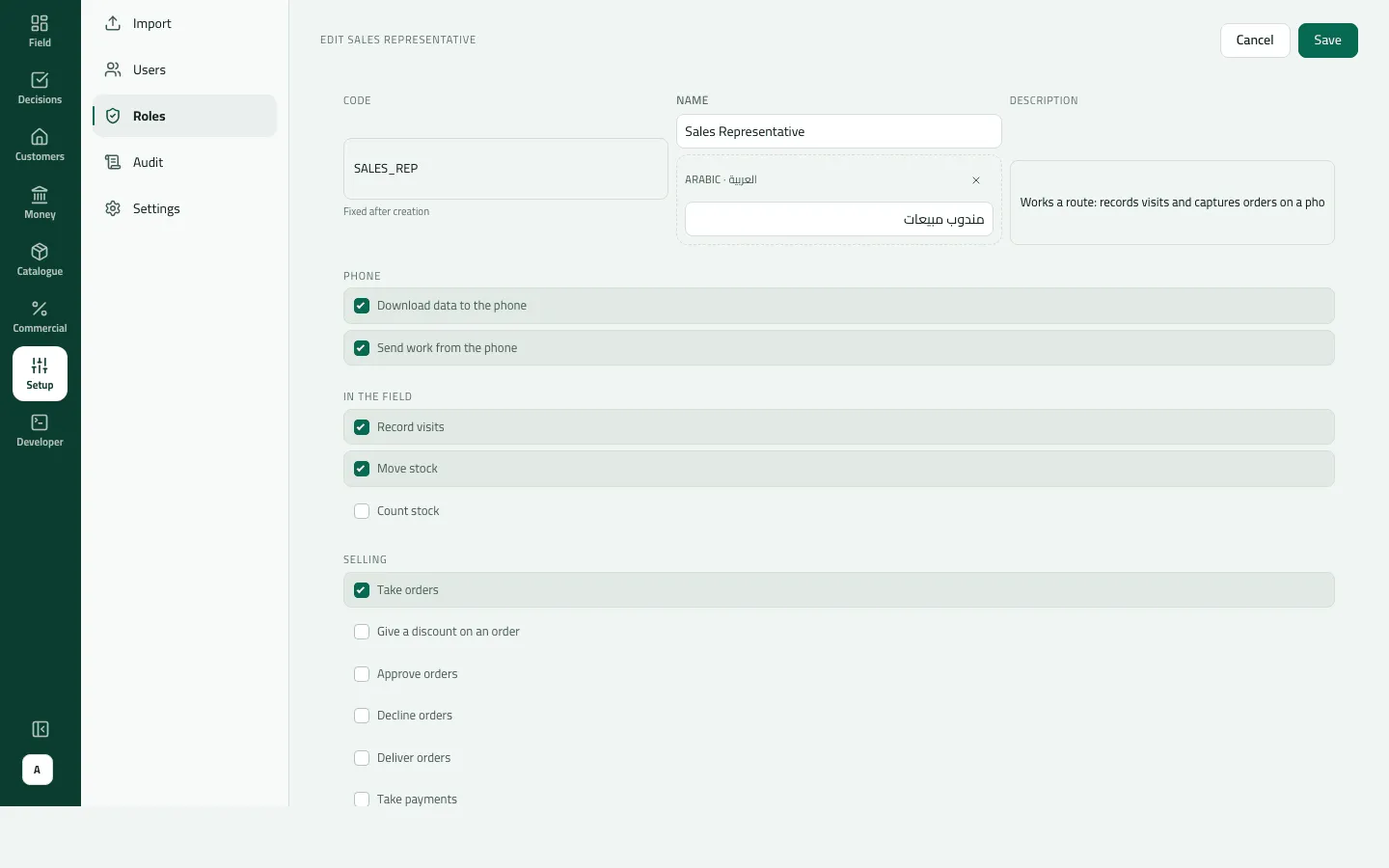
| Sales Representative | Download data to the phone, send work from it, take orders, invoice orders (van sales), see their own customers, move stock, issue receipts, record returns. No discounts, no reports. |
| Supervisor | Discounts up to 10%; approve orders for their team up to 50,000; decline; deliver and invoice; take payments for their team up to 50,000, issue receipts; record returns; reports and targets for their team; count and move stock. Not Manage people (so no Users or Routes), not customers or catalogue changes, not send work from a phone. |
| Administrator | Every permission, reaching everyone, no number limits. |
Built-in roles can be edited, not deleted.
- Open Setup › Roles and press New role (or Edit on a row).
- Type a Code (letters, digits, underscore; fixed afterwards), a Name and a Description.
- Open a group — Phone, In the field, Selling, Customers and products, Reports and targets, Running the company — and tick permissions.
- For a ticked permission, set its limits:
- Largest discount (%) on Give a discount on an order;
- Largest order on Approve orders;
- Largest payment on Take payments;
- Whose records: Their own, Their team, Everyone. A blank number means no limit.
- Save. The notice says “Created the role …”.
Example
Section titled “Example”Nile Fresh makes VAN_SELLER_PLUS, “Van seller with discount”: everything the Sales
Representative has, plus Give a discount on an order with Largest discount 5, plus
Take payments with Whose records Their own and Largest payment 20,000. Omar, given
this role, books an order for Nile Market at 5% off: it goes through. At 6% it waits in
Approvals (“Discount of 6% is above the 5% this rep may give”); a van sale at 6% is refused.
What happens next
Section titled “What happens next”- People holding the role get the change when their session renews — within an hour.
- Someone holding the same permission through two roles gets the broader of the two limits.
- Creating, changing and deleting roles is in the audit trail, with what was added and taken away.
If something goes wrong
Section titled “If something goes wrong”| What you see | What to do |
|---|---|
You cannot give more than you have yourself: a permission you do not hold, a wider reach or a higher limit than yours. ESCALATION | The role gives more than you hold. Ask an administrator, or lower it to your own level. |
A limit is a plain number without commas, such as 50000. INVALID_LIMIT | Type a plain number such as 50000, without commas. |
Another record already has this code. Choose another code. DUPLICATE_CODE | Another role uses this code. Choose another. |
1 user(s) still hold this role. Reassign them first. | A role someone holds can't be deleted, whatever the confirmation says. Change their roles on Users first. |
Built-in roles cannot be deleted. Edit its permissions instead. | Edit the built-in role instead. |
Whose records is blank | A blank reach means Their own, not Everyone. |
A supervisor can't open Routes or send work from the phone | The built-in Supervisor has neither Manage people nor Send work from the phone. Add them to a role of yours if needed. |